
Table of Contents
ToggleHow to Fix Hotspot Software Not Working
If you are searching for How to fix hotspot software not working, chances are your customers cannot access the internet, payments are failing, login pages are not appearing, or your hotspot management software has suddenly stopped functioning. Whether you operate a hostel WiFi network, apartment hotspot, hotel internet service, cyber café, shopping centre, or public WiFi business, downtime translates directly into lost revenue and unhappy customers.
Learning How to fix hotspot software not working is essential because even a short outage can affect dozens or hundreds of users. Imagine operating a hostel with 120 students where each customer purchases internet access daily. If your hotspot remains offline for six hours, many customers may request refunds, switch to mobile data, or move to competing internet providers. Small technical issues can therefore become expensive business problems if they are ignored.
Fortunately, most hotspot software problems are not caused by faulty software alone. They often result from network configuration errors, expired licenses, router problems, ISP outages, incorrect DNS settings, firewall conflicts, payment gateway failures, or outdated firmware. The good news is that these issues are usually straightforward to diagnose and fix using a systematic troubleshooting process.
This guide explains How to fix hotspot software not working using practical examples suitable for Kenyan businesses and organizations. Instead of relying on generic advice, you’ll learn what to check first, how to identify the root cause, and how to prevent similar failures in the future.
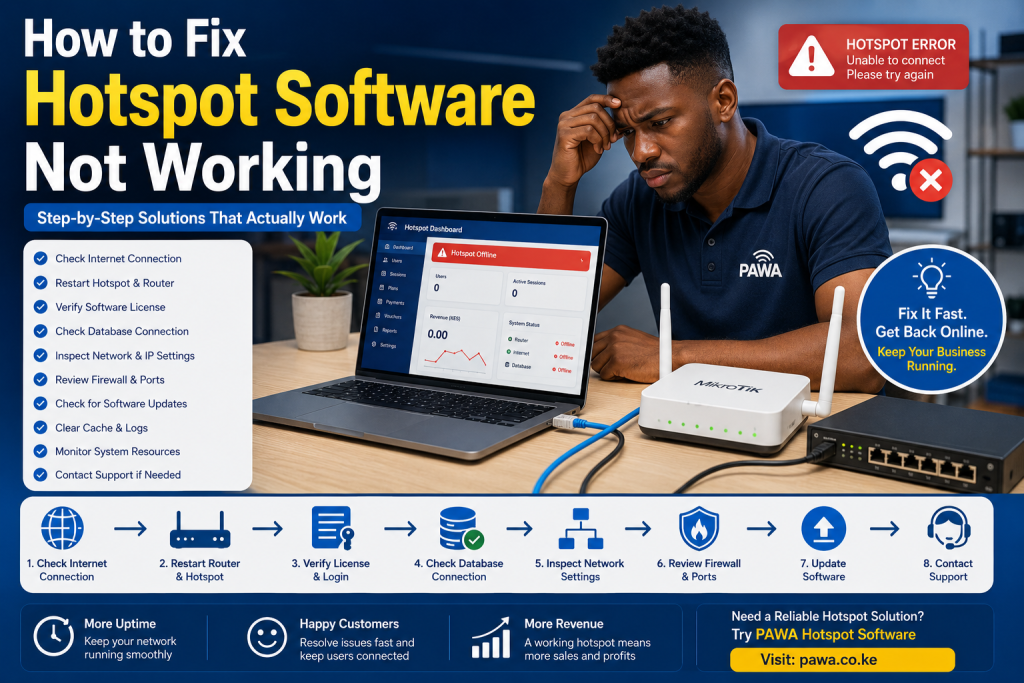
Why Hotspot Software Stops Working
Before attempting repairs, it is important to understand why hotspot software fails. Many business owners immediately blame the billing software, yet in reality the software is often functioning correctly while another component of the network has failed.
A hotspot system depends on several components working together. These include your internet service provider, router, access points, hotspot billing software, DNS configuration, authentication server, payment gateway, and power supply. If any one of these components fails, customers may experience connection problems.
Understanding How to fix hotspot software not working therefore begins with identifying which component is causing the interruption.
Common Symptoms of Hotspot Software Problems
Different businesses experience different symptoms depending on the underlying issue.
Common signs include:
- Customers cannot see the hotspot login page.
- M-Pesa payments are not activating internet packages.
- Internet connects but no websites load.
- Voucher codes are rejected.
- Users authenticate successfully but cannot browse.
- Login pages load slowly.
- Sessions disconnect unexpectedly.
- User accounts expire immediately after activation.
- Reports fail to generate.
- Customer devices keep requesting repeated login.
Each symptom points toward a different technical issue, making diagnosis much easier when approached logically.
Step 1: Confirm Your Internet Connection
The first step in How to fix hotspot software not working is verifying that your ISP connection is active.
Many hotspot operators spend hours troubleshooting software when the real problem is that fibre internet has gone offline.
Begin by connecting a laptop directly to the router.
Check whether:
- Websites open normally.
- Speed tests complete successfully.
- DNS resolves websites.
- Gateway responds correctly.
If the internet itself is unavailable, contact your ISP before modifying hotspot settings.
For example, if your monthly fibre package costs KES 12,000 and remains unavailable for an entire working day, your business may lose considerably more in customer refunds and reduced sales than the actual internet subscription itself.
Step 2: Restart Networking Equipment Properly
Many issues disappear after a structured restart.
Power cycling should follow the correct order.
Turn off:
- Router
- Switches
- Access points
- Hotspot server
Wait approximately two minutes.
Restart:
- Internet modem
- Router
- Switches
- Access points
- Billing server
This allows routing tables, DHCP leases, authentication services, and hotspot processes to initialize correctly.
Improper restart sequences sometimes create temporary routing conflicts that prevent hotspot authentication.
Step 3: Verify Router Configuration
Most hotspot deployments rely on MikroTik routers.
Incorrect router settings remain one of the biggest reasons businesses search for How to fix hotspot software not working.
Administrators should verify:
- Hotspot profile
- DHCP server
- NAT rules
- Firewall rules
- Bridge configuration
- DNS settings
- User profiles
- Bandwidth queues
Even accidental changes to firewall rules may block authentication traffic while allowing the network itself to remain operational.
Configuration backups should always be created before making changes.
Step 4: Check the Hotspot Login Page
If customers connect to WiFi but never see the login portal, several issues could be responsible.
These include:
- DNS problems
- Captive portal configuration
- Browser cache
- HTTPS redirection issues
- Router hotspot configuration
- Expired SSL certificates
Testing multiple devices helps determine whether the issue affects everyone or only specific operating systems.
Sometimes clearing browser cache immediately restores captive portal functionality.
Step 5: Confirm M-Pesa Payment Integration
Many hotspot operators depend on automated M-Pesa payments.
If customers pay successfully but internet access never activates, payment integration should be examined.
Check:
- Callback URLs
- API credentials
- Payment confirmations
- Server logs
- Transaction status
Businesses manually activating customers waste valuable time.
Professional hotspot platforms automate payment confirmation within seconds.
Reliable payment integration improves customer confidence while reducing support requests.
Step 6: Verify User Authentication
Authentication problems often resemble internet failures.
Customers enter usernames or voucher codes but remain disconnected.
Possible causes include:
- Expired accounts
- Duplicate usernames
- Invalid passwords
- Database synchronization problems
- Authentication server downtime
Review authentication logs carefully.
Most hotspot platforms provide detailed logs indicating whether login attempts succeeded or failed.
These records significantly simplify troubleshooting.
Step 7: Inspect DNS Configuration
Incorrect DNS settings prevent websites from opening even when internet connectivity exists.
Customers frequently assume WiFi is broken when DNS simply cannot resolve domain names.
Testing with alternative public DNS services temporarily helps identify whether DNS causes the problem.
Reliable DNS improves customer experience while reducing unnecessary support tickets.
Step 8: Examine Firewall Rules
Firewall misconfiguration frequently interrupts hotspot services.
Security rules designed to protect networks sometimes accidentally block legitimate traffic.
Administrators should inspect:
- Forward rules
- NAT rules
- Input rules
- Output rules
- Port forwarding
After recent software updates, firewall policies occasionally change unexpectedly.
Reviewing recent configuration changes often reveals the cause.
Step 9: Check Available System Resources
A hotspot server requires adequate computing resources.
If CPU usage remains consistently high or memory becomes exhausted, authentication slows dramatically.
Monitor:
- Processor utilization
- RAM usage
- Disk space
- Active sessions
- Network throughput
Businesses supporting hundreds of simultaneous users may eventually outgrow entry-level networking hardware.
Upgrading infrastructure before reaching capacity prevents future outages.
Step 10: Update Router Firmware Carefully
Outdated firmware introduces compatibility issues and security vulnerabilities.
Manufacturers regularly release updates correcting:
- Stability issues
- Authentication bugs
- Security weaknesses
- Performance improvements
However, updates should never be installed without creating configuration backups first.
Testing updates outside business hours minimizes disruption.
Advanced Troubleshooting for Persistent Hotspot Problems
If you have completed the basic troubleshooting steps and the issue remains unresolved, it is time to perform a more detailed diagnosis. Understanding How to fix hotspot software not working sometimes requires checking every component individually rather than assuming the software itself is faulty.
Start by reviewing your hotspot logs. Most professional hotspot billing platforms record every authentication request, payment confirmation, voucher activation, login attempt, and system error. These logs can quickly reveal whether the problem originates from user authentication, payment processing, bandwidth allocation, or router communication.
If the logs show repeated timeout errors, inspect your network latency. High latency between the hotspot server and the router can delay customer authentication, causing users to believe the system is offline even when it is processing requests slowly.
Advanced Network Diagnostics for How to Fix Hotspot Software Not Working
When the basic troubleshooting steps fail to solve the problem, administrators need to investigate the network more thoroughly. Understanding How to fix hotspot software not working requires looking beyond the hotspot application itself and examining every device involved in delivering internet access.
Begin by checking whether every network device is communicating correctly. Verify that your router can reach the internet, your hotspot server can communicate with the router, and your access points are broadcasting the correct SSID. A single faulty network cable or misconfigured switch can prevent users from reaching the hotspot portal even though the software is functioning perfectly.
Network monitoring tools can also reveal hidden issues. High packet loss, unstable latency, or overloaded interfaces often explain why customers experience slow logins or repeated disconnections. Learning How to fix hotspot software not working becomes much easier when you rely on measurable network statistics instead of guessing.
Verify DHCP Configuration
DHCP is responsible for assigning IP addresses to customer devices. If the DHCP server stops working, customers may connect to WiFi but fail to receive valid network settings.
Check whether:
- IP addresses are being assigned correctly.
- The DHCP pool has available addresses.
- Lease times are appropriate.
- Gateway information is correct.
- DNS servers are reachable.
Many businesses searching for How to fix hotspot software not working eventually discover that their DHCP address pool has simply become exhausted because too many devices remain connected. Increasing the available address range or reducing lease duration often resolves the issue immediately.
Inspect Bandwidth Management Policies
Bandwidth management plays an important role in customer experience. Incorrect bandwidth queues may cause some users to consume excessive internet resources while others struggle to browse basic websites.
Review your bandwidth profiles regularly.
Ensure:
- Package speeds match advertised rates.
- Premium users receive higher priority where applicable.
- Individual devices cannot monopolize bandwidth.
- Streaming traffic does not overwhelm the network.
A properly configured bandwidth management policy improves overall network stability and reduces customer complaints, minimizing situations where operators search for How to fix hotspot software not working after periods of heavy usage.
Power Protection Matters
Unexpected power interruptions remain one of the biggest causes of hotspot downtime in many parts of Kenya.
Every hotspot installation should include reliable power protection.
Recommended equipment includes:
- UPS systems.
- Surge protectors.
- Proper grounding.
- Voltage stabilizers where necessary.
Without adequate protection, routers may reboot unexpectedly, databases may become corrupted, and authentication services may fail.
Understanding How to fix hotspot software not working also means preventing failures before they occur.
Conduct Regular Backup Testing
Creating backups is only useful if restoration actually works.
Many administrators create automatic backups but never test them.
A professional maintenance schedule should include periodic restoration tests to verify that:
- Router configurations restore correctly.
- User databases remain intact.
- Payment settings are preserved.
- Authentication services resume normally.
Businesses that understand How to fix hotspot software not working always maintain verified backups because they know hardware failures can occur without warning.
Capacity Planning for Future Growth
Many hotspot deployments work perfectly during installation but become unstable months later because customer numbers increase.
Capacity planning should consider:
- Expected user growth.
- Peak simultaneous connections.
- Internet bandwidth requirements.
- Router processing capacity.
- Wireless coverage expansion.
Rather than waiting until performance deteriorates, businesses should upgrade infrastructure before reaching maximum capacity.
This proactive strategy greatly reduces situations requiring emergency troubleshooting for How to fix hotspot software not working.
Why Businesses Should Avoid Manual Hotspot Management
Some operators continue using manually generated passwords or shared WiFi credentials instead of automated billing systems.
This creates several problems.
Shared passwords spread quickly.
Unauthorized users consume bandwidth.
Revenue becomes difficult to track.
Customer accountability disappears.
Automated hotspot software eliminates these challenges by assigning individual user accounts, tracking payments, monitoring usage, and generating accurate reports.
When businesses invest in automation, they spend less time learning How to fix hotspot software not working because professionally designed platforms include better diagnostics and monitoring features.
Establish Standard Operating Procedures
Every hotspot business should document standard operating procedures for handling technical incidents.
These procedures should explain:
- How to verify ISP connectivity.
- How to restart equipment.
- How to confirm payment gateway status.
- How to restore backups.
- How to escalate technical issues.
- How to communicate with customers during outages.
Documented procedures ensure consistent responses regardless of which employee is on duty.
Continuous Improvement
Technology changes rapidly.
Businesses should continuously evaluate:
- Equipment performance.
- Customer feedback.
- Software updates.
- Security improvements.
- Internet package pricing.
- Emerging networking technologies.
Operators who continuously improve their infrastructure experience fewer service interruptions and stronger customer retention.
Ultimately, mastering How to fix hotspot software not working is not simply about repairing faults after they occur. It is about building a reliable hotspot business that minimizes failures through preventive maintenance, quality equipment, staff training, proactive monitoring, documented procedures, secure configurations, and professional hotspot management software.
Every improvement made today reduces future downtime, protects recurring revenue, and strengthens customer confidence. As your hotspot network grows, applying these best practices ensures your business continues delivering dependable internet access while avoiding many of the common issues that cause operators to search for How to fix hotspot software not working. By treating maintenance as an ongoing business process instead of an emergency response,
organizations can provide consistent service quality, simplify administration, and build a reputation for reliable connectivity that encourages customers to return again and again.
Businesses that invest in proactive maintenance spend less time searching for How to fix hotspot software not working and more time serving customers. Every network should have a maintenance schedule that includes firmware updates, router backups, equipment inspections, and payment gateway testing. When staff understand How to fix hotspot software not working, they can resolve minor issues before they become major outages. Documenting How to fix hotspot software not working procedures also improves response times during emergencies. As your business grows, regularly reviewing How to fix hotspot software not working best practices helps maintain reliable service. Ultimately, mastering How to fix hotspot software not working, teaching your team How to fix hotspot software not working, documenting How to fix hotspot software not working, testing How to fix hotspot software not working procedures, and continuously improving How to fix hotspot software not working processes will increase customer satisfaction and reduce costly downtime.
- https://zamacore.com/
- https://pawa.co.ke/
- https://rentaldesk.co.ke/
- https://pms.co.ke/
- https://estateadmin.co.ke/
- https://vega.co.ke/
- https://zivo.co.ke/
- https://zchat.zamacore.com/
- https://dexa.co.ke/
- https://ratibu.co.ke/
- https://churchesadmin.com/
- https://dereva.co.ke/
- https://fama.co.ke/
- https://jaat.co.ke/
- https://kayapro360.com/
Suggested External DoFollow Links
- https://mikrotik.com/
- https://www.ca.go.ke/
- https://www.safaricom.co.ke/
- https://www.wi-fi.org/
- https://www.cloudflare.com/
- https://www.speedtest.net/
- https://www.ietf.org/
- https://learn.microsoft.com/
Frequently Asked Questions
1. Why does my hotspot connect but no login page appears?
This usually indicates DNS problems, captive portal configuration issues, browser cache conflicts, or incorrect router hotspot settings rather than complete software failure.
2. Why are M-Pesa payments successful but customers receive no internet?
Most cases involve callback configuration, payment gateway communication, API credentials, or authentication synchronization problems. Reviewing payment logs usually identifies the cause quickly.
3. Can outdated routers cause hotspot software problems?
Yes. Older routers may struggle with increasing user numbers, newer firmware requirements, or modern encryption standards, leading to unstable hotspot performance.
Conclusion
Understanding How to fix hotspot software not working is an essential skill for anyone operating a commercial WiFi network. Most problems are caused by networking, authentication, DNS, payment integration, hardware, or configuration issues rather than the hotspot software itself. A structured troubleshooting process allows businesses to identify the root cause quickly, minimize customer disruption, and restore internet access efficiently.
The most successful hotspot operators do not simply repair problems after they occur. They invest in preventive maintenance, reliable networking equipment, automated monitoring, regular backups, and professional hotspot management software. These practices reduce downtime, improve customer satisfaction, and protect recurring revenue.
If your business depends on paid WiFi services, reliability should always be your highest priority.
Start with a Professional Hotspot Solution
If you want a reliable hotspot platform with automated M-Pesa payments, voucher management, bandwidth control, user authentication, detailed reporting, remote administration, and enterprise-grade hotspot billing designed for Kenyan businesses, start with https://pawa.co.ke.