Pricing

Simple pricing to sell WiFi like airtime.

Connect MikroTik, complete WiFi setup, then choose the monthly subscription and payment collection path that fits your business.

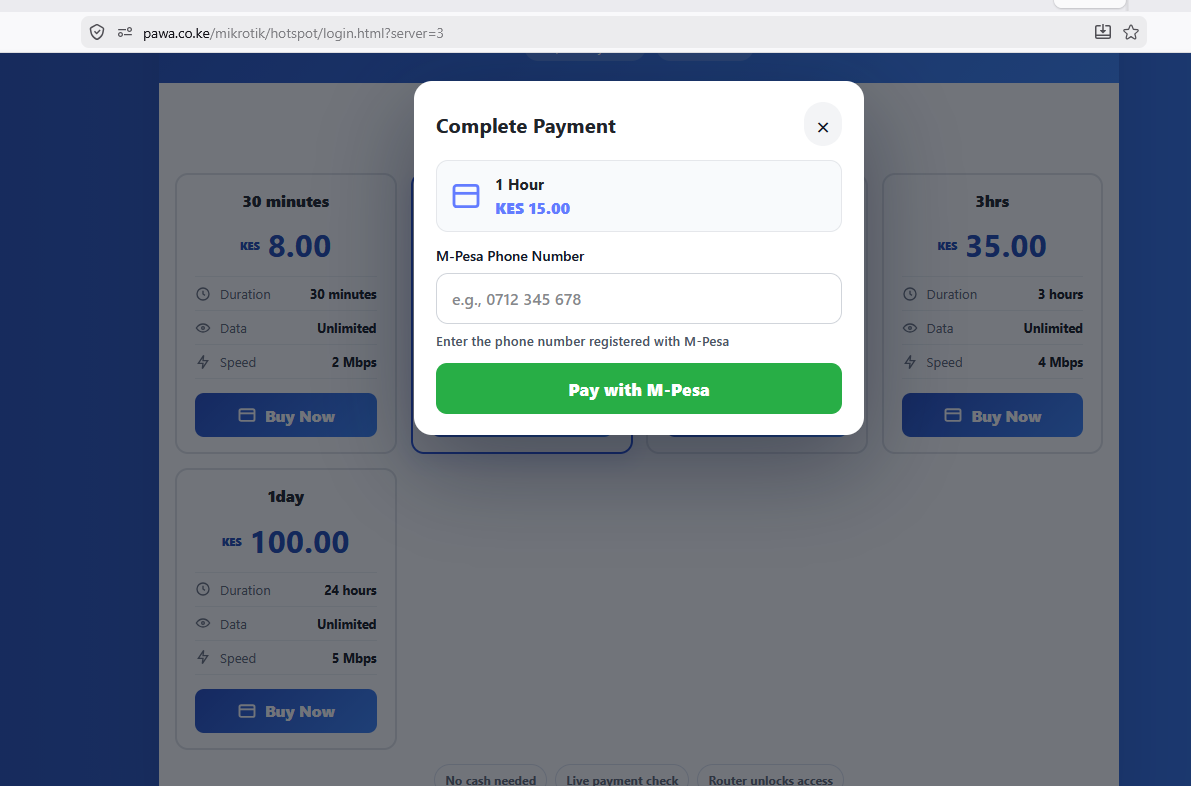
Pawa M-Pesa checkout and package payment flow

Workspace

KES 0

Setup

KES 1,500

Add-on

5% when Pawa collects

1. Create workspace

Create the workspace and connect MikroTik before setup fee payment is required.

2. Complete WiFi setup

Once the WiFi/HotSpot setup is complete, the setup invoice becomes due immediately.

3. Continue live

Settle setup, keep the monthly subscription active, then choose Pawa collection or your own PayBill/Till.

Pricing Breakdown

Know exactly what you pay and when.

The monthly subscription is fixed. Pawa collection is the only path that adds the 5% net sales fee.

Stage

Workspace setup

KES 0

Available while you create the business workspace and connect MikroTik.

Setup

KES 1,500 once

Due immediately after WiFi setup is complete.

Monthly subscription

KES 1,500 or KES 3,500 / month

Always charged based on the selected plan or month-end workspace size, regardless of collection method.

Pawa collects

+5% of net WiFi sales

Added only when customer STK payments pass through the Pawa platform gateway.

Own PayBill/Till

No 5% collection fee

Customer payments land directly in your shortcode. Monthly subscription still applies.

Example: Pawa collects

If customers buy KES 10,000 net WiFi sales through Pawa, the collection fee is KES 500 plus the monthly subscription.

Example: own PayBill

If you use your own shortcode, you pay the Starter or Silver monthly subscription only. There is no 5% collection fee.

Payment Collection

Two clear ways to collect customer payments.

Pawa Collects

Best when you want Pawa to handle customer payment collection.

Monthly + 5%
  • Customer STK payments use the Pawa platform gateway.
  • Pawa charges 5% of net sales collected through the platform.
  • The Starter or Silver monthly subscription still applies.
  • No Daraja setup is needed before first launch.
  • Collections and payout records stay visible in the dashboard.

Use Your Own PayBill

Best when payments should land directly in your shortcode.

Monthly only
  • Add your own PayBill/Till Daraja credentials during onboarding.
  • Pawa runs the portal, access rules, payment checks, and router workflows.
  • The system invoices the monthly subscription based on the selected plan or month-end user count.
  • No 5% collection fee is added because payments do not pass through the Pawa gateway.

Monthly Plans

The subscription applies to every collection path.

Use your own Till/PayBill for monthly subscription only, or let Pawa collect payments and add 5% of net WiFi sales.

Get Started Now

Starter

Up to 3,000 users

Fixed monthly subscription for operators with up to 3,000 customers at month end.

KES 1,500 / month
  • Month-end users 0 - 3,000
  • Own PayBill/Till No 5% fee
  • Pawa collection +5% net sales
  • Billing invoice Automatic
  • Core workflows Hotspot + M-Pesa
  • Support Standard

Business

Above 3,000 users

Fixed monthly subscription for operators whose month-end customer count is above 3,000.

KES 3,500 / month
  • Month-end users 3,001+
  • Own PayBill/Till No 5% fee
  • Pawa collection +5% net sales
  • Billing invoice Automatic
  • Core workflows Hotspot + routers
  • Support Priority

Need Help Choosing?

Tell us how you collect today.

Share your routers, packages, payment preference, and user estimate. We will confirm the cleanest setup path before launch after you review the pricing guide.

Open Pricing Guide

Call or WhatsApp +254725345345

Get started now