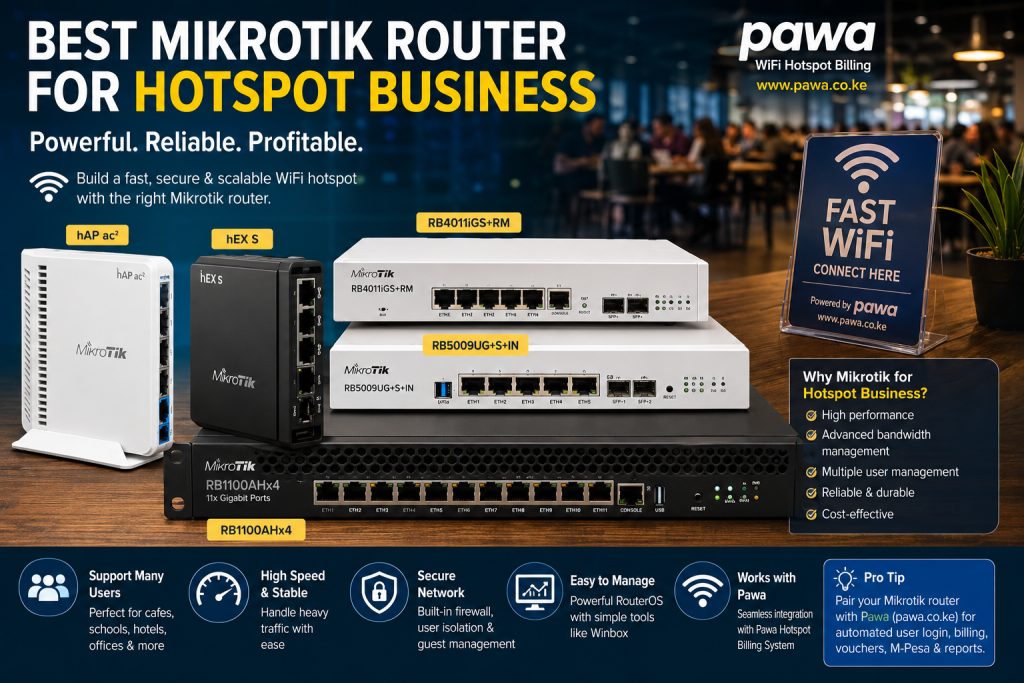
Best MikroTik Router for Hotspot Business: Comparing the Top Models
Choosing the best MikroTik router for hotspot business depends on the size of your deployment rather than simply purchasing the most expensive router available. Every hotspot network has different requirements. A coffee shop serving 30 customers daily does not need the same hardware as an apartment complex with 400 active users or a hotel serving hundreds of guests.
The advantage of MikroTik is that every RouterOS-powered device uses the same operating system. This means that as your hotspot business grows, you will already be familiar with the interface, making upgrades much easier.
MikroTik hAP ax² – Best MikroTik Router for Hotspot Business Beginners
For entrepreneurs starting their first hotspot, the MikroTik hAP ax² is among the strongest options available.
This router combines modern WiFi 6 technology with sufficient processing power for small commercial deployments. It works well in:
- Small apartments
- Coffee shops
- Restaurants
- Cyber cafés
- Student hostels
- Retail businesses
The router supports RouterOS hotspot functionality, advanced firewall rules, bandwidth queues, VPNs, and customer authentication.
If your hotspot expects fewer than 70–100 active users at a time, the hAP ax² provides excellent performance while keeping startup costs manageable.
Another advantage is energy efficiency, making it suitable for businesses operating continuously.
For entrepreneurs looking for the best MikroTik router for hotspot business on a moderate budget, the hAP ax² represents excellent value.
MikroTik hEX S – Best When Using External Access Points
Many hotspot operators mistakenly assume they need a wireless router.
In larger commercial deployments, WiFi coverage is normally handled by dedicated access points while the router performs routing, firewall, authentication, and bandwidth management.
This makes the MikroTik hEX S one of the most popular routers among professional installers.
The hEX S performs exceptionally well in:
- Apartment blocks
- Hostels
- Schools
- Office buildings
- Shopping centres
Because wireless access is handled separately, the router can focus entirely on managing customer sessions efficiently.
Many installers pair the hEX S with Ubiquiti UniFi or MikroTik cAP access points for improved wireless coverage.
This combination often provides better performance than relying on one wireless router.
MikroTik RB4011 – Best MikroTik Router for Growing Businesses
As customer numbers increase, additional processing power becomes necessary.
The RB4011 has become one of the most respected commercial routers because it offers enterprise-grade performance without the cost of carrier-class hardware.
Businesses commonly using this router include:
- Medium hotels
- Hospitals
- Universities
- Shopping malls
- Apartment estates
- Large office complexes
Its powerful processor handles large numbers of hotspot users while maintaining stable authentication, firewall filtering, queue management, and VPN services.
If you expect rapid growth, the RB4011 is often considered the best MikroTik router for hotspot business because it provides room for expansion without immediate hardware replacement.
MikroTik CCR Series – Enterprise Performance
Some hotspot operators eventually expand into Internet Service Providers or municipal WiFi deployments.
For these businesses, MikroTik’s Cloud Core Router (CCR) series delivers exceptional performance.
CCR routers are designed for:
- Large ISPs
- County WiFi projects
- Universities
- Airports
- Large hotels
- Multi-building apartment estates
They support thousands of simultaneous sessions depending on the deployment.
However, many beginners purchase CCR routers unnecessarily.
Unless your business genuinely requires enterprise throughput, investing in mid-range equipment often provides a better return on investment.
The best MikroTik router for hotspot business is not always the biggest or most expensive model.
Router Performance Should Match Customer Demand
One common mistake made by beginners is selecting hardware based only on internet speed.
In reality, routers process far more than internet traffic.
Every customer login requires authentication.
Every active user consumes memory.
Every bandwidth queue requires processor resources.
Every firewall rule consumes additional computing power.
As your hotspot grows, these tasks increase rapidly.
Selecting the best MikroTik router for hotspot business means choosing equipment capable of handling both current demand and future expansion.
WiFi Coverage Still Requires Quality Access Points
Even the most powerful MikroTik router cannot overcome poor wireless coverage.
Many commercial deployments use the router purely as the network controller while professional wireless access points distribute WiFi throughout the property.
Hotels, apartment buildings, shopping centres, and schools often install multiple ceiling-mounted access points instead of relying on one central router.
This approach improves:
- Coverage
- Roaming
- Customer experience
- Signal strength
- Overall reliability
Customers judge your hotspot based on browsing performance, not router specifications.
Common Buying Mistakes
Many entrepreneurs searching for the best MikroTik router for hotspot business make avoidable purchasing mistakes.
The first mistake is buying based only on price.
Cheap hardware often becomes expensive when frequent upgrades become necessary.
The second mistake is ignoring future expansion.
Businesses usually grow gradually.
Buying equipment that supports future users often saves money over several years.
Another mistake is forgetting backup power.
Power interruptions disconnect every customer immediately.
Installing UPS systems significantly improves network reliability.
Some operators also overlook ventilation.
Networking equipment generates heat.
Poor ventilation reduces equipment lifespan and increases unexpected failures.
Finally, many businesses fail to budget for quality cabling.
Even the best router performs poorly when connected through low-quality cables.
Why Pawa Complements MikroTik Perfectly
While MikroTik RouterOS includes powerful hotspot capabilities, managing a commercial hotspot manually quickly becomes time-consuming.
This is where https://pawa.co.ke
provides a significant advantage.
Pawa integrates with MikroTik to automate nearly every customer-facing process.
These include:
- Automatic M-Pesa payment confirmation
- Instant hotspot activation
- Voucher generation
- User management
- Customer reports
- Revenue tracking
- Remote hotspot monitoring
- Multi-branch management
Instead of creating user accounts manually every day, the system performs these tasks automatically.
This reduces administrative work while improving customer satisfaction.
Many hotspot operators discover that automation saves more time than purchasing additional hardware.
Expanding Beyond One Hotspot
Many successful entrepreneurs begin with one apartment or shopping centre before expanding to multiple locations.
Using centralized management software allows every hotspot to be monitored from one dashboard.
As your business grows, you may also benefit from integrating other business platforms such as RentalDesk (https://rentaldesk.co.ke
) for property management, PMS (https://pms.co.ke), EstateAdmin (https://estateadmin.co.ke), Prim (https://prim.co.ke), Vega POS (https://vega.co.ke), Dereva (https://dereva.co.ke), Vota (https://vota.co.ke), Zivo (https://zivo.co.ke), ZChat (https://zchat.zamacore.com), Dexa (https://dexa.co.ke), Ratibu (https://ratibu.co.ke), ChurchesAdmin (https://churchesadmin.com), Fama (https://fama.co.ke), Jaat (https://jaat.co.ke), and KayaPro360 (https://kayapro360.com
). These solutions help automate operations across property management, customer communication, education, HR, retail, and other sectors, creating a fully digital business ecosystem.
Ultimately, the best MikroTik router for hotspot business is the one that matches your current customer load, allows for future growth, and integrates seamlessly with professional hotspot billing software like Pawa. Starting with the right foundation makes expansion easier, reduces operating costs, and delivers a better experience for your customers.
Risks of Choosing the Wrong MikroTik Router
Selecting the best MikroTik router for hotspot business is one of the most important investment decisions you will make. While MikroTik equipment is known for reliability and flexibility, choosing the wrong model or configuring it poorly can negatively affect customer satisfaction and profitability.
One of the biggest risks is underestimating the number of users your network will support. A router that performs well for 30 simultaneous users may struggle when the customer base grows to over 150 active users. Slow logins, dropped sessions, delayed authentication, and poor browsing performance can quickly damage your business reputation. The solution is to estimate future growth before purchasing hardware and select a router that allows room for expansion.
Another common problem is poor network design. Even if you buy the best MikroTik router for hotspot business, customers may still experience weak WiFi signals if access points are installed incorrectly. Hotels, apartments, schools, and shopping centres require multiple professionally positioned access points rather than relying on one router to provide wireless coverage.
Power interruptions remain another challenge in Kenya. Frequent blackouts disconnect customers immediately and may damage networking equipment. Installing a UPS, inverter, or solar backup protects your investment while reducing downtime.
Improper RouterOS configuration is another risk. MikroTik routers offer hundreds of advanced features, but incorrect firewall rules, bandwidth queues, DHCP settings, or hotspot configurations can create network instability. Businesses without networking experience should consider professional installation to ensure the router performs optimally.
Finally, many hotspot operators fail because they rely entirely on manual customer management. Without hotspot billing automation, staff spend unnecessary time creating vouchers, activating users, and tracking payments. Integrating MikroTik with a platform like Pawa removes much of this manual work and improves customer satisfaction.
Is the Best MikroTik Router for Hotspot Business Worth Buying?
Many entrepreneurs researching the best MikroTik router for hotspot business want a simple answer: is MikroTik actually worth the investment?
For most commercial hotspot businesses, the answer is yes.
MikroTik has earned its reputation by offering enterprise networking features at prices that remain accessible to small and medium-sized businesses. Instead of paying recurring license fees for hotspot functionality, RouterOS includes advanced routing, hotspot management, bandwidth control, firewall protection, VPN support, traffic monitoring, VLAN configuration, and user authentication.
The value becomes even greater as your business expands. Rather than replacing your networking platform every few years, many MikroTik deployments simply upgrade hardware while continuing to use the same RouterOS environment.
However, MikroTik is not designed as a plug-and-play consumer router. It requires proper planning and configuration to unlock its full potential. Business owners willing to invest in professional installation or learn RouterOS basics usually enjoy reliable long-term performance.
If your goal is building a scalable hotspot business rather than simply sharing an internet connection, investing in the best MikroTik router for hotspot business is a smart long-term decision.
Frequently Asked Questions
1. Which is the best MikroTik router for hotspot business in Kenya?
The answer depends on your business size. Small cafés and apartments may perform well with the MikroTik hAP ax², while growing apartment complexes often benefit from the hEX S or RB4011. Larger commercial deployments and ISPs may require the CCR series.
2. Can one MikroTik router support an entire apartment?
The router manages the hotspot, but WiFi coverage should normally be provided by multiple access points. This improves signal quality, roaming, and customer experience throughout the property.
3. Do I need hotspot billing software with MikroTik?
Yes. Although RouterOS supports hotspot functionality, billing software automates voucher generation, M-Pesa integration, customer authentication, reporting, and user management. Automation saves time and improves operational efficiency.
4. Is MikroTik better than ordinary home routers?
For commercial hotspot deployments, yes. MikroTik routers provide enterprise-grade networking features that consumer routers generally do not offer, including advanced bandwidth management, firewall policies, hotspot authentication, VPN services, VLAN support, and detailed monitoring.
5. Can I expand my hotspot business later?
Absolutely. One advantage of selecting the best MikroTik router for hotspot business is scalability. Additional access points, faster internet connections, and multiple hotspot locations can all be added while continuing to use the same RouterOS platform and centralized management software.
Why Pawa Is the Ideal Partner for MikroTik Hotspot Businesses
Owning the best MikroTik router for hotspot business is only one part of operating a successful WiFi business. Efficient customer management, payment automation, and network monitoring are equally important.
Pawa is built specifically to simplify commercial hotspot operations. It integrates with MikroTik to automate customer onboarding, voucher creation, M-Pesa payment processing, user authentication, bandwidth allocation, and reporting.
With Pawa, hotspot operators can:
- Manage multiple hotspot branches from one dashboard.
- Automate M-Pesa payment verification.
- Generate vouchers instantly.
- Monitor customer activity in real time.
- View sales and revenue reports.
- Manage user accounts remotely.
- Reduce manual administration.
- Improve customer satisfaction through instant activation.
Whether you operate one apartment hotspot or several commercial locations across Kenya, Pawa helps you manage your business professionally while reducing operational costs.
Visit https://pawa.co.ke
today to learn how Pawa can help you build, automate, and grow a profitable MikroTik-powered hotspot business.
Conclusion
Choosing the best MikroTik router for hotspot business is about selecting equipment that matches your business goals rather than simply buying the most expensive device. Small businesses often achieve excellent performance using entry-level or mid-range MikroTik routers, while larger deployments benefit from enterprise-grade models with additional processing power.
The most successful hotspot operators combine quality MikroTik hardware with reliable internet connectivity, professional access points, backup power, and automated hotspot billing software. This combination delivers stable performance, simplifies customer management, and creates a scalable business capable of serving hundreds of users.
Technology continues to evolve, but the principles of running a successful hotspot business remain the same. Invest in reliable infrastructure, prioritize customer experience, automate repetitive tasks, and plan for future growth.
If you are serious about launching or expanding your hotspot business in Kenya, combining the best MikroTik router for hotspot business with the automation capabilities of Pawa provides one of the strongest foundations for long-term success.
Recommended Internal DoFollow Links
Recommended External DoFollow Links