
Introduction: Understanding Pay to Connect WiFi
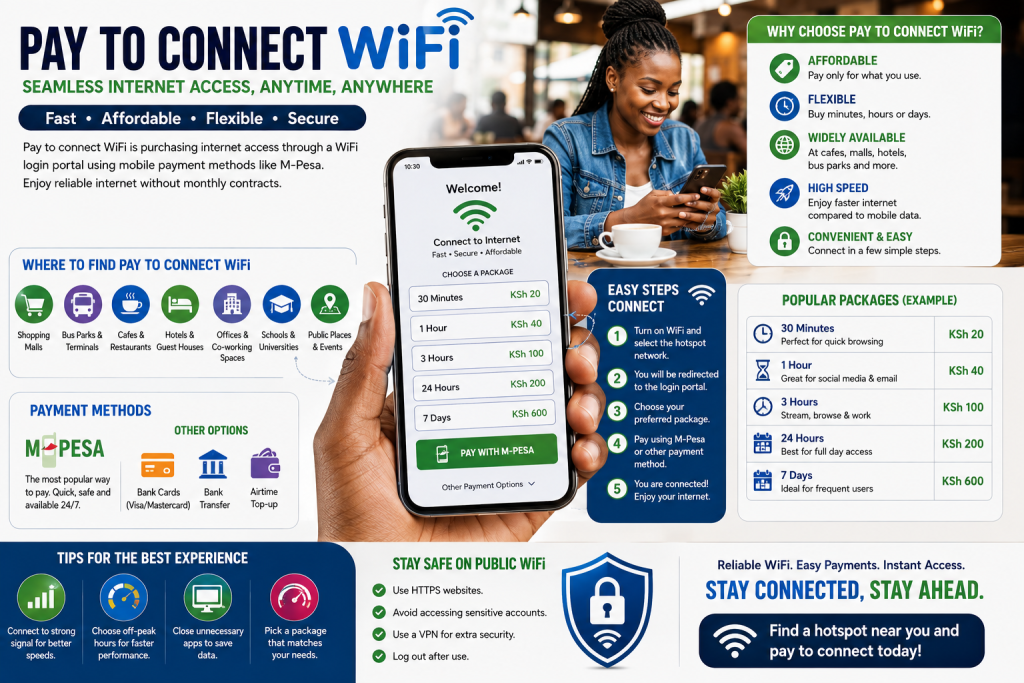
Definition: Pay to connect WiFi is purchasing internet access through a WiFi login portal using mobile payment methods like M-Pesa.
The concept of pay to connect WiFi has revolutionized how millions of Kenyans access the internet daily. Understanding pay to connect WiFi is essential for anyone seeking flexible, affordable internet access without long-term commitments. Whether you’re traveling, working remotely, or simply need temporary connectivity, pay to connect WiFi offers unmatched convenience and affordability.
Pay to connect WiFi has become ubiquitous across Kenya—at shopping centers, transport hubs, restaurants, hotels, and public spaces. The simplicity of how pay to connect WiFi works has made it the preferred internet access method for millions who lack home connectivity. For those unfamiliar with pay to connect WiFi, this comprehensive guide explains everything you need to know about accessing, using, and maximizing pay to connect WiFi services.
The evolution of pay to connect WiFi reflects Kenya’s digital transformation. What began as basic WiFi hotspots has evolved into sophisticated pay to connect WiFi ecosystems offering multiple payment options, competitive pricing, reliable speeds, and seamless user experiences. Understanding pay to connect WiFi today means appreciating how technology has democratized internet access across socioeconomic levels and geographic regions.
This guide explores every aspect of pay to connect WiFi—how it works, where to find it, how to use it safely, pricing strategies, payment methods, and optimization tips. Whether you’re a casual user seeking occasional pay to connect WiFi or a frequent traveler depending on pay to connect WiFi for connectivity, this guide provides essential knowledge for maximizing your pay to connect WiFi experience.
Table of Contents
- Understanding Pay to Connect WiFi: Fundamentals
- How Pay to Connect WiFi Works: Technical Process
- Finding Pay to Connect WiFi Networks: Location Guide
- Payment Methods for Pay to Connect WiFi: M-Pesa and Alternatives
- Pricing Strategies: Understanding Pay to Connect WiFi Costs
- Using Pay to Connect WiFi: Step-by-Step Guide
- Safety and Security: Protecting Yourself on Pay to Connect WiFi
- Optimization Tips: Getting Best Performance from Pay to Connect WiFi
- Troubleshooting Pay to Connect WiFi: Common Issues
- Comparing Pay to Connect WiFi Providers: Service Quality
- Alternatives to Pay to Connect WiFi: Other Connectivity Options
- The Future of Pay to Connect WiFi: Evolution and Innovation
Foundation and Practical Guide
Understanding Pay to Connect WiFi: Fundamentals
Before diving into technical details or usage instructions, establishing a solid foundation in what pay to connect WiFi fundamentally is will guide all subsequent understanding. Pay to connect WiFi represents a revolutionary approach to internet access that fundamentally differs from traditional home broadband or mobile data.
At its core, pay to connect WiFi is a pay-as-you-go internet access model where users purchase connectivity for specific durations or data volumes rather than committing to monthly subscriptions. This flexibility is what makes pay to connect WiFi appealing to millions of Kenyans who cannot afford or don’t need permanent internet connectivity. Understanding pay to connect WiFi means recognizing it as internet access democratized—affordable, flexible, and accessible to virtually everyone.
Pay to connect WiFi operates on a simple premise: operators acquire bulk internet connectivity from upstream providers and resell it in smaller increments through captive portal technology. When users connect to pay to connect WiFi networks, they encounter login pages prompting them to purchase access before they can use the network. This mechanism is what enables pay to connect WiFi to function economically.
The appeal of pay to connect WiFi extends beyond mere affordability. Users appreciate pay to connect WiFi because:
- No commitment: No monthly contracts for pay to connect WiFi
- Flexibility: Purchase exactly what you need for pay to connect WiFi
- Speed: WiFi typically faster than mobile data for pay to connect WiFi access
- Convenience: Multiple locations offering pay to connect WiFi throughout Kenya
- Accessibility: Works on any WiFi-capable device for pay to connect WiFi connection
Understanding pay to connect WiFi also means recognizing its limitations. Pay to connect WiFi speeds and reliability depend on operator infrastructure quality. Some pay to connect WiFi networks offer excellent service; others are slower or less reliable. Building knowledge about pay to connect WiFi quality indicators helps users identify superior operators.
How Pay to Connect WiFi Works: Technical Process
The mechanics of how pay to connect WiFi functions reveal why the model is so efficient and why it’s become so prevalent across Kenya. Technical understanding of pay to connect WiFi isn’t necessary for users but helps explain why pay to connect WiFi works the way it does.
Captive Portal Technology: The Engine Behind Pay to Connect WiFi
Pay to connect WiFi depends entirely on captive portal technology—the mechanism that intercepts internet requests and redirects them to login pages. Understanding pay to connect WiFi requires understanding captive portals.
When users connect to pay to connect WiFi networks, their first internet request doesn’t go to the website they intended. Instead, network equipment intercepts that request and redirects users to a captive portal page. This page presents pay to connect WiFi options: purchasing data bundles, time-based passes, or subscriptions. Only after completing pay to connect WiFi payment does the portal grant actual internet access.
This technology is what enables pay to connect WiFi operators to:
- Control access to networks
- Collect payments efficiently
- Manage bandwidth allocation
- Prevent unauthorized network access
- Track usage statistics
Without captive portal technology, pay to connect WiFi as a business model wouldn’t function. The portal is fundamental to how pay to connect WiFi operates.
Authentication and Access Control: How Pay to Connect WiFi Manages Users
Pay to connect WiFi systems manage user access through authentication protocols. When users connect to pay to connect WiFi:
- Device connects to WiFi access point
- User’s device sends initial request (attempting to access website)
- Network intercepts request, redirects to captive portal
- User sees pay to connect WiFi login/purchase page
- User completes pay to connect WiFi transaction
- Billing system grants authentication token to user’s device
- User’s device stores token, uses it for ongoing pay to connect WiFi access
- Network validates token, permits user traffic through network
This authentication flow is invisible to most pay to connect WiFi users, who simply experience seamless connectivity after payment.
M-Pesa Integration: The Payment Engine of Pay to Connect WiFi
Pay to connect WiFi’s viability in Kenya depends critically on M-Pesa integration. Most pay to connect WiFi operators integrate M-Pesa STK Push technology enabling customers to complete pay to connect WiFi purchases through their phones instantly.
When users purchase pay to connect WiFi access:
- User selects data package or time-based pass on pay to connect WiFi portal
- Portal prompts user for phone number
- System sends M-Pesa STK Push prompt to user’s phone
- User confirms payment on their phone (without leaving pay to connect WiFi portal browser)
- M-Pesa completes transaction
- Portal immediately grants pay to connect WiFi access
- User experiences uninterrupted connectivity
This integration is what makes pay to connect WiFi accessible to Kenya’s largely unbanked population. Without M-Pesa, pay to connect WiFi would be impractical for most users.
Finding Pay to Connect WiFi Networks: Location Guide
Understanding where to find pay to connect WiFi is the first practical step for users. Pay to connect WiFi networks exist throughout Kenya in specific locations where operators have deployed infrastructure.
High-Traffic Hotspots: Where to Find Pay to Connect WiFi
Pay to connect WiFi operators strategically place networks in locations with high customer concentration:
Shopping Centers and Malls (top pay to connect WiFi locations): Pay to connect WiFi is common in Nairobi malls like Westgate, South C, Village Market; Mombasa’s 80/20 mall; Kisumu’s Mega City mall. Shopping centers provide foot traffic enabling pay to connect WiFi revenue generation.
Transport Hubs (major pay to connect WiFi destinations): Pay to connect WiFi networks operate at airports (JKIA, Mombasa International), bus terminals (Nairobi’s River Road stations, Kisumu’s main terminal), railway stations. Travelers using these hubs for pay to connect WiFi connectivity represent consistent customer base.
Educational Institutions (growing pay to connect WiFi segment): Universities and technical colleges increasingly have pay to connect WiFi for student use. Kenya’s universities (University of Nairobi, Kenyatta University, Strathmore, etc.) offer student pay to connect WiFi access through operators.
Hotels and Hospitality (premium pay to connect WiFi locations): Hotels increasingly partner with pay to connect WiFi operators to provide guest internet. Quality hotels offer complimentary pay to connect WiFi; budget establishments charge for access through pay to connect WiFi.
Business Centers and Office Parks (corporate pay to connect WiFi): Office buildings in Nairobi’s business districts (Westlands, CBD) often have pay to connect WiFi for visitor or tenant use. Corporate pay to connect WiFi serves business-focused customers.
Restaurants and Cafés (social pay to connect WiFi locations): Coffee shops and restaurants throughout Kenya deploy pay to connect WiFi attracting customers seeking connectivity while dining. Social pay to connect WiFi locations offer sustained revenue potential.
Public Spaces (community pay to connect WiFi): Some municipalities deploy pay to connect WiFi in public areas (parks, markets) as digital inclusion initiatives. Community pay to connect WiFi serves broader accessibility goals.
Identifying Pay to Connect WiFi Networks: Recognition Tips
When seeking pay to connect WiFi, users should know how to identify legitimate networks:
Network Name Visibility: Pay to connect WiFi networks typically use clear, identifiable names (SSIDs) indicating they’re paid services. Names like “PAWA_WIFI,” “Sasa_Konnect,” “Jibu_Internet” signal pay to connect WiFi networks.
Signage and Branding: Quality pay to connect WiFi operators display signage indicating services are available. Look for posters, banners, or signs advertising pay to connect WiFi with pricing information.
Portal Quality: Professional pay to connect WiFi operators maintain well-designed, responsive login portals. Poorly designed portals may indicate unreliable pay to connect WiFi service.
Provider Reputation: Established pay to connect WiFi operators build reputations through consistent service. Choosing pay to connect WiFi from recognized brands increases likelihood of quality experience.
Mapping Pay to Connect WiFi Networks in Your Area
Users wanting to consistently access pay to connect WiFi should map available networks in frequented locations. Mental notes about pay to connect WiFi availability help with planning.
Apps like WiFi Map show some pay to connect WiFi networks, though coverage isn’t comprehensive. Local knowledge often proves more reliable than apps for identifying pay to connect WiFi in specific areas.
Payment Methods for Pay to Connect WiFi: M-Pesa and Alternatives
Understanding available payment methods is essential for using pay to connect WiFi successfully. Kenya’s digital payment ecosystem has created multiple options for pay to connect WiFi payment.
M-Pesa: Dominant Pay to Connect WiFi Payment Method
M-Pesa dominates pay to connect WiFi payment processing in Kenya. Nearly all pay to connect WiFi operators accept M-Pesa because:
- M-Pesa is ubiquitous (over 30 million users)
- Users prefer mobile payment to credit cards
- Integration is straightforward for pay to connect WiFi providers
- Transaction fees are reasonable for pay to connect WiFi operations
Using pay to connect WiFi with M-Pesa typically involves:
- User selects pay to connect WiFi package
- Portal prompts for M-Pesa phone number
- STK Push sends payment prompt to user’s phone
- User confirms payment
- Portal grants immediate access to pay to connect WiFi
This process is so seamless that most pay to connect WiFi users complete payment within seconds.
Airtel Money: Alternative for Pay to Connect WiFi
Some pay to connect WiFi operators accept Airtel Money as payment method. Airtel Money integration works similarly to M-Pesa for pay to connect WiFi:
- User selects pay to connect WiFi package
- Portal prompts for Airtel phone number
- STK Push sends payment prompt
- User confirms payment
- Pay to connect WiFi access granted
Airtel Money adoption among pay to connect WiFi operators is increasing as the service expands across Kenya.
Bank Transfers: Pay to Connect WiFi Corporate Option
Corporate pay to connect WiFi customers sometimes use bank transfers, particularly for:
- Bulk purchases for office WiFi
- Long-term corporate pay to connect WiFi contracts
- Enterprise deployments requiring documentation
Bank transfers are less common for individual pay to connect WiFi customers due to friction compared to mobile money.
Card Payments: Limited Pay to Connect WiFi Option
Some pay to connect WiFi operators accept credit or debit cards, particularly in tourist areas or premium locations. Card payments for pay to connect WiFi are less common than mobile money because:
- Requires card possession (not universal in Kenya)
- Higher transaction fees impact pay to connect WiFi pricing
- Slower payment processing compared to instant M-Pesa for pay to connect WiFi
Pricing Strategies: Understanding Pay to Connect WiFi Costs
Pay to connect WiFi pricing varies significantly by location, operator, and service quality. Understanding pricing helps users identify best pay to connect WiFi value.
Data Bundle Pricing: Standard Pay to Connect WiFi Model
Most pay to connect WiFi operators offer tiered data packages:
Typical Pay to Connect WiFi Pricing:
- 500 MB: KES 30-50 (budget pay to connect WiFi)
- 1 GB: KES 50-100 (standard pay to connect WiFi)
- 2 GB: KES 100-150 (popular pay to connect WiFi option)
- 5 GB: KES 200-400 (power user pay to connect WiFi)
- 10 GB: KES 350-700 (heavy user pay to connect WiFi)
These pay to connect WiFi prices reflect wholesale internet costs plus operator margins. Variations depend on:
- Location (CBD pay to connect WiFi costs more than suburbs)
- Competition (high competition reduces pay to connect WiFi prices)
- Speed tier (faster pay to connect WiFi commands premium pricing)
- Operator brand (established brands often charge more for pay to connect WiFi)
Time-Based Pricing: Alternative Pay to Connect WiFi Model
Some pay to connect WiFi operators price by duration rather than data volume:
Time-Based Pay to Connect WiFi Packages:
- 1 hour: KES 30-50
- 4 hours: KES 80-120
- 24 hours: KES 150-250
- 7 days: KES 500-800
Time-based pay to connect WiFi works well for users who spend predictable periods in specific locations (café customers, hotel guests, office workers).
Daily Passes: Convenient Pay to Connect WiFi Option
Daily unlimited passes are popular pay to connect WiFi offering:
Daily Pass Pricing (typical pay to connect WiFi):
- Full day (6 AM-10 PM): KES 100-150
- Evening pass (5 PM-midnight): KES 50-80
- Night pass (midnight-6 AM): KES 30-50
- Student daily: KES 50 (discounted pay to connect WiFi)
- Tourist daily: KES 200-300 (premium pay to connect WiFi)
Daily passes appeal to pay to connect WiFi users wanting simplicity without worrying about data limits.
Subscription Plans: Committed Pay to Connect WiFi Option
Professional pay to connect WiFi users might prefer monthly subscriptions:
Monthly Pay to Connect WiFi Subscriptions:
- Standard: KES 500-800 (20-30 GB)
- Premium: KES 1,000-1,500 (unlimited or 100+ GB)
- Business: KES 1,500-3,000 (multiple devices, priority support)
Subscriptions make sense for pay to connect WiFi users consistently returning to same location.
Comparative Analysis: Pay to Connect WiFi Value
Users should evaluate pay to connect WiFi value by calculating cost per GB:
Example Pay to Connect WiFi Value Comparison:
- Bundle (1 GB for KES 100): KES 100/GB
- Bundle (5 GB for KES 300): KES 60/GB
- Subscription (50 GB for KES 1,000): KES 20/GB
Data shows that committed pay to connect WiFi users benefit from subscriptions, while casual users optimize with standard bundles.
Using Pay to Connect WiFi: Step-by-Step Guide
For users unfamiliar with pay to connect WiFi, a clear step-by-step guide simplifies the process. Following these steps ensures successful pay to connect WiFi connection and payment.
Step 1: Locate Available Pay to Connect WiFi Networks
Start by identifying available pay to connect WiFi networks in your location.
Finding Pay to Connect WiFi:
- Open WiFi settings on your device (phone, tablet, or laptop)
- Scan available networks
- Look for networks clearly labeled as pay to connect WiFi
- Networks offering pay to connect WiFi usually have descriptive names indicating service
Select the pay to connect WiFi network you want to use. Ensure you’re selecting correct network—scammers sometimes create misleading pay to connect WiFi names to trap users.
Step 2: Connect to Pay to Connect WiFi Network
Connecting to pay to connect WiFi network is straightforward:
Connecting to Pay to Connect WiFi:
- Select pay to connect WiFi network from available list
- If password required (most pay to connect WiFi networks are open), no password needed
- Device connects to pay to connect WiFi network
- Connection typically completes within seconds
You’ll see connection indication (usually signal bars) showing you’re connected to pay to connect WiFi, though internet traffic won’t work yet until you complete payment.
Step 3: Wait for Pay to Connect WiFi Portal
After connecting to pay to connect WiFi network, automatic portal redirect usually appears.
Accessing Pay to Connect WiFi Portal:
- Open web browser on your device
- Attempt to visit any website (or wait for automatic redirect)
- Pay to connect WiFi portal page automatically loads
- You’ll see login page with pay to connect WiFi packages and pricing
- Portal displays clearly what pay to connect WiFi options are available
If automatic redirect doesn’t appear, manually open browser and visit any website to trigger pay to connect WiFi portal.
Step 4: Select Your Pay to Connect WiFi Package
Choose which pay to connect WiFi package meets your needs.
Choosing Pay to Connect WiFi Package:
- Review available pay to connect WiFi options (data bundles, time passes, subscriptions)
- Decide how much data or time you need for pay to connect WiFi
- Calculate value: cost per GB or hour for pay to connect WiFi comparison
- Select your preferred pay to connect WiFi package
- Click “Purchase” or similar button to proceed with pay to connect WiFi transaction
Select wisely—while you can purchase more pay to connect WiFi later if needed, choosing correctly minimizes cost.
Step 5: Provide Phone Number for Pay to Connect WiFi Payment
Payment processing requires providing phone number to complete pay to connect WiFi purchase.
Entering Phone Number for Pay to Connect WiFi:
- Portal prompts for phone number
- Enter your M-Pesa registered phone number for pay to connect WiFi
- Verify number is correct (errors might direct payment to wrong account, preventing pay to connect WiFi access)
- Click continue to proceed with pay to connect WiFi payment
Double-check phone number accuracy—incorrect entry complicates pay to connect WiFi payment processing.
Step 6: Complete M-Pesa Payment for Pay to Connect WiFi
M-Pesa STK Push initiates payment prompt on your phone for pay to connect WiFi.
Completing Pay to Connect WiFi M-Pesa Payment:
- M-Pesa prompt appears on your phone (usually within 10-15 seconds of entering number)
- Prompt shows amount and pay to connect WiFi operator name
- Review details to confirm this is your intended pay to connect WiFi purchase
- Enter your M-Pesa PIN to confirm payment
- M-Pesa confirms transaction completion
- Payment is processed for pay to connect WiFi access
The M-Pesa prompt is identical to normal M-Pesa transactions, maintaining security for your pay to connect WiFi payment.
Step 7: Verify Pay to Connect WiFi Access Granted
After successful M-Pesa payment, pay to connect WiFi portal should grant access.
Confirming Pay to Connect WiFi Access:
- Portal shows confirmation message indicating pay to connect WiFi purchased
- “Success” page may display with access details (data remaining, expiration time, etc.)
- Try accessing website to confirm internet working through pay to connect WiFi
- You should now have full internet access via pay to connect WiFi network
Congratulations—you’ve successfully purchased and activated pay to connect WiFi!
Safety, Optimization, and Advanced Topics
Safety and Security: Protecting Yourself on Pay to Connect WiFi
While pay to connect WiFi is generally safe, users should practice cybersecurity precautions when using public networks. Understanding pay to connect WiFi security helps protect your personal information.
Encryption and Data Protection on Pay to Connect WiFi
Pay to connect WiFi networks are public, meaning anyone with WiFi access can potentially intercept unencrypted traffic. Protecting yourself on pay to connect WiFi requires using encryption:
HTTPS and SSL Protection (essential for pay to connect WiFi security):
- Modern websites use HTTPS encryption
- Data transmitted via HTTPS is encrypted even on pay to connect WiFi networks
- When accessing websites on pay to connect WiFi, ensure address bar shows “https://” and padlock icon
- Banking and email via HTTPS is safe on pay to connect WiFi despite public network
VPN Usage (advanced pay to connect WiFi security):
- VPNs encrypt all internet traffic, providing protection on pay to connect WiFi
- Using VPN on pay to connect WiFi prevents network operators from viewing your activity
- Quality VPNs make public pay to connect WiFi nearly as secure as private networks
- Consider VPN essential for pay to connect WiFi on sensitive transactions
Avoid Sensitive Transactions on Pay to Connect WiFi:
- Don’t enter passwords on pay to connect WiFi (use VPN if necessary)
- Don’t transmit credit card information via pay to connect WiFi
- Avoid sensitive financial transactions on pay to connect WiFi
- Bank transfers and purchases better completed on cellular data for pay to connect WiFi security
Fake Pay to Connect WiFi Networks: Man-in-the-Middle Attacks
Scammers sometimes create fake pay to connect WiFi networks to trap users:
Identifying Fake Pay to Connect WiFi:
- Scam networks have names similar to legitimate pay to connect WiFi (e.g., “PAWA-WIFI” instead of “PAWA_WIFI”)
- Fake portals may look similar to legitimate pay to connect WiFi but with typos or poor design
- Malicious pay to connect WiFi networks intercept traffic to steal login credentials
Protecting Against Fake Pay to Connect WiFi:
- Connect only to pay to connect WiFi networks operated by established brands
- Verify pay to connect WiFi operator name with location staff
- Check portal URLs for legitimacy before entering credentials
- Use VPN when accessing pay to connect WiFi from unknown operators
- Never enter passwords on pay to connect WiFi login pages (only phone numbers needed)
Payment Security on Pay to Connect WiFi
M-Pesa integration makes pay to connect WiFi payment secure, but users should verify they’re completing legitimate pay to connect WiFi transactions:
Verifying Pay to Connect WiFi Payment Security:
- Confirm operator name matches what you expect for pay to connect WiFi
- Verify amount shown matches pay to connect WiFi package selected
- Never share M-Pesa PIN with anyone for pay to connect WiFi payment
- Check M-Pesa confirmation shows correct pay to connect WiFi operator
- Request receipts from pay to connect WiFi for record-keeping
Device Security on Pay to Connect WiFi
Personal device security protects you when using pay to connect WiFi:
Device Security Practices for Pay to Connect WiFi:
- Keep device software updated for pay to connect WiFi security
- Use strong passwords/PINs on your device when using pay to connect WiFi
- Disable auto-connect features that automatically connect to pay to connect WiFi networks
- Enable two-factor authentication on important accounts before using pay to connect WiFi
- Avoid accessing accounts with important data on pay to connect WiFi
Optimization Tips: Getting Best Performance from Pay to Connect WiFi
Maximizing value from pay to connect WiFi requires understanding optimization strategies. These tips help users get best speeds and longest-lasting packages.
Speed Optimization: Maximizing Pay to Connect WiFi Performance
Pay to connect WiFi speeds depend on operator infrastructure and network congestion. Optimizing helps achieve better performance:
Positioning for Pay to Connect WiFi Speed:
- Move closer to access point for better pay to connect WiFi signal
- Position device where you have line-of-sight to access point for pay to connect WiFi
- Avoid physical obstructions (walls, metal, water) blocking pay to connect WiFi signal
- Higher signal strength improves pay to connect WiFi speeds significantly
Timing Optimization for Pay to Connect WiFi:
- Avoid peak hours when other users consume pay to connect WiFi bandwidth
- Morning and afternoon hours typically faster than evening for pay to connect WiFi
- Weekdays often faster than weekends for pay to connect WiFi due to fewer users
- Off-peak usage provides superior pay to connect WiFi performance
Device Optimization for Pay to Connect WiFi:
- Close unnecessary apps consuming bandwidth on pay to connect WiFi
- Disable auto-updating for apps/OS during pay to connect WiFi usage
- Use single device (not multiple) connected to pay to connect WiFi simultaneously
- Clear browser cache periodically for better pay to connect WiFi performance
Data Optimization: Extending Pay to Connect WiFi Package Duration
Making data last longer maximizes pay to connect WiFi value:
Data-Efficient Usage on Pay to Connect WiFi:
- Stream video in low quality rather than high definition for pay to connect WiFi
- Download media when on unlimited WiFi rather than using pay to connect WiFi for large files
- Use text-based websites and apps rather than media-heavy alternatives for pay to connect WiFi
- Disable image loading in browser for pay to connect WiFi bandwidth savings
- Use offline modes for maps, email, documents on pay to connect WiFi
Compression and Optimization Tools:
- Browser compression extensions reduce data usage on pay to connect WiFi
- Opera Mini or similar lightweight browsers use less pay to connect WiFi bandwidth
- YouTube’s data-saving mode reduces video quality for lower pay to connect WiFi consumption
- Disable auto-play on social media to conserve pay to connect WiFi data
Tracking Pay to Connect WiFi Usage:
- Monitor remaining data on pay to connect WiFi portal
- Set alerts when approaching pay to connect WiFi package limits
- Use data tracking apps to understand consumption patterns for pay to connect WiFi
- Adjust usage behavior based on pay to connect WiFi tracking data
Troubleshooting Pay to Connect WiFi: Common Issues
Users may encounter problems accessing or using pay to connect WiFi. Understanding common issues and solutions helps resolve problems quickly.
Cannot Connect to Pay to Connect WiFi Network
If you cannot connect to the pay to connect WiFi network:
Solutions for Pay to Connect WiFi Connection Problems:
- Verify network name is correct for pay to connect WiFi
- Move closer to access point if pay to connect WiFi signal weak
- Forget network in WiFi settings and reconnect to pay to connect WiFi
- Restart your device and attempt pay to connect WiFi connection again
- Check if device WiFi is enabled (some devices disable WiFi after certain time)
- Try connecting to pay to connect WiFi from different location within range
If pay to connect WiFi still won’t connect, network may be experiencing technical problems. Wait 15-30 minutes and retry pay to connect WiFi connection.
Portal Doesn’t Appear After Connecting to Pay to Connect WiFi
If you connect to pay to connect WiFi but portal doesn’t appear:
Solutions for Missing Pay to Connect WiFi Portal:
- Open web browser manually (don’t rely on automatic redirect for pay to connect WiFi)
- Visit any website (e.g., google.com) to trigger pay to connect WiFi portal
- Try different websites if first doesn’t trigger pay to connect WiFi portal
- Clear browser cache and cookies, then try again for pay to connect WiFi
- Try different browser if available (sometimes browser-specific for pay to connect WiFi)
- Ensure you’re not already logged into pay to connect WiFi (would skip portal)
M-Pesa Payment Doesn’t Appear for Pay to Connect WiFi
If you don’t receive M-Pesa prompt for pay to connect WiFi payment:
Solutions for Missing Pay to Connect WiFi M-Pesa Prompt:
- Verify phone number entered is correct for pay to connect WiFi payment
- Ensure you have sufficient M-Pesa balance for pay to connect WiFi purchase
- Wait 20-30 seconds—M-Pesa prompt sometimes delayed for pay to connect WiFi
- Check if payment already processed (check M-Pesa balance for pay to connect WiFi charge)
- Retry transaction if first attempt failed for pay to connect WiFi
- Contact operator support if persistent pay to connect WiFi payment problems
Can Connect to Pay to Connect WiFi but No Internet
If you have signal but can’t access internet on pay to connect WiFi:
Solutions for Pay to Connect WiFi Connection Without Internet:
- Verify you’ve actually purchased pay to connect WiFi (portal may show error)
- Check if data package expired for pay to connect WiFi (may show in portal)
- Disconnect and reconnect to pay to connect WiFi network
- Try accessing different websites to isolate pay to connect WiFi problem
- Clear browser cache for pay to connect WiFi access issues
- Try mobile data briefly to confirm device internet works (isolate pay to connect WiFi issue)
Slow Speeds on Pay to Connect WiFi
If pay to connect WiFi speeds are disappointing:
Solutions for Slow Pay to Connect WiFi Performance:
- Check operator speed claims for pay to connect WiFi (expectations realistic?)
- Move closer to access point to improve signal for pay to connect WiFi
- Test at different time to see if pay to connect WiFi speed improves (less congestion)
- Ensure no other devices consuming pay to connect WiFi bandwidth
- Clear browser cache and disable extensions for better pay to connect WiFi speed
- Test with mobile data to confirm network connection (not device issue) for pay to connect WiFi comparison
- Contact operator if pay to connect WiFi consistently slower than advertised
Comparing Pay to Connect WiFi Providers: Service Quality
Not all pay to connect WiFi providers are equal. Understanding quality differences helps users identify best pay to connect WiFi operators.
Major Pay to Connect WiFi Operators in Kenya
Several large operators dominate pay to connect WiFi market:
Pawa WiFi (leading pay to connect WiFi provider):
- Present across Kenya in shopping centers, transport hubs, educational institutions
- Professional portal with clear pricing for pay to connect WiFi
- Reliable M-Pesa integration for pay to connect WiFi payment
- Generally competitive pay to connect WiFi pricing
- High customer satisfaction for pay to connect WiFi service
Sasa Konnect (popular pay to connect WiFi service):
- Strong presence in major cities (Nairobi, Mombasa, Kisumu)
- Known for reliable speeds in pay to connect WiFi offerings
- Multiple payment options supported for pay to connect WiFi
- Brand recognition helps with pay to connect WiFi trust
Local Operators (independent pay to connect WiFi providers):
- Many locations have independent pay to connect WiFi operators
- Quality varies significantly between local pay to connect WiFi operators
- Often most affordable pay to connect WiFi in specific locations
- Support local entrepreneurs through pay to connect WiFi purchases
Evaluating Pay to Connect WiFi Quality
When comparing pay to connect WiFi providers, consider:
Speed Performance (testing pay to connect WiFi):
- Run speedtest when connected to pay to connect WiFi
- Compare speeds to advertised pay to connect WiFi speeds
- Test at different times to understand pay to connect WiFi consistency
- Acceptable pay to connect WiFi speeds minimum 2-3 Mbps (more is better)
Pricing Fairness (analyzing pay to connect WiFi costs):
- Compare cost per GB across pay to connect WiFi operators
- Factor in speed and reliability into pay to connect WiFi value calculation
- Premium pay to connect WiFi justified by superior service
- Extremely cheap pay to connect WiFi may indicate poor quality
Reliability (assessing pay to connect WiFi uptime):
- Try connecting to pay to connect WiFi multiple times over several days
- Consistent pay to connect WiFi connectivity indicates reliable operator
- Frequent disconnections suggest reliability issues with pay to connect WiFi
- Ask local users about pay to connect WiFi operator reliability
Customer Support (evaluating pay to connect WiFi service):
- Can you reach pay to connect WiFi operator support if problems arise?
- Response time for pay to connect WiFi customer service issues
- Quality of pay to connect WiFi support solutions
- Support availability (some operators available 24/7 for pay to connect WiFi)
Alternatives to Pay to Connect WiFi: Other Connectivity Options
While pay to connect WiFi is excellent option for many users, alternative connectivity exists:
Mobile Data: Primary Alternative to Pay to Connect WiFi
Mobile data (cellular internet) represents main alternative to pay to connect WiFi:
Mobile Data Advantages (compared to pay to connect WiFi):
- Portable—works anywhere with signal (unlike pay to connect WiFi)
- Consistent speeds where coverage available
- Private/secure compared to public pay to connect WiFi
- No login process required vs. pay to connect WiFi portal
Mobile Data Disadvantages (compared to pay to connect WiFi):
- More expensive per GB than pay to connect WiFi
- Data limits stricter than pay to connect WiFi bundles
- Battery consumption higher than WiFi for pay to connect WiFi alternative
- Speeds often slower than pay to connect WiFi in same location
Home Broadband: Premium Alternative to Pay to Connect WiFi
Fixed-line internet (fiber, DSL, fixed wireless) provides alternative to pay to connect WiFi:
Home Broadband Advantages:
- Unlimited data (typically) vs. pay to connect WiFi limits
- Highest speeds available vs. pay to connect WiFi
- Most economical for heavy users vs. pay to connect WiFi costs
- Private/secure network unlike public pay to connect WiFi
Home Broadband Disadvantages:
- Expensive monthly commitment vs. flexible pay to connect WiFi
- Requires physical infrastructure (not portable like pay to connect WiFi)
- Installation wait times vs. instant pay to connect WiFi access
- Unsuitable for temporary connectivity like pay to connect WiFi
Satellite Internet: Remote Alternative to Pay to Connect WiFi
Satellite internet (increasingly viable with Starlink in Kenya) provides alternative to pay to connect WiFi:
Satellite Internet Advantages:
- Coverage in remote areas where pay to connect WiFi unavailable
- Reasonable speeds for basic browsing (vs. pay to connect WiFi)
- Reliable service not dependent on ground infrastructure like pay to connect WiFi
Satellite Internet Disadvantages:
- High latency unsuitable for real-time applications vs. pay to connect WiFi
- Expensive equipment and monthly costs vs. pay to connect WiFi affordability
- Weather dependent (vs. pay to connect WiFi reliability)
For most Kenyans seeking occasional connectivity, pay to connect WiFi remains superior alternative to these options.
The Future of Pay to Connect WiFi: Evolution and Innovation
The pay to connect WiFi landscape continues evolving with emerging technologies and innovations shaping future service delivery.
Technology Improvements in Pay to Connect WiFi
Future pay to connect WiFi improvements include:
5G Integration for Pay to Connect WiFi:
- 5G networks enable faster pay to connect WiFi speeds
- Lower latency improves real-time applications on pay to connect WiFi
- Operators will leverage 5G for premium pay to connect WiFi services
AI-Powered Optimization for Pay to Connect WiFi:
- Machine learning optimizes pay to connect WiFi performance automatically
- Predictive pricing adjusts pay to connect WiFi costs based on demand
- Fraud detection protects pay to connect WiFi systems from exploitation
Blockchain for Pay to Connect WiFi:
- Distributed ledgers could enable decentralized pay to connect WiFi payment systems
- Cryptocurrency integration potentially replaces M-Pesa for pay to connect WiFi in future
- Tokenized pay to connect WiFi access creates new economic models
Market Growth Projections for Pay to Connect WiFi
Kenya’s pay to connect WiFi market continues expanding:
Growth Drivers for Pay to Connect WiFi:
- Increasing internet demand as Kenya develops economically
- More smartphones means more pay to connect WiFi users
- Improvement in upstream connectivity enables better pay to connect WiFi services
- Corporate adoption of pay to connect WiFi for guest networks
Market Size Estimates for Pay to Connect WiFi:
- Current pay to connect WiFi market estimated KES 10-15 billion annually
- Projected growth 25-35% annually for pay to connect WiFi
- Potential market size KES 50+ billion as penetration increases
This growth demonstrates pay to connect WiFi’s central role in Kenya’s digital future.
Related Resources for Pay to Connect WiFi
SpaceKits WiFi Hardware Solutions – Complete hardware and infrastructure solutions enabling operators to deploy and scale their own pay to connect WiFi services, from entry-level equipment to enterprise-grade infrastructure supporting thousands of pay to connect WiFi users simultaneously.
Pawa WiFi Billing Platform – Professional cloud-based billing system powering reliable pay to connect WiFi operations with M-Pesa integration, multi-location management, and analytics essential for successful pay to connect WiFi service delivery across Kenya.
Pawa WiFi Portal Implementation – Complete technical guidance for implementing professional pay to connect WiFi portals and infrastructure, including step-by-step configuration ensuring optimal pay to connect WiFi experience for users and maximum profitability for operators.
SpaceKits Equipment Installation Services – Professional installation ensuring proper pay to connect WiFi infrastructure deployment, from site preparation through testing and launch, guaranteeing pay to connect WiFi reliability and performance from day one of operations.
Conclusion: Mastering Pay to Connect WiFi
Understanding pay to connect WiFi is increasingly essential for millions of Kenyans seeking affordable, flexible internet access. Pay to connect WiFi has democratized connectivity, making internet access available to those unable to afford home broadband or who need temporary connectivity.
Key insights about pay to connect WiFi:
Pay to connect WiFi is accessible. The service exists throughout Kenya in convenient locations, making pay to connect WiFi available to virtually anyone needing connectivity. Locating pay to connect WiFi is straightforward for users in urban areas.
Pay to connect WiFi is affordable. Compared to mobile data or home broadband, pay to connect WiFi offers exceptional value. Users pay only for what they need without long-term commitments that make pay to connect WiFi economical for flexible users.
Pay to connect WiFi is convenient. The instant access through simple login portals, combined with M-Pesa payment processing, makes pay to connect WiFi the most user-friendly internet option for most Kenyans. No contracts or complex processes required for pay to connect WiFi.
Pay to connect WiFi is secure with proper precautions. While public networks carry security considerations, proper practices (using VPNs, avoiding sensitive transactions, checking portals) make pay to connect WiFi acceptably safe for general use.
Pay to connect WiFi is evolving. Ongoing technology improvements, market expansion, and innovation ensure pay to connect WiFi service quality and options will continue improving for years to come.
Whether you’re a casual user seeking occasional connectivity or someone who relies on pay to connect WiFi regularly, the insights in this guide will help you use services effectively, safely, and economically. Start using pay to connect WiFi today and discover why millions of Kenyans have embraced this revolutionary connectivity solution.