
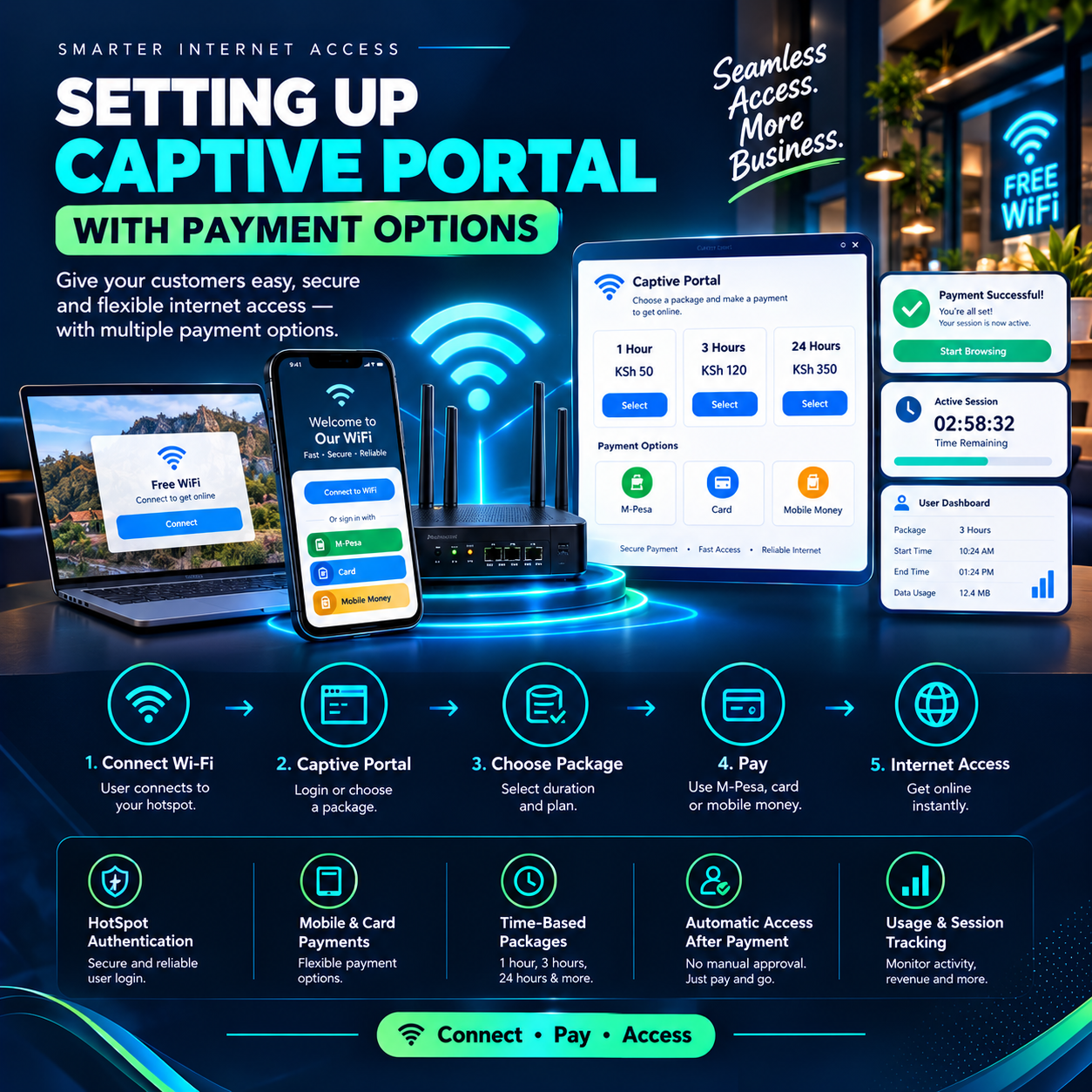
Setting up captive portal with payment options is the single decision that separates networks that collect money while their owners sleep from networks that depend on a human standing behind a counter all day.
Every connected customer passes through one screen before a single byte of internet flows — the captive portal.
It is the front door, the shop window, and the cashier, all in one page. When that door is designed well, customers walk through it, pay in seconds, and start browsing without asking anyone anything.
When it is done badly, sales evaporate at the exact moment of purchase — a customer standing with money ready, phone in hand, giving up in confusion.
That is why setting up captive portal with payment options deserves more attention than almost any other task in running a paid network.
This article examines what the process really involves, where operators go wrong, and why the portal is quietly the most profitable screen the business owns.
What a Captive Portal Actually Is
Strip away the jargon and the concept is simple. A captive portal is the page that intercepts every device joining a network, before any internet access is allowed.
The customer connects to the WiFi, the portal appears on their screen, and nothing flows until they act. In the old days, that action meant typing a password scribbled on a wall.
In a modern commercial network, the action is a purchase — and setting up captive portal with payment options is what transforms a login page into a functioning point of sale. The word “captive” describes the customer’s attention perfectly.
For those few seconds, every connected user is looking at your screen — no feed to scroll, no app to switch to, nothing else competing.
No poster, banner, or social media post commands attention like the page standing between a customer and their internet.
Operators who understand this treat setting up captive portal with payment options as designing a storefront, not filling in a form.
Why the Portal Decides Whether Visitors Become Paying Customers
Every network sells the same invisible product: connectivity. What differs is the moment of exchange — the few seconds where a visitor decides to pay or walk away. That moment happens entirely on the portal.
Research across the hotspot industry tells the same story repeatedly: the majority of abandoned purchases happen on poorly designed portals, not because customers lacked money or intent. They hesitated because the page was slow, cluttered, confusing, or asked for too much before offering anything.
This is the business case for setting up captive portal with payment options properly the first time. A clean portal converts visitors at rates that surprise operators who previously relied on paper vouchers and cash at a counter.
The customer selects a package, pays from their phone, and browses — a complete sale with no staff involved. Every friction point removed from that flow is money recovered, which is why professionals obsess over setting up captive portal with payment options with the care a shop gives its checkout counter.
The Anatomy of a Portal That Sells
A converting portal has a recognizable anatomy, and each part earns its place. The header carries the brand — a name and logo that tell the customer this is a serious, professional service.
Below it sit the packages, displayed as large, obvious buttons with prices in plain sight. Nobody should have to scroll, squint, or guess what things cost.
The payment call-to-action is the heart of the page — one clear button per package that starts the purchase immediately.
When setting up captive portal with payment options, the golden rule is that the path from landing on the page to paying should take under a minute. Anything longer leaks customers.
Supporting elements complete the picture: terms of use, a contact line for help, and optionally a short free-trial option for hesitant first-timers.
The operators who excel at setting up captive portal with payment options test their page relentlessly on the cheapest phones and weakest signals their customers actually use.
A portal that only looks good on a premium device in a strong-coverage room is a portal that fails where it counts.
The Payment Options: Where Trust Is Won or Lost
The payment step is where setting up captive portal with payment options succeeds or fails commercially, because this is the moment money changes hands.
In Kenya, that moment belongs to mobile money — M-Pesa above all.
The gold standard is the STK push: the customer taps a package, a payment prompt appears directly on their phone, they enter their PIN, and the session activates automatically.
No paybill numbers to memorize, no account fields to mistype, no waiting for a human to confirm anything.
Portals built this way convert dramatically better than those that send customers away to manual payment flows.
The second payment consideration is choice.
While mobile money dominates, setting up captive portal with payment options thoughtfully means covering the edges: voucher codes sold at a counter for cash-preferring customers, and clean fallback flows for failed transactions.
Every option still lands in the same place — the session activates, the record is logged, the customer is online.
The third consideration is speed of confirmation.
A customer standing with phone in hand is a transaction in progress, and every second of delay invites second thoughts.
Platforms engineered for setting up captive portal with payment options activate sessions within seconds of payment confirmation, and that speed is visible directly in conversion rates.
Design Principles That Separate Professional Portals From Amateur Ones
Certain design truths repeat across every high-converting portal, and they cost nothing to apply.
First: fewer words.
Customers read almost nothing on a login page — they scan for prices and buttons, so every unnecessary sentence is an obstacle.
Second: bigger targets.
Fingers on phones miss small buttons, and a mis-tap on a portal often means losing the customer entirely.
Operators serious about setting up captive portal with payment options design for thumbs, not mice.
Third: honest loading behavior.
Portals should display fully and function on 2G-level connections and five-year-old handsets, because that is the reality of the customer base.
Fourth: instant orientation.
Within one second of the page appearing, the customer should understand what this network costs and how to get online. Portals that fail this test watch visitors disconnect and move on.
Fifth: brand consistency.
Colors, logo, and tone should match every other touchpoint of the business, because recognition builds the trust that payment requires.
The craft of setting up captive portal with payment options is mostly the discipline of removing things — clutter, steps, words, choices — until only the path to purchase remains.
The Free Tier Question: Generosity as Strategy
One design decision shapes the whole customer relationship: whether to offer anything free.
A short complimentary session — fifteen minutes, say — serves light users, builds goodwill, and lets hesitant visitors experience the service before paying.
Done deliberately, this is one of the most powerful features available when setting up captive portal with payment options.
The free session converts skeptics into buyers, and it captures the email or phone number of visitors who would otherwise remain anonymous.
But the free tier must be controlled — limited per device, per day, with a clear upgrade path displayed the moment it expires. Unlimited free access is not generosity; it is the absence of a business model.
Operators skilled at setting up captive portal with payment options use free time the way shops use free samples: small, deliberate, and always one step away from a purchase.
The upgrade prompt at expiry becomes the highest-converting moment in the entire system.
What Happens After Payment: The Completion Experience
The sale is not over when the PIN is entered — it is over when the customer is browsing.
A complete setting up captive portal with payment options process includes what happens in those final seconds.
The portal should confirm the purchase visibly: what was bought, how much time was added, and when it expires.
A countdown or remaining-time display builds confidence and prevents the “am I connected?” uncertainty that generates support messages.
Receipts matter equally. An automatic confirmation — by SMS or on-screen — gives the customer a record and the operator a defense in any dispute.
Systems designed for setting up captive portal with payment options handle this automatically, timestamping every transaction for both parties. The completion experience is also a marketing moment.
A confirmation page saying “enjoy your session” is wasted space; the same page promoting a day-pass upgrade or a loyalty offer is a second sale waiting to happen.
Operators who treat the whole journey — from connection to payment to confirmation — as one designed experience get the full return on setting up captive portal with payment options rather than half of it.
The Mistakes That Cost Operators Daily
Every experienced consultant can list the same recurring failures, and naming them is cheaper than making them.
The first is burying the price. Portals that hide costs behind clicks or logins watch visitors retreat — transparency is not just ethical, it converts.
The second is demanding too much information.
A portal that asks for a name, email, phone, birthday, and feedback before allowing payment is a portal that collects nothing. When setting up captive portal with payment options, every added field measurably reduces completion rates — collect only what the transaction requires.
The third mistake is ignoring the failed-payment path.
Transactions occasionally fail — networks hiccup, confirmations lag — and the portal must handle these gracefully with a clear message and a retry path. A failed payment that ends in a blank screen loses the customer permanently.
The fourth is forgetting mobile screens entirely, designing on a laptop and never testing on the cheap Android phone that represents most of the traffic.
The fifth is launching silently.
The best portal in the world earns nothing until customers know it exists — signage, staff briefings, and a simple “connect and pay from your phone” message complete the work of setting up captive portal with payment options.
None of these mistakes is technical. All of them are visible in the revenue figures within days.
Security and Privacy: The Invisible Requirements
Money flows through the portal, so trust must be engineered into it. Customers should pay through their own mobile money prompt, entering their PIN only on their own device — never on a web form.
Any portal asking for a PIN directly should be abandoned immediately, and operators should insist on the same standard when setting up captive portal with payment options on their own networks.
The connection itself should be protected, with the portal served over HTTPS so no one between the customer and the page can tamper with it.
Data collection follows the same discipline. Names and numbers collected at login exist to deliver receipts and manage accounts — nothing more — and customers deserve to know that.
Platforms built for setting up captive portal with payment options professionally include consent language, privacy notices, and data handling that would survive scrutiny.
Finally, the network behind the portal must be hardened — guest traffic isolated from business systems, admin interfaces locked away from the public side.
A portal is the public face of the network, and everything behind it should be prepared for that exposure.
The Marketing Machine Hiding in the Login Page
Here is the dimension of setting up captive portal with payment options that even experienced operators underestimate: the portal is the highest-attention advertising space the business owns.
Every banner on it reaches every connected customer, daily, at the moment of maximum engagement.
A new package announced on the portal outsells the same announcement on a poster by an order of magnitude, because the audience is already inside and already engaged.
Seasonal promotions, referral offers, loyalty programs — all travel through this screen at zero distribution cost. The data layer compounds the value.
With consent, the login flow builds a contact list of people who chose to hear from the business, converting anonymous foot traffic into a reachable audience.
Operators who approach setting up captive portal with payment options with marketing in mind from day one end up with a customer database their competitors would envy.
The login page, treated properly, stops being a toll booth and becomes the front window of the business — refreshed weekly, working daily.
Beyond Cafés: Where Portals Quietly Take Over
The portal model has spread far beyond its original home, and the spread proves its flexibility.
Estates use portals to sell tenant internet packages with automatic receipts and visible arrears. Schools deliver managed, metered access to students through the same screens.
Hotels replace the handwritten password card with proper per-guest sessions, and event venues sell day-passes at conferences and weddings. Churches, gyms, clinics, and co-working corners all run on identical infrastructure.
In every setting, the craft remains the same: setting up captive portal with payment options that match the audience — express sessions for commuters, monthly packages for tenants, day-passes for events.
The businesses that benefit most are those whose customers already live on their phones, which in this market means nearly everyone.
The pattern across industries is identical: once the portal goes live, collections rise, disputes shrink, and the operator stops being a cashier.
That consistency is why setting up captive portal with payment options has become standard practice anywhere people gather and connectivity matters.
The Payoff: What a Well-Built Portal Actually Delivers
Ask operators months after launch what changed, and the answers converge.
Collections became continuous — payments arriving at 6 a.m., midnight, and every hour between, without anyone present.
Staff stopped selling access and started doing the work that actually grows the business. Disputes ended, because every transaction carried a timestamped record both parties could read.
Customers described the network as professional — “I just pay on my phone and it works” is the most valuable sentence a customer can say about a business.
None of this required new bandwidth, new hardware, or new prices.
It came from setting up captive portal with payment options with intention — treating the login screen as the most important page in the business, because it is.
The operators who internalize this stop seeing the portal as setup chores and start seeing it as their storefront, their cashier, and their billboard, all paying rent at once.
Frequently Asked Questions
How long does the whole process take?
With a modern billing platform, most operators go from nothing to a live, selling portal in a day or two.
The technical work of setting up captive portal with payment options is now largely configuration — the real time goes into package design, pricing, and testing the customer journey on real devices.
Do I need coding skills?
No. Platforms built for setting up captive portal with payment options provide customizable templates where the operator edits text, prices, colors, and logos through a simple interface.
If a solution requires writing code to change a price, it is the wrong solution for a small operator.
Which payment options should I definitely include?
Mobile money first and deepest — with STK push as the primary flow — plus voucher codes for cash customers as the secondary path.
Operators setting up captive portal with payment options for mixed audiences also test card payments, but the mobile money experience determines daily revenue.
How much free time should I offer, if any?
A short, controlled session — ten to twenty minutes per device per day — converts skeptics without creating a free-riding culture.
The design goal when setting up captive portal with payment options is that free time always ends with a visible, one-tap upgrade path.
What causes most payment failures on portals?
Manual flows with paybill numbers and typed account fields, slow confirmations, and portals that give up silently when a transaction hiccups.
Professional setting up captive portal with payment options uses automated payment pushes, clear retry messages, and reconciliation that catches stray payments automatically.
How do I test my portal before launch?
Hand a phone to someone who has never seen the network — ideally on the cheapest device available — and watch them connect, pay, and browse without help.
If they hesitate anywhere, that spot needs fixing. This single test has saved more setting up captive portal with payment options projects than any checklist.
Can one portal serve several locations?
Yes — modern platforms manage multiple networks and routers from one dashboard, presenting the same branded portal at every site.
Centralized setting up captive portal with payment options keeps packages, pricing, and branding consistent everywhere while reporting revenue per location separately.
What should the portal display after payment?
Confirmation of what was purchased, the remaining time or validity, and a receipt — ideally by SMS as well as on screen. This completion experience is part of setting up captive portal with payment options done properly, because it prevents the “am I connected?” messages that otherwise flood support.
Is collecting customer data at login worth it?
Enormously, when done with consent — a portal that captures opted-in contacts builds a marketing audience worth more than the connectivity revenue itself.
Operators setting up captive portal with payment options should ask for the minimum: a phone number, clearly explained, with the purpose stated.
What is the single biggest mistake to avoid?
Designing the portal on a laptop, launching it silently, and never testing it on the devices customers actually carry.
Every other error in setting up captive portal with payment options is survivable; a portal that fails on cheap phones in the real world loses sales invisibly, every single day.