
Table of Contents
ToggleIntroduction
If you are searching for how to setup wifi hotspot mikrotik, you are probably planning to launch a hotspot business, provide internet access in a hotel, apartment, school, church, cyber café, shopping center, or public WiFi zone. MikroTik remains one of the most trusted hotspot platforms because it combines routing, bandwidth management, authentication, voucher management, and captive portal functionality in a single device.
Many online tutorials explaining how to setup wifi hotspot mikrotik focus only on clicking a few buttons in WinBox. They rarely explain the complete business perspective, common mistakes, security concerns, customer experience, and billing integration. Some guides also use vague statements about profitability without explaining the actual factors that determine success.
According to official MikroTik documentation, HotSpot functionality provides user authentication, captive portal login pages, user accounting, bandwidth control, and integration with local users or RADIUS servers. MikroTik recommends using the HotSpot Setup Wizard because it automatically creates most required settings.
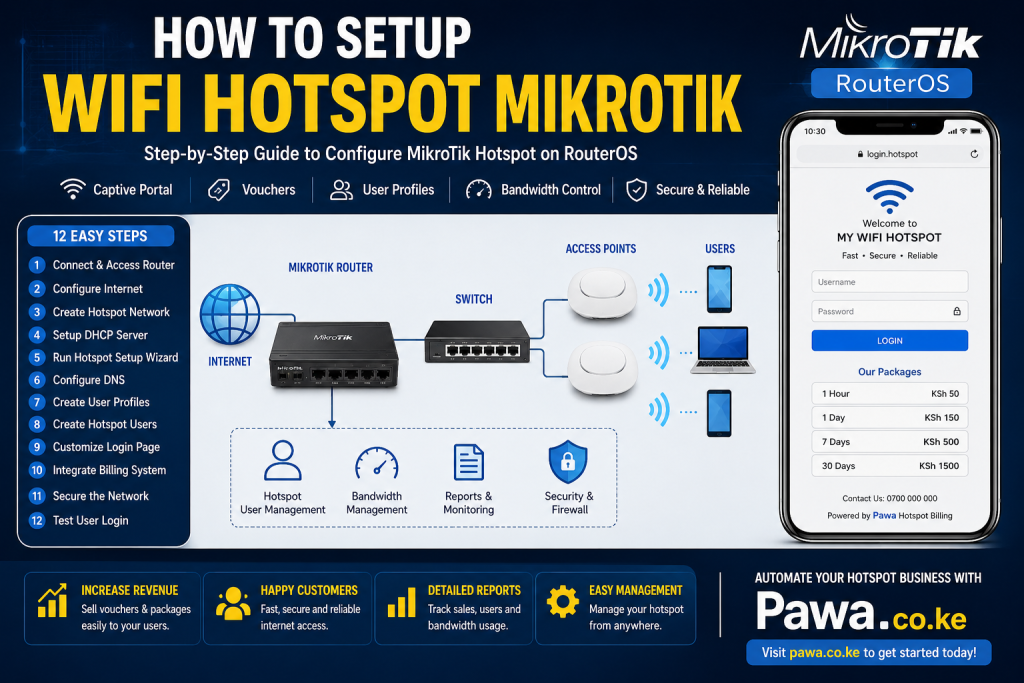
In this guide, you will learn how to setup wifi hotspot mikrotik from the ground up, including network planning, RouterOS configuration, hotspot setup, user management, security optimization, and integration with billing systems such as Pawa.
For organizations looking to automate hotspot billing and voucher sales, consider solutions such as Pawa WiFi Billing System. Businesses managing rental properties can explore RentalDesk, while estates may benefit from EstateAdmin. Additional business automation platforms include PMS Kenya, Vega POS, Prim Salon Software, Ratibu School Management System, and ChurchesAdmin.
Why MikroTik Is Popular for Hotspot Networks
Before learning how to setup wifi hotspot mikrotik, it helps to understand why MikroTik dominates the hotspot industry.
MikroTik offers a captive portal that redirects users to a login page before they can access the internet. The system can authenticate users through local accounts, vouchers, RADIUS servers, or integrated billing platforms. It also allows bandwidth limitation, session control, time restrictions, quota enforcement, and customized login pages.
For a hotspot operator, this means one device can perform tasks that would otherwise require multiple systems. Whether you run a 20-user hotspot in a café or a 5,000-user network in an apartment complex, MikroTik provides flexibility and scalability.
Understanding these capabilities is essential when learning how to setup wifi hotspot mikrotik correctly.
Hardware Needed Before You Setup a MikroTik Hotspot
The first step in how to setup wifi hotspot mikrotik is selecting suitable hardware.
A typical hotspot deployment requires:
- MikroTik Router
- Internet connection from ISP
- Access Points
- Network Switch
- Ethernet cables
- Power backup solution
- Billing software
- Customer authentication platform
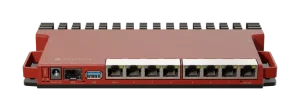
For small deployments, a MikroTik hEX or hAP series device may be sufficient. Larger installations may require RB5009 or CCR series routers.
Reliable access points are equally important because poor wireless coverage creates customer complaints regardless of hotspot configuration quality.
When planning how to setup wifi hotspot mikrotik, always size equipment according to expected concurrent users rather than total registered users.
Network Planning Before Configuration
One of the biggest mistakes people make while learning how to setup wifi hotspot mikrotik is skipping network design.
Before touching RouterOS settings, determine:
- Internet speed available
- Expected users
- Coverage area
- Authentication method
- Billing model
- Number of access points
- Security requirements
For example, a 100 Mbps fiber connection serving 20 users delivers a different experience compared to serving 300 users.
Proper planning prevents performance problems later.
Step 1: Connect and Access the MikroTik Router
The practical process of how to setup wifi hotspot mikrotik begins by connecting to the router.
Connect:
- ISP to WAN port
- Laptop to LAN port
- Access Point to LAN or switch
Install WinBox and log in using the router’s MAC address or IP address.
Always update RouterOS before deploying a production hotspot. Many stability and security improvements are included in current RouterOS releases.
Step 2: Configure Internet Connectivity
The next stage in how to setup wifi hotspot mikrotik is establishing internet access.
Configure:
- DHCP Client for ISP connections
- PPPoE Client if required
- Static IP if assigned by ISP
Verify internet connectivity by testing DNS resolution and website access.
Without a functioning WAN connection, hotspot services will not operate correctly.
Step 3: Create the Hotspot Network
A dedicated hotspot subnet should be created.
When learning how to setup wifi hotspot mikrotik, many beginners incorrectly mix hotspot users with administrative devices.
A common example is:
- Hotspot Gateway: 192.168.88.1/24
- User Pool: 192.168.88.10 – 192.168.88.254
MikroTik documentation recommends assigning an IP address to the hotspot interface before running hotspot configuration.
This separation improves management and security.
Step 4: Configure DHCP Server
The DHCP server automatically assigns IP addresses to hotspot users.
A proper DHCP configuration includes:
- Address pool
- Gateway address
- DNS server
- Lease settings
According to MikroTik hotspot deployment guides, DHCP should be configured before enabling the hotspot service.
This step is critical in how to setup wifi hotspot mikrotik because users cannot access the captive portal without valid IP addresses.
Step 5: Run Hotspot Setup Wizard
The easiest method of how to setup wifi hotspot mikrotik is using the built-in HotSpot Setup Wizard.
Navigate to:
IP → Hotspot → Hotspot Setup
The wizard will request:
- Interface
- Local network
- Address pool
- SSL certificate
- SMTP settings
- DNS server
- DNS name
- Initial hotspot user
MikroTik specifically recommends using the setup wizard because it automatically creates required hotspot settings and profiles.
Once completed, the hotspot service becomes active.
Step 6: Configure DNS Correctly
DNS problems are among the most common causes of hotspot login failures.
When implementing how to setup wifi hotspot mikrotik, ensure DNS settings allow remote requests.
Many successful deployments use:
- 8.8.8.8
- 1.1.1.1
DNS misconfiguration often prevents captive portal redirection and causes customer complaints.
Step 7: Create User Profiles
The next phase of how to setup wifi hotspot mikrotik involves creating user profiles.
Profiles define:
- Download speed
- Upload speed
- Session limits
- Quotas
- Connection duration
Examples include:
- 1-hour package
- Daily package
- Weekly package
- Monthly package
These profiles simplify customer management and improve consistency.
Step 8: Create Hotspot Users
Users can be created manually or automatically through billing software.
For small networks, local user accounts may be sufficient.
For larger deployments, automated billing systems are recommended.
A hotspot with 500 customers becomes difficult to manage manually.
This is why businesses implementing how to setup wifi hotspot mikrotik often integrate external billing platforms.
Step 9: Customize the Login Page
A professional login page increases customer trust.
MikroTik allows customization of hotspot pages through HTML templates and profile overrides.
Your portal should include:
- Business logo
- Contact information
- Support details
- Package pricing
- Terms of use
When designing how to setup wifi hotspot mikrotik, never leave the default login page unchanged.
Professional branding improves customer perception.
Step 10: Integrate Billing and Voucher Systems
Modern hotspot businesses rarely rely on manual account creation.
Instead, they integrate hotspot billing software.
For example, a customer can:
- Select package
- Pay online
- Receive voucher
- Login automatically
Using automated systems reduces operational costs and improves customer convenience.
Businesses looking to automate hotspot operations can evaluate Pawa Hotspot Billing Software.
Automated billing is one of the most important upgrades after completing how to setup wifi hotspot mikrotik.
Step 11: Secure the Network
Security is often ignored during how to setup wifi hotspot mikrotik.
Recommended protections include:
- Strong administrator passwords
- Firewall rules
- RouterOS updates
- Secure management interfaces
- User isolation
- HTTPS portals
Failure to secure the router may lead to unauthorized access or service disruption.
Step 12: Test the Entire User Journey
The final step of how to setup wifi hotspot mikrotik is testing.
Connect a device and verify:
- IP assignment
- Redirect to portal
- Login process
- Internet access
- Speed limits
- Session expiration
Every customer experience should be tested before deployment.
Common Mistakes When Setting Up MikroTik Hotspots
Many hotspot operators struggle because they make avoidable mistakes.
Common problems include:
- Incorrect DNS settings
- DHCP conflicts
- Wrong hotspot interface selection
- Weak access point coverage
- Overloaded routers
- No backup power
- Poor login page design
- Lack of monitoring
Reddit discussions and field reports frequently show login pages failing because DHCP or access point settings are misconfigured.
Avoiding these mistakes improves network stability significantly.
Advanced Bandwidth Management Strategies for MikroTik Hotspots
After learning how to setup wifi hotspot mikrotik, the next step is optimizing bandwidth management. Many hotspot operators focus only on user authentication and forget that bandwidth allocation directly affects customer satisfaction. A hotspot with excellent login functionality but poor speed management will quickly generate complaints.
MikroTik allows administrators to create bandwidth profiles that prevent a few users from consuming all available internet resources. For example, in a 100 Mbps hotspot deployment serving an apartment complex, assigning unlimited speeds to every user can result in network congestion during peak hours. Instead, administrators can create separate packages with controlled download and upload limits.
One advantage of understanding how to setup wifi hotspot mikrotik properly is the ability to prioritize critical services. Educational institutions may prioritize learning platforms, while hotels may prioritize guest browsing and video conferencing traffic. Through queue management and traffic shaping, MikroTik helps maintain a consistent user experience even during busy periods.
Bandwidth control also improves profitability. Customers are often willing to pay more for premium packages with higher speeds. By creating multiple service tiers, hotspot operators can serve different customer segments without significantly increasing infrastructure costs.
Monitoring and Reporting for Long-Term Success
A hotspot network should never operate without monitoring. One reason many hotspot businesses fail is that administrators only react when customers complain. Instead, proactive monitoring helps identify problems before users are affected.
When implementing how to setup wifi hotspot mikrotik, administrators should regularly review router logs, bandwidth consumption reports, and active user sessions. Monitoring allows operators to identify unusual traffic patterns, unauthorized access attempts, and overloaded network segments.
For example, if a specific access point consistently reaches maximum capacity every evening, it may indicate the need for additional wireless coverage. Similarly, if a user account consumes excessive bandwidth, administrators can investigate potential misuse or compromised credentials.
MikroTik provides built-in monitoring tools, but many operators enhance visibility through integrated hotspot billing systems. Platforms such as Pawa provide user activity reports, package performance analytics, voucher sales tracking, and customer usage history, making management significantly easier.
Proper monitoring is a critical component of how to setup wifi hotspot mikrotik because network performance directly impacts customer retention.
Expanding a MikroTik Hotspot Network
Many businesses begin with a small deployment and later expand as demand grows. One benefit of mastering how to setup wifi hotspot mikrotik is that the platform scales effectively from a few users to thousands of concurrent connections.
A small café may initially use a single access point and entry-level MikroTik router. As customer demand increases, additional access points, switches, and upgraded routers can be added without redesigning the entire network.
Apartment owners frequently start by serving a single building and later expand to neighboring properties. Hotels often increase coverage to include conference rooms, restaurants, gardens, and outdoor recreation areas. Educational institutions may extend connectivity to multiple campuses.
Scalability should be considered during the initial planning phase. Proper IP addressing, structured cabling, and centralized management simplify future growth. Operators who understand how to setup wifi hotspot mikrotik with scalability in mind avoid costly redesigns later.
Improving Customer Experience
Customer experience is one of the most overlooked aspects of hotspot management. While technical configuration is important, users primarily judge a network based on speed, reliability, and ease of access.
A well-designed hotspot should provide a smooth login experience. Customers should connect, authenticate, and access the internet within seconds. Complex login procedures often frustrate users and increase support requests.
When implementing how to setup wifi hotspot mikrotik, consider the entire customer journey. Login pages should display clear instructions, package pricing, contact information, and support channels. Mobile-friendly designs are especially important because most users connect through smartphones.
Fast issue resolution is equally important. Customers who experience login problems or payment issues expect immediate assistance. Integrating customer support channels with hotspot management systems can significantly improve satisfaction.
Positive user experiences encourage repeat purchases, referrals, and long-term customer loyalty. This is especially valuable for businesses that depend on recurring internet package sales.
Future Trends in MikroTik Hotspot Deployments
The hotspot industry continues to evolve. Operators who understand how to setup wifi hotspot mikrotik today will be well-positioned to take advantage of future opportunities.
Mobile payment integration is becoming increasingly important, particularly in Kenya where digital payments are widely used. Customers expect to purchase internet access instantly without visiting physical sales points. Automated payment systems connected to hotspot billing platforms simplify this process.
Cloud-based management is another growing trend. Instead of managing each router individually, administrators can monitor multiple hotspot locations from a centralized dashboard. This approach reduces operational costs and improves efficiency.
Customer analytics are also becoming more valuable. Businesses increasingly use hotspot systems to understand user behavior, peak usage times, and service demand. These insights help optimize package pricing and infrastructure investments.
Security requirements continue to increase as cyber threats become more sophisticated. Regular updates, secure authentication methods, and encrypted management interfaces are becoming standard best practices.
Organizations that invest time in learning how to setup wifi hotspot mikrotik gain a foundation that remains relevant as technology evolves.
Risk Factors and How to Mitigate Them
Understanding risk is essential when implementing how to setup wifi hotspot mikrotik.
Power outages can disconnect all users. Install UPS systems for routers, switches, and access points.
Internet provider downtime can stop revenue generation. Consider backup internet links from multiple providers.
Unauthorized access may occur if administrator credentials are weak. Use strong passwords and restricted management access.
Poor coverage creates customer complaints. Conduct proper wireless site surveys before deployment.
Hardware failure can interrupt services. Maintain spare routers and access points.
By addressing these risks early, hotspot operators can maintain reliable service and customer satisfaction.
Business Applications of MikroTik Hotspots
Organizations implementing how to setup wifi hotspot mikrotik include:
- Hotels
- Apartments
- Estates
- Campuses
- Churches
- Hospitals
- Restaurants
- Shopping centers
- Cyber cafés
- Event venues
Many property managers combine hotspot systems with platforms such as RentalDesk and PMS Kenya for centralized operations.
Schools may integrate connectivity management alongside Ratibu School Management System, while churches can leverage ChurchesAdmin.
Is This Worth It? Honest Verdict
Yes, learning how to setup wifi hotspot mikrotik is worthwhile for businesses that need controlled internet access.
MikroTik offers enterprise-grade hotspot functionality at a fraction of the cost of many competing solutions. The platform is flexible, highly customizable, and widely supported by network professionals worldwide.
However, success depends on more than configuration. Quality internet connectivity, good coverage, reliable billing systems, and customer support play equally important roles.
If you only need basic internet sharing, a hotspot may be excessive. If you need authentication, vouchers, bandwidth control, and monetization, MikroTik remains one of the strongest options available.
Successfully implementing how to setup wifi hotspot mikrotik involves much more than running a setup wizard. Long-term success requires proper planning, reliable infrastructure, bandwidth management, customer-focused design, security best practices, and effective monitoring.
Businesses that approach hotspot deployment strategically often achieve better customer satisfaction, reduced operational costs, and stronger profitability. Whether you are building a hotspot for an apartment complex, hotel, school, estate, church, shopping center, or public WiFi business, MikroTik provides a powerful and flexible foundation.
By combining a properly configured MikroTik hotspot with professional billing automation from Pawa.co.ke, operators can streamline customer management, automate voucher sales, improve reporting, and create a scalable internet business capable of supporting future growth. The result is a more reliable network, happier customers, and a stronger return on investment from your connectivity infrastructure.
Frequently Asked Questions
1. How long does it take to learn how to setup wifi hotspot mikrotik?
Most beginners can complete a basic hotspot deployment within a few hours. Advanced billing and customization may require additional training.
2. Can I use MikroTik without hotspot billing software?
Yes. MikroTik supports local user accounts. However, billing software becomes important as customer numbers grow.
3. Does MikroTik support voucher systems?
Yes. Voucher-based authentication is widely used in hotels, cafés, apartments, and public WiFi deployments.
4. Can I customize the hotspot login page?
Yes. MikroTik allows extensive customization of hotspot pages and branding.
5. Which MikroTik router is best for hotspot businesses?
The answer depends on expected users. Small businesses may use hAP or hEX devices, while larger deployments often require RB5009 or CCR routers.
Conclusion
Understanding how to setup wifi hotspot mikrotik is one of the most valuable skills for anyone planning to run a hotspot business, apartment WiFi service, hotel network, or public internet access solution. The process involves planning the network, configuring RouterOS, setting up DHCP, enabling HotSpot services, creating user profiles, securing the network, and integrating billing automation.
While the technical setup is important, long-term success depends on customer experience, reliable infrastructure, strong security, and efficient billing management. Organizations that combine MikroTik’s powerful hotspot capabilities with automated management platforms can significantly reduce operational workload while improving service quality.
Start Your Hotspot Business with Pawa
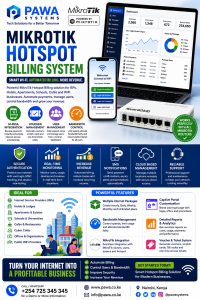
Ready to move beyond manual hotspot management?
Pawa.co.ke helps businesses automate hotspot billing, voucher generation, customer authentication, usage tracking, package management, and revenue collection. Whether you operate an apartment network, hotel WiFi system, estate internet service, school hotspot, or public WiFi business, Pawa provides the tools needed to scale efficiently and professionally.
Visit Pawa.co.ke today and start building a smarter, more profitable WiFi hotspot business.