
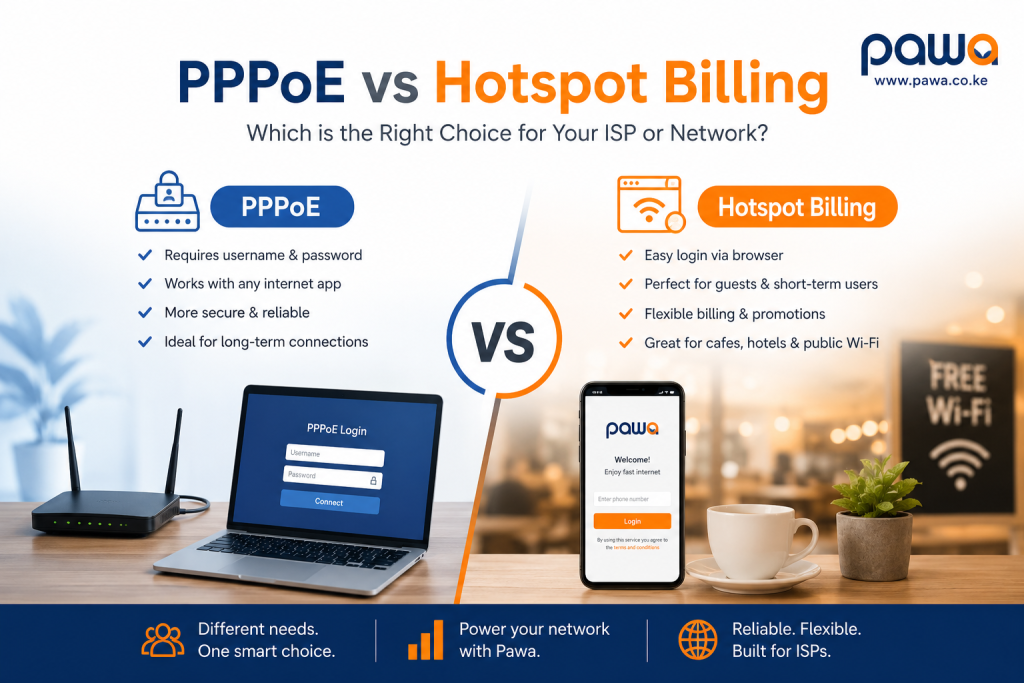
If you run an internet business in Kenya — whether you’re an ISP, an apartment WiFi operator, a hotel, a school, or a small cyber café — one question decides how smoothly you get paid every month: PPPoE vs Hotspot billing. Get this choice right and your revenue collection runs on autopilot. Get it wrong and you’ll spend your weekends chasing customers for payment, resetting routers manually, and losing money to users who “forgot” to pay. This guide breaks down PPPoE vs Hotspot billing in plain language, compares both systems side by side, and helps you pick the right billing method for your network — without the technical jargon that makes most PPPoE vs Hotspot billing guides hard to follow.
Quick Definition: PPPoE vs Hotspot Billing in One Sentence
Before we go deep, here is the simplest possible definition of PPPoE vs Hotspot billing:
PPPoE billing charges monthly customers through a router login, while Hotspot billing charges pay-as-you-go users through a web login page.
That’s it. That one line captures the entire PPPoE vs Hotspot billing debate. Everything else in this guide simply expands on what that sentence means for your business, your customers, and your revenue.
Most guides that cover PPPoE vs Hotspot billing bury the definition under paragraphs of technical background before actually answering the question. This guide does the opposite: it gives you the short definition first, then backs it up with everything an ISP owner, network technician, or business manager actually needs to make a confident, informed decision. By the end, you won’t just know the textbook difference between PPPoE and Hotspot billing — you’ll know exactly which one fits your customers, how to set it up, how to price it, and how to avoid the billing mistakes that quietly drain revenue from Kenyan internet businesses every month.
1. What Is PPPoE Billing?
PPPoE stands for Point-to-Point Protocol over Ethernet. In the context of PPPoE vs Hotspot billing, PPPoE billing is the system used to charge customers who connect through a dedicated router login, usually set up once by a technician and remembered by the router itself.
When people search for PPPoE vs Hotspot billing, they are often trying to understand why their home or office WiFi asks for a username and password on the router configuration page instead of a browser pop-up. That username and password combination is the PPPoE login, and the billing system tied to it is what we call PPPoE billing.
In a typical PPPoE vs Hotspot billing comparison, PPPoE is described as the “invisible” billing method because, once configured, the customer never has to log in again through a browser. The router authenticates automatically every time it powers on. This is why PPPoE billing is the default choice for monthly home internet plans, office broadband, and fixed-location connections where the same device (a router, not a phone or laptop) is always the one connecting.
Any serious discussion of PPPoE vs Hotspot billing has to start here, because PPPoE is fundamentally about identity at the router level, not the device level. The ISP’s billing system matches a customer account to a specific PPPoE username, and that username is what determines whether the connection is active, throttled, or suspended for non-payment.
2. What Is Hotspot Billing?
The second half of the PPPoE vs Hotspot billing equation is Hotspot billing. Hotspot billing is a system where users authenticate through a web login page — often called a captive portal — that appears automatically when a device connects to a WiFi network.
Unlike PPPoE billing, Hotspot billing does not require a technician to configure anything on the customer’s device. Anyone who connects to the WiFi network is redirected to a login page where they can buy a voucher, enter a code, or pay instantly through M-Pesa to unlock internet access. This is the core of the PPPoE vs Hotspot billing distinction: Hotspot billing is designed for walk-in, short-term, or pay-as-you-go users, while PPPoE billing is designed for long-term, fixed subscribers.
When you compare PPPoE vs Hotspot billing from a customer experience angle, Hotspot billing feels a lot like buying airtime. A guest at a hotel, a customer at a café, or a tenant in an estate without a personal router can simply connect, pay a small amount through M-Pesa, and get online in seconds — no router configuration required.
3. PPPoE vs Hotspot Billing: The Core Differences
Here is the clearest side-by-side breakdown of PPPoE vs Hotspot billing:
| Feature | PPPoE Billing | Hotspot Billing |
|---|---|---|
| Login method | Router-level username and password | Web login page (captive portal) |
| Best for | Monthly home or office plans | Short-term or pay-as-you-go access |
| Setup effort | One-time technician setup | No customer-side setup needed |
| Billing cycle | Monthly, fixed subscription | Daily, hourly, or per-voucher |
| Device dependency | Tied to the router | Tied to the browser session |
| Typical users | Homes, offices, apartments | Hotels, cafés, campuses, estates |
| Payment style | Recurring M-Pesa or bank payment | Instant pay-per-use M-Pesa payment |
| Disconnection on non-payment | Router login fails | Portal blocks new sessions |
This table is the fastest way to understand PPPoE vs Hotspot billing at a glance, but the real decision comes down to how your customers behave. If your customers are the same people every month, PPPoE billing wins. If your customers change daily or hourly, Hotspot billing wins. That single behavioral question is the heart of every PPPoE vs Hotspot billing decision.
4. How PPPoE Billing Works, Step by Step
To fully understand PPPoE vs Hotspot billing, it helps to walk through exactly how PPPoE billing operates from signup to disconnection.
Step 1: Customer signup. A new customer requests internet service. The ISP or operator creates a customer profile in the billing system and assigns a unique PPPoE username and password.
Step 2: Router configuration. A technician (or the customer, in some cases) enters the PPPoE credentials into the router’s WAN settings. From this point forward, the router automatically logs in every time it is powered on — no browser page, no manual login.
Step 3: Package assignment. The billing system links the PPPoE username to a specific package — for example, a 10 Mbps home plan or a 20 Mbps office plan. This package determines the customer’s speed and monthly price.
Step 4: Monthly billing. Each month, the billing system generates an invoice and sends a payment reminder, usually via SMS or WhatsApp. The customer pays through M-Pesa, and the payment is matched to their PPPoE account.
Step 5: Automatic disconnection or renewal. If payment is not received by the due date, the billing system suspends the PPPoE login automatically. Once payment is confirmed, access is restored — often within seconds if the billing system is integrated with M-Pesa.
This entire workflow is what makes PPPoE billing so attractive for recurring revenue. In the PPPoE vs Hotspot billing conversation, this is the strongest argument for PPPoE: it removes the need for constant manual intervention once the initial setup is complete.
5. How Hotspot Billing Works, Step by Step
Now let’s look at the other half of PPPoE vs Hotspot billing — how Hotspot billing actually works in practice.
Step 1: Network setup. The operator configures a MikroTik router or similar device to broadcast an open WiFi network with a captive portal (login page) instead of a password-protected network.
Step 2: User connects. A user’s phone or laptop detects the WiFi network and connects. Instead of getting internet access immediately, the device is redirected to the Hotspot login page.
Step 3: Payment or voucher entry. The user either buys a voucher code from an attendant, enters a pre-purchased code, or pays instantly via M-Pesa (Paybill or Till Number) directly from the login page.
Step 4: Session activation. Once payment is confirmed, the billing system grants internet access for a specific time period or data allowance — for example, 1 hour, 24 hours, or 1 GB.
Step 5: Automatic expiry. When the time or data allowance runs out, the session ends automatically and the user is redirected back to the login page to pay again.
This is the operational backbone of Hotspot billing, and it is dramatically different from PPPoE billing in one key way: there is no long-term commitment. Every session in the PPPoE vs Hotspot billing world of Hotspot access is a fresh transaction, which is exactly why Hotspot billing is so popular for public and semi-public WiFi.
6. PPPoE vs Hotspot Billing: Best Use Cases
Choosing correctly in the PPPoE vs Hotspot billing decision depends entirely on where and how the internet will be used. Below are the clearest use cases for each side of PPPoE vs Hotspot billing.
When PPPoE Billing Makes Sense
- Home internet subscriptions — families who want internet every day, all month, without repeatedly logging in.
- Office broadband — businesses that need a stable, always-on connection for staff computers and servers.
- Apartment or estate internet — where each unit has its own router and its own monthly PPPoE account.
- Dedicated business branches — where the ISP needs to track usage and billing per physical location.
When Hotspot Billing Makes Sense
- Hotels and guesthouses — guests stay for a night or a week and need short-term WiFi access.
- Cafés and restaurants — walk-in customers who want internet for the duration of their visit.
- Campuses and co-working spaces — many different users, each paying for their own session.
- Public WiFi zones and estates without personal routers — tenants who want to pay small daily amounts instead of a fixed monthly bill.
- Events and conferences — temporary, high-volume access that needs pay-as-you-go control.
Every serious PPPoE vs Hotspot billing strategy starts by asking: “Will the same people use this connection every day for a month, or will different people use it for short bursts?” That single question resolves most PPPoE vs Hotspot billing confusion instantly.
7. PPPoE vs Hotspot Billing: Pricing and Package Models
Pricing structure is another major point of separation in PPPoE vs Hotspot billing. PPPoE billing typically uses fixed monthly packages — for example, KSh 1,500 for 5 Mbps, KSh 2,500 for 10 Mbps, and KSh 4,000 for 20 Mbps. These packages rarely change month to month, and the customer knows exactly what they’ll pay.
Hotspot billing, on the other hand, is far more flexible. A single Hotspot billing setup can offer multiple pricing tiers at once:
- KSh 10 for 30 minutes
- KSh 20 for 1 hour
- KSh 50 for 3 hours
- KSh 100 for 24 hours
- KSh 500 for 7 days
This flexibility is one of the biggest commercial advantages of Hotspot billing over PPPoE billing. In the PPPoE vs Hotspot billing pricing debate, Hotspot billing wins on flexibility, while PPPoE billing wins on predictability. Operators who understand this difference can design pricing that matches their exact customer type instead of forcing every user into the same box.
Some advanced billing platforms allow operators to combine both approaches — offering PPPoE-style monthly plans for regular residents and Hotspot-style vouchers for visitors on the same network. This hybrid approach is becoming increasingly common in the PPPoE vs Hotspot billing space, especially in apartment complexes and gated estates in Kenya.
8. PPPoE vs Hotspot Billing: Pros and Cons Compared
No PPPoE vs Hotspot billing guide would be complete without an honest look at the trade-offs of each system.
PPPoE Billing: Pros
- Predictable, recurring monthly revenue.
- No repeated login friction for the customer once set up.
- Easier to track long-term usage patterns per household or office.
- Works well with automated renewal reminders and M-Pesa STK push billing.
PPPoE Billing: Cons
- Requires technician setup on each router.
- Not ideal for short-term or walk-in customers.
- Customers must remember or store their PPPoE credentials.
- Harder to monetize casual or one-time users.
Hotspot Billing: Pros
- Zero setup required on the customer’s device.
- Perfect for pay-as-you-go and walk-in traffic.
- Extremely flexible pricing (per hour, per day, per GB).
- Great for businesses that want to monetize foot traffic, like cafés and hotels.
Hotspot Billing: Cons
- Requires the user to log in every time a session expires.
- Slightly more friction for long-term, loyal customers.
- Can be harder to forecast monthly revenue compared to fixed PPPoE subscriptions.
- Voucher management can become tedious without a proper billing system.
Weighing these pros and cons is the practical core of any PPPoE vs Hotspot billing decision. Most operators eventually realize that PPPoE vs Hotspot billing isn’t really an “either-or” question — it’s about matching the billing method to the customer behavior you’re trying to serve.
9. PPPoE vs Hotspot Billing: Security Considerations
Security is an often-overlooked part of the PPPoE vs Hotspot billing conversation, but it matters a lot for operators managing shared networks.
PPPoE billing is generally considered more secure at the connection level because each customer has a unique, encrypted login tied directly to their router. Unauthorized users cannot simply “join” a PPPoE network the way they might join an open WiFi hotspot — they would need the exact PPPoE username and password, which are rarely shared.
Hotspot billing, by contrast, often runs on open WiFi networks (no WiFi password), which means anyone within range can attempt to connect. Security in Hotspot billing comes from the captive portal itself — blocking access until payment or a voucher code is provided — rather than from network-level encryption. This is why properly configured Hotspot billing systems include session limits, MAC address binding, and automatic timeouts to prevent abuse.
When evaluating PPPoE vs Hotspot billing from a security standpoint, operators should also think about bandwidth abuse. A poorly configured Hotspot billing setup can allow one user to consume disproportionate bandwidth, slowing the network for everyone else. Good billing software includes fair-usage controls and speed caps per session to prevent this — a feature worth checking for in any PPPoE vs Hotspot billing software comparison.
10. PPPoE vs Hotspot Billing: M-Pesa and Payment Automation in Kenya
In Kenya, the PPPoE vs Hotspot billing conversation is incomplete without talking about M-Pesa. Mobile money has completely changed how both PPPoE and Hotspot billing operate, removing the need for cash collection or manual invoicing.
For PPPoE billing, M-Pesa integration typically works through STK push reminders — the customer receives a prompt on their phone, enters their M-Pesa PIN, and the payment is automatically matched to their PPPoE account. This closes the loop between billing and network access without any manual work from the operator.
For Hotspot billing, M-Pesa integration is even more direct. The captive portal displays a Paybill number or Till Number, and once the customer pays, the billing system instantly activates their session — often in under 10 seconds. This instant activation is what makes Hotspot billing feel as simple as buying airtime, and it’s a major reason Hotspot billing has grown so quickly across Kenyan estates, hotels, and public spaces.
Operators comparing PPPoE vs Hotspot billing platforms should specifically check for automated M-Pesa reconciliation — meaning payments are matched to customer accounts without manual checking of M-Pesa statements. This single feature can save hours of admin work every week, regardless of which side of the PPPoE vs Hotspot billing decision you land on.
Providers like Pawa specialize in building this kind of automation into both PPPoE and Hotspot billing systems, so operators don’t have to choose between convenience and control. You can read more about how this works in Pawa’s guide to PPPoE billing systems for broadband and reseller networks, which breaks down setup, package rules, and M-Pesa payment matching in detail.
11. PPPoE vs Hotspot Billing: Which One Should You Choose?
If you’re still undecided after reading this far, here’s a simple framework for resolving the PPPoE vs Hotspot billing question for your specific business.
Choose PPPoE billing if:
- Your customers live or work at a fixed location.
- You want predictable, recurring monthly revenue.
- Your customers are comfortable with a one-time router setup.
- You’re running a residential ISP, apartment network, or office broadband service.
Choose Hotspot billing if:
- Your customers change frequently (guests, walk-ins, visitors).
- You want to monetize short bursts of usage instead of monthly commitments.
- Your business is a hotel, café, campus, or public space.
- You want maximum pricing flexibility with minimal setup per user.
Choose both (hybrid billing) if:
- You manage an estate or apartment complex with both residents and visitors.
- You want to offer monthly plans to some users and pay-as-you-go access to others on the same infrastructure.
This decision framework is the practical endpoint of every PPPoE vs Hotspot billing debate. There is no universally “better” option — only the option that matches your customer base. Operators who get PPPoE vs Hotspot billing wrong usually do so because they picked a billing model based on what was easiest to set up, not what matched their actual customers.
12. PPPoE vs Hotspot Billing: Can You Combine Both? (Hybrid Billing)
One of the most common questions in the PPPoE vs Hotspot billing space is whether operators are forced to pick just one. The answer is no — modern billing platforms increasingly support both PPPoE and Hotspot billing on the same network infrastructure.
A good example is an apartment complex where residents subscribe to monthly PPPoE plans through their in-unit routers, while visiting guests or non-resident users can pay for short-term access through a Hotspot login page on the same MikroTik router. This hybrid approach captures both types of revenue: predictable monthly income from PPPoE billing and flexible pay-as-you-go income from Hotspot billing.
Hybrid PPPoE vs Hotspot billing setups are especially popular among estate WiFi operators, hostels, and shared workspace providers in Kenya, where the customer base naturally includes both long-term residents and short-term visitors. If you’re building this kind of network, it’s worth reviewing Pawa’s breakdown of hotspot billing software alongside their PPPoE billing tools, since both can run on the same MikroTik-based infrastructure with the right billing platform.
13. PPPoE vs Hotspot Billing: Common Mistakes ISPs Make
After working through dozens of real deployments, a few recurring mistakes show up again and again in the PPPoE vs Hotspot billing decision:
- Using Hotspot billing for long-term residential customers. This creates unnecessary login friction for people who should have a seamless, always-on PPPoE connection.
- Using PPPoE billing for short-term or public access. This forces operators to manually create and delete accounts constantly, which doesn’t scale.
- Ignoring M-Pesa automation. Manually checking M-Pesa messages and activating accounts by hand is one of the biggest time-wasters in both PPPoE and Hotspot billing.
- No fair-usage controls on Hotspot networks. Without bandwidth caps, a handful of heavy users can degrade the experience for everyone else.
- Not planning for hybrid needs. Many operators eventually need both PPPoE and Hotspot billing but build their network around only one, forcing an expensive redesign later.
- Weak router hardware. Both PPPoE and Hotspot billing rely on stable routing hardware — underpowered routers cause dropped sessions and billing mismatches regardless of which method you choose. If your equipment is the bottleneck, it’s worth reviewing reliable networking gear through Spacekits’ business WiFi installation guide, which covers router selection, cabling, and network planning for growing operations.
Avoiding these mistakes is often more important than the actual PPPoE vs Hotspot billing choice itself. A well-run Hotspot billing system will outperform a poorly-run PPPoE setup, and vice versa. The billing method matters, but execution matters more.
14. PPPoE vs Hotspot Billing: Real-World Examples From Kenya
Reading about PPPoE vs Hotspot billing in theory is useful, but seeing how it plays out in real Kenyan setups makes the decision much easier to picture.
Example 1: A Nairobi Apartment Block
A 40-unit apartment block in Nairobi originally launched with Hotspot billing only, letting tenants buy daily WiFi vouchers through M-Pesa. Within three months, the operator noticed that around 70% of tenants were buying the same daily voucher every single day — effectively paying more over a month than a fixed PPPoE plan would have cost them. The operator introduced PPPoE billing as a monthly option alongside the existing Hotspot billing setup. Tenants who wanted convenience switched to PPPoE billing, while short-term guests and new move-ins continued using Hotspot billing until they were ready to commit. This is a textbook case of PPPoE vs Hotspot billing not being a competition, but a complementary pairing on the same network.
Example 2: A Mombasa Road Hotel
A mid-sized hotel along Mombasa Road relies entirely on Hotspot billing, and for good reason: guests rarely stay more than a few nights, and each guest is a brand-new customer. Setting up PPPoE billing for every guest would be impractical — nobody wants to configure router settings during a two-night stay. Instead, the hotel’s Hotspot billing system issues a voucher code at check-in, valid for the length of the guest’s stay, with M-Pesa payment available for guests who want extra data or speed upgrades. In this scenario, the PPPoE vs Hotspot billing decision was obvious from day one.
Example 3: A Small Estate ISP in Kiambu
A small wireless ISP serving a residential estate in Kiambu started with PPPoE billing exclusively, since every customer was a homeowner signing up for a monthly plan. As the estate grew and a communal clubhouse and gym were added, the operator layered in Hotspot billing for the shared spaces, letting visitors and non-resident members pay for short WiFi sessions without needing a full PPPoE account. This gradual evolution from pure PPPoE billing to a hybrid PPPoE vs Hotspot billing model is one of the most common growth paths for small Kenyan ISPs.
These examples show that the “right” answer in the PPPoE vs Hotspot billing debate is rarely permanent. Businesses evolve, customer bases diversify, and billing systems need to evolve with them.
15. PPPoE vs Hotspot Billing: A Setup Checklist
If you’ve decided which side of the PPPoE vs Hotspot billing decision fits your business, here is a practical checklist to get started the right way.
For PPPoE billing setup:
- Confirm your router (MikroTik or similar) supports PPPoE server configuration.
- Set up a billing platform that can generate and manage PPPoE usernames automatically.
- Define your package tiers (speed and price) before onboarding customers.
- Enable automated M-Pesa STK push billing and reminders.
- Test automatic suspension and reactivation before going live with real customers.
For Hotspot billing setup:
- Configure your router’s captive portal (login page) with your business branding.
- Set up voucher generation or direct M-Pesa payment on the login page.
- Decide your pricing tiers (per hour, per day, per GB).
- Add fair-usage speed caps to prevent one user from slowing the whole network.
- Test the full user journey: connect, get redirected, pay, get online.
For hybrid PPPoE vs Hotspot billing setup:
- Separate your router interfaces or VLANs for PPPoE and Hotspot traffic.
- Make sure your billing software supports both authentication types on one dashboard.
- Set clear rules for which customers qualify for PPPoE billing versus Hotspot billing.
- Monitor both revenue streams separately to understand which is growing faster.
Following this checklist removes most of the guesswork from PPPoE vs Hotspot billing implementation, whether you’re launching a brand-new network or upgrading an existing one.
16. PPPoE vs Hotspot Billing: Glossary of Key Terms
To fully master PPPoE vs Hotspot billing, it helps to know the terminology operators and technicians use daily:
- Captive portal — the web login page used in Hotspot billing to authenticate users before granting access.
- PPPoE username/password — the unique login credentials assigned to a customer’s router in PPPoE billing.
- Voucher — a pre-paid code used in Hotspot billing to unlock a specific amount of time or data.
- STK push — an M-Pesa prompt sent directly to a customer’s phone, commonly used to automate PPPoE billing payments.
- MAC binding — a security feature in Hotspot billing that ties a session to a specific device to prevent sharing.
- Fair usage policy (FUP) — bandwidth limits applied in Hotspot billing to keep the network fair for all users.
- RADIUS server — the authentication server that many billing platforms use to manage both PPPoE and Hotspot billing logins centrally.
- Session timeout — the point at which a Hotspot billing session automatically expires and redirects the user back to the login page.
Understanding these terms makes it much easier to compare PPPoE vs Hotspot billing software, since most billing platforms use this exact vocabulary in their dashboards and documentation.
17. PPPoE vs Hotspot Billing: Total Cost of Ownership
Beyond the sticker price of monthly plans and vouchers, it’s worth looking at the full cost of running PPPoE vs Hotspot billing over time, since the cheaper option upfront isn’t always the cheaper option long-term.
PPPoE billing costs to plan for:
- Technician time for initial router configuration at each customer site.
- Ongoing support calls when customers change routers or forget their PPPoE credentials.
- Billing software fees, usually charged per active PPPoE subscriber.
- Occasional truck-rolls (site visits) for troubleshooting connection issues.
Hotspot billing costs to plan for:
- Router and access point hardware capable of handling many simultaneous captive-portal sessions.
- Billing software fees, often charged per transaction or per active hotspot location.
- Voucher printing or SMS costs, if you’re not using instant M-Pesa activation.
- Customer support for users who struggle with the login page (rare, but it happens).
In most PPPoE vs Hotspot billing comparisons, PPPoE billing has higher upfront setup costs per customer but lower ongoing friction, while Hotspot billing has lower setup costs per customer but requires stronger infrastructure to handle volume. Operators should model both sides of PPPoE vs Hotspot billing against their expected customer numbers before committing to hardware and software.
18. PPPoE vs Hotspot Billing: How to Migrate Between Systems
Many operators eventually need to migrate customers between PPPoE and Hotspot billing as their business changes. Here’s how that migration typically works in practice.
Migrating from Hotspot billing to PPPoE billing usually happens when a Hotspot billing customer becomes a long-term, loyal user. The operator creates a PPPoE account for the customer, configures their router with the new login, and stops charging them through the Hotspot billing portal. Many billing platforms allow this switch without any service interruption, since both billing types can share the same customer record.
Migrating from PPPoE billing to Hotspot billing is less common but does happen — for example, when a customer downsizes from a full-time office to a shared co-working space that only offers Hotspot billing. In this case, the operator simply deactivates the PPPoE account and directs the customer to the Hotspot billing login page for future sessions.
Whichever direction you’re moving, the key to a smooth PPPoE vs Hotspot billing migration is choosing a billing platform that treats both methods as part of one unified customer database, rather than two completely separate systems. This is exactly the kind of unified approach that makes scaling a network so much easier, and it’s a feature worth prioritizing when you’re comparing PPPoE vs Hotspot billing software vendors in Kenya.
19. PPPoE vs Hotspot Billing: Frequently Asked Questions
Is PPPoE billing more expensive to set up than Hotspot billing? Not necessarily. Both PPPoE and Hotspot billing can run on the same MikroTik router hardware. The real cost difference comes from the billing software subscription and the time spent on technician setup, which is usually higher for PPPoE billing since each router needs individual configuration.
Can one router run both PPPoE and Hotspot billing at the same time? Yes. Many MikroTik-based billing systems allow a single router to serve PPPoE customers on one interface and Hotspot customers on another, which is exactly how hybrid PPPoE vs Hotspot billing setups work in apartment complexes and estates.
Which is better for a small ISP just starting out — PPPoE or Hotspot billing? It depends on your first customers. If you’re signing up households for monthly plans, start with PPPoE billing. If you’re targeting walk-in or public users, start with Hotspot billing. Many small ISPs in Kenya start with Hotspot billing because it requires less upfront customer commitment, then add PPPoE billing as they build a base of loyal, long-term subscribers.
Does Hotspot billing work without internet vouchers? Yes. Modern Hotspot billing systems support direct M-Pesa payment through the login page, so users don’t need to buy a physical or SMS voucher — they can pay instantly and get connected without any middleman.
Is PPPoE billing safer than Hotspot billing? Generally, yes, at the network level — PPPoE requires a unique login per router, while Hotspot billing often runs on open WiFi. However, a well-configured Hotspot billing system with session limits and MAC binding can still be very secure. Security depends more on how the network is configured than on which side of the PPPoE vs Hotspot billing choice you make.
Can I switch from Hotspot billing to PPPoE billing later? Yes, and many growing operators do exactly this. As customers move from casual, short-term use to wanting dedicated, always-on connections, operators often migrate them from Hotspot billing to PPPoE billing without disrupting the rest of the network.
What is the biggest difference between PPPoE and Hotspot billing for the customer? The biggest difference customers actually notice is the login experience: PPPoE billing is invisible after setup, while Hotspot billing requires a browser login page each time a session expires. Everything else — pricing, speed, reliability — depends on the specific ISP, not the billing method itself.
Do I need different hardware for PPPoE vs Hotspot billing? No. Most modern routers, including MikroTik devices, support both PPPoE and Hotspot billing natively. The choice between PPPoE vs Hotspot billing is a configuration and business decision, not a hardware limitation. For guidance on choosing dependable hardware that supports both modes reliably, see Spacekits’ Starlink and networking installation services, which cover router setup, WiFi optimization, and connectivity planning across Kenya.
Which billing method scales better for a growing ISP — PPPoE or Hotspot billing? Both scale well with the right software, but they scale differently. PPPoE billing scales in step with your subscriber count, since each new customer needs an account and a router configuration. Hotspot billing scales in step with foot traffic and volume, since a single access point can serve hundreds of short-term sessions per day. Fast-growing Kenyan operators often find that PPPoE vs Hotspot billing isn’t a scaling limitation at all — the billing software and router hardware are the real bottlenecks, not the billing method itself.
Can PPPoE vs Hotspot billing be managed from one dashboard? Yes, and this is increasingly the standard. Modern billing platforms let operators view PPPoE subscribers and Hotspot sessions side by side, track combined revenue, and manage both sides of the PPPoE vs Hotspot billing setup from a single login, instead of juggling separate tools for each billing method.
PPPoE vs Hotspot Billing: Choosing the Right Software Vendor
Once you understand the mechanics of PPPoE vs Hotspot billing, the last piece of the puzzle is choosing software that implements it well. Not every billing platform handles PPPoE vs Hotspot billing equally, and the difference shows up the moment your customer base grows past a few dozen users.
Here’s what to look for when evaluating a PPPoE vs Hotspot billing vendor:
- Native M-Pesa integration. The platform should support both Paybill/Till payments for Hotspot billing and STK push billing for PPPoE billing, without needing a separate third-party payment app.
- MikroTik compatibility. Since most Kenyan ISPs run MikroTik hardware, your billing software should talk directly to RouterOS for both PPPoE and Hotspot billing, rather than requiring manual router updates.
- Unified customer records. As covered earlier, the best platforms manage PPPoE vs Hotspot billing from one dashboard, so you’re not maintaining two disconnected systems.
- Automatic suspension and reactivation. Whether a customer is on PPPoE billing or Hotspot billing, the system should cut and restore access automatically based on payment status, with no manual admin work.
- Reporting and analytics. Good billing software shows you revenue trends across both PPPoE and Hotspot billing, so you can see which side of your business is growing and adjust pricing accordingly.
- Local support. Because PPPoE vs Hotspot billing setups depend heavily on router configuration, having support that understands the Kenyan networking environment — MikroTik quirks, M-Pesa Daraja API changes, local ISP regulations — makes a real difference when something breaks at 11 p.m. on a Friday.
Providers like Pawa build their platforms specifically around this Kenyan context, combining PPPoE billing, Hotspot billing, and M-Pesa automation into one system so operators don’t have to stitch together multiple tools. Whatever vendor you choose, testing both sides of PPPoE vs Hotspot billing on a small pilot group before a full rollout is the safest way to confirm the software performs as promised under real customer load.
21. Final Verdict on PPPoE vs Hotspot Billing
So, what’s the final answer in the PPPoE vs Hotspot billing debate? There isn’t a single winner — there’s a right tool for the right job. PPPoE billing is built for stability, predictability, and long-term subscribers who want their internet to simply work every day without thinking about it. Hotspot billing is built for flexibility, speed, and short-term users who want to pay for exactly what they use, when they use it.
The smartest operators don’t treat PPPoE vs Hotspot billing as a one-time decision — they treat it as an ongoing design choice that evolves with their customer base. Start with the billing method that matches your first customers, automate your M-Pesa payment collection from day one, and stay open to adding the other method as your network grows.
If you’re setting up or upgrading your billing system, Pawa provides tools that support both PPPoE and Hotspot billing with M-Pesa automation built in, so you’re never locked into one side of the PPPoE vs Hotspot billing decision. Whether you choose PPPoE billing, Hotspot billing, or a hybrid of both, the goal remains the same: turn your internet connection into a reliable, self-collecting revenue stream — without the manual work that used to make PPPoE vs Hotspot billing feel so complicated.
Understanding PPPoE vs Hotspot billing is the first step. Implementing it correctly, with the right hardware and the right automated billing platform, is what actually determines whether your internet business grows or stalls. Now that you know exactly how PPPoE vs Hotspot billing works, you’re ready to choose — and to start collecting revenue automatically, whichever path you take.
Whichever direction you take, remember that the PPPoE vs Hotspot billing decision is never permanent. Your network can start on one side and grow into a hybrid model as your customer base changes, and the businesses that treat PPPoE vs Hotspot billing as a flexible, evolving system — rather than a one-time technical setting — are consistently the ones that collect revenue with the least friction and the fewest support headaches over time.