
Table of Contents
ToggleWiFi Hotspot with Starlink Technology
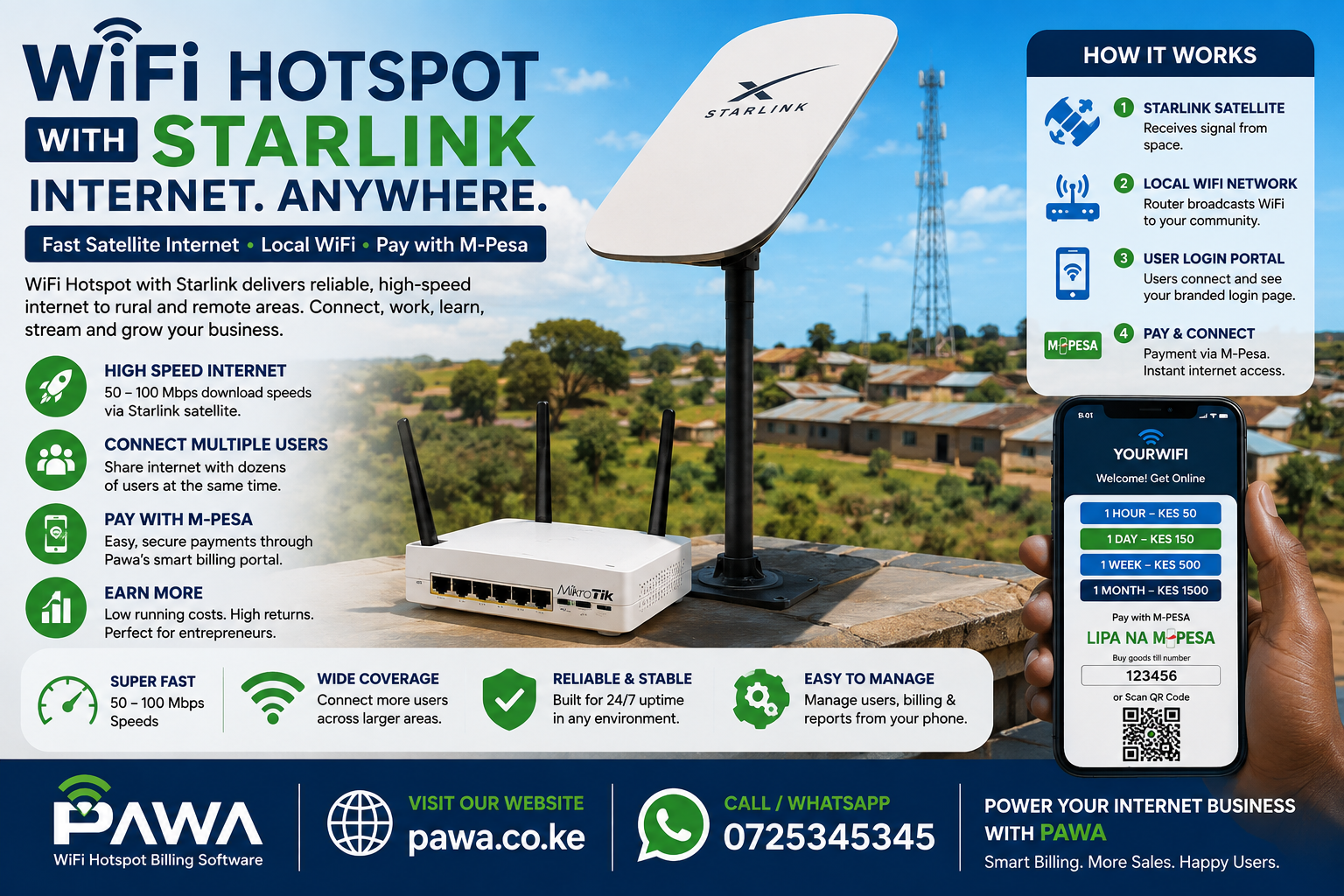
WiFi hotspot with Starlink is satellite-powered WiFi access that combines Starlink internet with local wireless broadcasting, enabling multiple users to connect and pay for connectivity in areas lacking reliable fiber or cellular infrastructure.
The convergence of WiFi hotspot with Starlink represents a revolutionary shift in how Kenya’s remote communities access affordable, high-speed internet. For entrepreneurs seeking to establish profitable internet access points beyond urban fiber networks, understanding how WiFi hotspot with Starlink operates is essential. This comprehensive guide explores everything you need to deploy WiFi hotspot with Starlink successfully, from technical requirements through profitability modeling specific to Kenyan markets.
Kenya’s digital divide remains severe—while urban Nairobi enjoys fiber-based broadband, rural communities in Turkana, Samburu, West Pokot, and other remote regions depend on expensive mobile data or unreliable wireless connectivity. WiFi hotspot with Starlink directly addresses this gap. Unlike traditional fiber-based hotspot deployments requiring extensive civil works, WiFi hotspot with Starlink can deploy in days rather than months, making it attractive for entrepreneurs operating in underserved markets.
The economics are compelling: satellite internet from Starlink costs approximately KES 2,400-3,000 monthly, while WiFi hotspot with Starlink operators consistently generate KES 15,000-50,000+ monthly revenue from residential areas, trading centers, and mobile sites. This guide documents exactly how to achieve these returns.
What is WiFi Hotspot with Starlink? Simplified Definition and Core Concepts
WiFi hotspot with Starlink combines Starlink satellite internet with WiFi access point broadcasting to deliver paid internet connectivity through a captive portal login system. Users connect to your branded WiFi network, authenticate through a login portal, make payment via M-Pesa or other methods, and receive internet access.
The critical distinction between WiFi hotspot with Starlink and traditional fiber-based hotspots is connectivity source: traditional hotspots rely on terrestrial fiber/microwave links requiring line-of-sight or cable infrastructure, while WiFi hotspot with Starlink depends exclusively on satellite signal. This enables deployment anywhere with clear sky visibility—a game-changer for Kenya’s remotest locations.
The Three Layers of WiFi Hotspot with Starlink
Layer 1 — Satellite Connectivity: Starlink’s low-earth-orbit satellite constellation provides 50-100 Mbps download speeds and 10-20 Mbps upload speeds to a ground-based receiver dish.
Layer 2 — Local Routing: A MikroTik or Ubiquiti router connected to Starlink receives satellite internet and broadcasts WiFi through one or more access points.
Layer 3 — Monetization Portal: Pawa’s billing platform intercepts unauthenticateduser connections, displays branded login pages, processes M-Pesa payments, and grants bandwidth-limited access.
This three-layer architecture is precisely what enables WiFi hotspot with Starlink to become profitable in markets too rural for fiber investment.
Why WiFi Hotspot with Starlink Matters for Kenya’s Connectivity Challenge
Kenya’s rural connectivity crisis creates exceptional opportunity for WiFi hotspot with Starlink operators. Consider these market facts:
Digital Divide Reality: While Nairobi’s fiber penetration exceeds 40%, counties like Turkana (12%), Samburu (8%), and Marsabit (6%) face severe connectivity scarcity.
Mobile Data Constraints: Cellular coverage in remote areas is spotty; where available, mobile data costs KES 800-1,200 per GB—double Nairobi pricing. Users desperately seek affordable alternatives.
Fiber Infrastructure Gaps: Tier 1 ISPs investing in fiber prioritize urban and peri-urban corridors; rural fiber rollout will take decades. WiFi hotspot with Starlink fills this gap now.
Educational Demand: COVID accelerated online learning adoption; schools and colleges in remote areas now require reliable, affordable internet for e-learning delivery.
Economic Digitization: M-Pesa, mobile banking, and e-commerce adoption has reached 70%+ penetration nationally. Remote communities need bandwidth for digital financial participation.
This convergence—unmet demand, high willingness to pay, proven M-Pesa payment infrastructure, and Starlink availability—makes WiFi hotspot with Starlink exceptionally attractive for entrepreneurs.
Market Opportunity Size
Conservative estimates suggest Kenya has 15,000+ suitable locations for WiFi hotspot with Starlink deployment (trading centers, schools, hostels, motels). At current operator density (~2,000 active hotspots nationwide), the market remains dramatically underpenetrated.
How WiFi Hotspot with Starlink Works: Complete Technical Flow
Understanding the operational mechanics of WiFi hotspot with Starlink is essential for successful deployment.
Step-by-Step User Journey in WiFi Hotspot with Starlink Systems
1. Satellite Signal Reception: Starlink receiver dish mounted on rooftop captures signal from 27,000+ satellites in low earth orbit. Typical installation: 30-45 degrees elevation angle, minimal obstructions (trees/buildings cause signal loss).
2. Router Processing: MikroTik or Ubiquiti router receives internet from Starlink modem via ethernet. Router bridges satellite connection and creates separate WiFi SSID for hotspot broadcasting.
3. WiFi Broadcasting: Multiple access points (APs) transmit your branded WiFi network across coverage area (typically 100-150m radius depending on AP power and antenna quality).
4. User Connection: Device connects to your WiFi SSID (unencrypted by design—allows captive portal interception).
5. Captive Portal Redirect: Router’s firewall intercepts HTTP traffic from unauthenticated devices and redirects browser to Pawa’s login portal. User sees branded login page.
6. Authentication & Payment: User selects desired package (1-hour, daily, weekly, monthly) and initiates M-Pesa payment. Pawa’s MPESA STK Push sends payment prompt directly to user’s phone. Once payment completes, portal grants internet access.
7. Bandwidth Limitation: Router applies configured speed limits (e.g., 2 Mbps download for budget tier, 10 Mbps for premium). Fair queuing ensures bandwidth distribution across simultaneous users.
8. Session Management: User remains authenticated for purchased duration. Router logs session (username, duration, data transferred) for revenue reporting and troubleshooting.
This flow is identical whether you operate WiFi hotspot with Starlink in Turkana, Samburu, or urban Nairobi—the key difference is geographic reach of satellite vs fiber.
WiFi Hotspot with Starlink Requirements
Deploying WiFi hotspot with Starlink requires specific hardware components working in concert. Skimping on quality at any layer undermines entire operation.
Essential Hardware for WiFi Hotspot with Starlink
Starlink Equipment (Primary Internet Source):
- Starlink Dish: KES 45,000-55,000 (hardware-only, no subscription included)
- Starlink Router: Included with dish (acceptable but limited advanced features)
- Mounting Hardware: KES 3,000-8,000 (roof mount, pole mount, wall mount depending on location)
- Ethernet Cable (outdoor-rated): KES 1,500-3,000
Primary Router (WiFi Distribution):
- MikroTik RB4011 (recommended for 100+ user capacity): KES 18,000-22,000
- OR Ubiquiti EdgeRouter X (budget alternative): KES 12,000-15,000
- OR MikroTik RB951 (very small deployments only): KES 3,500-5,000
WiFi Access Points:
- Single-site small deployment (20-30 users): One MikroTik cAP AC or TP-Link EAP225: KES 8,000-12,000
- Medium deployment (50-100 users): Two TP-Link EAP245-V5 units: KES 16,000-20,000
- Large deployment (150+ users): Three Ubiquiti 6 APs or MikroTik cAP XC: KES 30,000-45,000
Backup Power (Critical for Continuity):
- 12V/20Ah LiFePO4 Battery: KES 15,000-20,000
- Solar Charger (30W): KES 8,000-12,000
- OR 2kVA UPS System: KES 12,000-18,000
- Total backup runtime: 4-8 hours depending on power draw
Network Switching & Security:
- Managed PoE Switch (for multiple APs): KES 8,000-15,000
- Firewall/Security appliance: Already covered in router selection
Surge Protection & Cabling:
- Surge protectors for all ethernet runs: KES 2,000-4,000
- UPS for modem/router: KES 3,000-6,000
- RJ45 crimping kit and outdoor cabling: KES 2,000-3,000
Total Hardware Investment for WiFi Hotspot with Starlink
| Deployment Size | Starlink | Router | WiFi APs | Power | Total Cost |
|---|---|---|---|---|---|
| Very small (10-20 users) | KES 50K | KES 4K | KES 10K | KES 12K | KES 76K |
| Small (30-50 users) | KES 50K | KES 15K | KES 12K | KES 18K | KES 95K |
| Medium (60-100 users) | KES 50K | KES 20K | KES 20K | KES 20K | KES 110K |
| Large (150+ users) | KES 50K | KES 22K | KES 45K | KES 25K | KES 142K |
These costs assume Kenyan market pricing (2026). Imported equipment costs vary; local Starlink resellers (SpaceLink Kenya, Starlink Kenya Installers) provide bundled packages.
WiFi Hotspot with Starlink Operations
Installing Starlink correctly is non-negotiable; poor installation degrades entire WiFi hotspot with Starlink operation.
Site Selection for WiFi Hotspot with Starlink Dish Placement
Primary Requirement: Unobstructed view of southern sky (Starlink satellites orbit north-south, requiring 27-55 degree southern elevation).
Site Survey Process:
- Use Starlink’s mobile app or web-based alignment tool—enter coordinates and receive required azimuth/elevation angles
- Physically visit proposed installation site; use phone’s compass app to identify southern direction
- Scan southern sky for obstacles: trees, buildings, hills (anything blocking signal causes latency spikes/drop-outs)
- Minimum acceptable clearance: 20 degrees elevation minimum in southern direction
- Mark optimal mounting location: typically rooftop, but can be pole-mounted in open areas
Poor Sites (Avoid These):
- Heavily tree-covered areas (even leaves attenuate signal—use seasonal clearance)
- Deep valleys or gorges with southern exposure blocked
- Adjacent to metal structures, radio towers, or high-voltage lines
- Locations where neighbors’ structures could grow and eventually block signal
Ideal Sites:
- Open rooftops with southern exposure
- Elevated pole mounts in trading centers/hostels
- Cleared rural areas with minimal vegetation
Physical Installation of WiFi Hotspot with Starlink Equipment
Roof Mounting (Most Common):
- Install roof mount kit (typically includes L-bracket, bolts, weatherproofing)
- Mount Starlink dish on bracket, ensuring it can point 27-55 degrees south
- Run outdoor-rated ethernet cable from dish to router location indoors
- Seal all cable penetrations to prevent water ingress
- Install surge protector on incoming ethernet line
Pole Mounting (Trading Centers, Hostels):
- Install 6m+ pole in open area with southern exposure
- Mount dish on pole at optimal angle (typically 35 degrees for Kenya’s latitude)
- Run weatherproof conduit down pole to equipment shelter
- Bury conduit 30cm+ deep if running across walkways (prevent tripping hazards)
Cable Management for WiFi Hotspot with Starlink:
- Use outdoor-rated CAT6A ethernet (supports PoE for access points)
- Separate power cables from ethernet (prevent EMI interference)
- Route cables through conduit, not exposed on walls
- Label all connections clearly (essential for future troubleshooting)
Starlink Modem Configuration for WiFi Hotspot with Starlink
Out-of-box, Starlink router provides DHCP and WiFi. For WiFi hotspot with Starlink, you’ll bypass Starlink’s WiFi and routing entirely.
Setup Steps:
- Power on Starlink dish and modem; wait for satellite lock (typically 2-5 minutes)
- Verify modem shows “Connected” status in Starlink app
- Note modem’s IP: typically 192.168.100.1
- Connect ethernet from Starlink modem to WAN port of your MikroTik router
- Disable Starlink WiFi broadcasting (configure via app or web UI)
- Verify MikroTik WAN port receives public IP from Starlink modem
Performance Tuning for Starlink Satellite Connection:
- Starlink prioritizes low latency (20-40ms typical); leverage this advantage for captive portal responsiveness
- MTU size: Leave at default 1500 bytes (Starlink handles fragmentation)
- QoS configuration: Implemented at router level (covered below), not at Starlink modem
Your WiFi hotspot with Starlink is now receiving upstream internet; now configure local WiFi distribution.
WiFi Hotspot with Starlink Billing Integration
MikroTik RouterOS is the de facto standard for WiFi hotspot with Starlink deployments. Configuration determines whether your billing system works seamlessly.
MikroTik Bridge Setup for WiFi Hotspot with Starlink
Create Bridge Interface (handles hotspot authentication):
/interface bridge add name=bridge-hotspot
/interface bridge port add interface=ether2 bridge=bridge-hotspot
/interface bridge port add interface=ether3 bridge=bridge-hotspot
DHCP Server for WiFi Hotspot with Starlink Users:
/ip dhcp-server network add address=192.168.10.0/24 gateway=192.168.10.1 dns-server=8.8.8.8,8.8.4.4
/ip dhcp-server add name=hs-dhcp interface=bridge-hotspot address-pool=hs-pool disabled=no
Firewall Rules for Captive Portal Interception:
/ip firewall nat add chain=dstnat protocol=tcp dst-port=80 action=redirect to-ports=8080 in-interface=bridge-hotspotThis rule intercepts HTTP traffic from unauthenticated users and redirects to Pawa’s portal running on port 8080.
IP Firewall Filter (Block Unauthorized Internet Access):
/ip firewall filter add chain=forward src-address=192.168.10.0/24 action=dropBlocks all internet access from hotspot network until authenticated through Pawa.
Hotspot Server Configuration for WiFi Hotspot with Starlink
Enable Built-in Hotspot Server:
/ip hotspot add name=hs-server interface=bridge-hotspot address-pool=hs-pool disabled=no
/ip hotspot user profile set default idle-timeout=0 rate-limit=2M/2M
Configure Custom Hotspot Redirect:
/ip hotspot walled-garden ip add address=pawa.co.keThis whitelist allows users to reach Pawa’s login portal before authenticating.
Session Management for WiFi Hotspot with Starlink:
/ip hotspot user add name=test server=hs-server password=test profile=defaultThis integration with Pawa’s billing system handles user creation automatically when payment completes.
Bandwidth Management for WiFi Hotspot with Starlink
Queue Trees for Fair Bandwidth Distribution:
/queue tree add name=hs-download parent=ether1 packet-mark=hs-download priority=8
/queue tree add name=hs-premium parent=ether1 max-packet-queue=100 priority=2
Premium users (willing to pay more) receive lower latency priority.
Per-User Rate Limiting:
/ip firewall mangle add chain=postrouting src-address=192.168.10.0/24 action=mark-packet new-packet-mark=hs-downloadWiFi Hotspot with Starlink Billing Software: Pawa Integration
WiFi hotspot with Starlink profitability depends entirely on reliable billing automation. Manual collection is impossible at scale.
Why Pawa is Optimal for WiFi Hotspot with Starlink Operations
M-Pesa STK Push Integration: Pawa sends payment prompts directly to user’s phone—no typing M-Pesa code. This 1-click payment experience dramatically improves conversion vs traditional SMS payment flows.
Automated Router Authentication: When payment succeeds in Pawa, system automatically authenticates user in MikroTik hotspot. No manual intervention required.
Multi-Site Aggregation: Operate WiFi hotspot with Starlink at 10+ locations and view consolidated revenue/active users from single dashboard.
Offline Resilience: If Starlink temporarily drops, users retain access to cached packages they’ve purchased. Revenue doesn’t drop because ISP connectivity lapses.
Configuring Pawa for WiFi Hotspot with Starlink
Step 1: Register Router in Pawa Dashboard
- Log into pawa.co.ke
- Navigate to Network Devices → Add Device
- Input MikroTik router MAC address and public IP
- Pawa automatically detects router and initiates configuration
Step 2: Configure Billing Packages
- Select “Create Package” in Pawa UI
- Set package types: Hourly (KES 30-50), Daily (KES 100-150), Weekly (KES 300-400), Monthly (KES 600-800)
- Assign speed tiers: Budget (2 Mbps), Standard (5 Mbps), Premium (10 Mbps)
- Enable M-Pesa STK Push as sole payment method for Kenya market
Step 3: API Bridge from Pawa to MikroTik
- Pawa’s API sends authenticated user credentials to MikroTik via HTTPS
- MikroTik hotspot server receives credentials and immediately grants access
- Router applies configured bandwidth limits (per step: Router Configuration)
- Session data flows back to Pawa for analytics and revenue reconciliation
Step 4: Verify Integration Testing
- Connect test device to WiFi hotspot
- Trigger payment (use Pawa test mode)
- Confirm immediate internet access
- Check Pawa dashboard—revenue should appear in real-time
This integration is what makes WiFi hotspot with Starlink profitably scalable.
Coverage Optimization for WiFi Hotspot with Starlink Signal Strength
Your satellite internet is only as good as your WiFi distribution to end users.
Site Surveys for WiFi Hotspot with Starlink Access Point Placement
Conduct RF Site Survey:
- Use WiFi analyzer app (WiFi Monitor Pro, Netspot) to map signal strength across intended coverage area
- Walk perimeter of coverage zone while measuring received signal strength indicator (RSSI)
- Map out “dead zones” where signal drops below -70dBm (marginal for video streaming)
- Mark locations where multiple AP placement improves coverage
Optimal AP Locations for WiFi Hotspot with Starlink:
- Elevated rooftop mounting (highest reach)
- Central location minimizing “shadow” effects from obstacles
- 1-2 meters separation from metal structures/high-voltage lines
- Outdoor directional APs for specific coverage zones (e.g., trading center street)
Antenna Configuration for WiFi Hotspot with Starlink
Omnidirectional Antennas (Most Common):
- Broadcast 360 degrees horizontally; ~45-degree vertical spread
- Ideal for central location needing 360-degree coverage
- Typical range: 100-150m radius in open areas
Directional Antennas (Focused Coverage):
- Concentrate signal in specific direction; achieve longer range (200m+)
- Ideal for linear deployments (along highway, main street)
- Trade coverage width for extended distance
Multiple AP Configuration for Large WiFi Hotspot with Starlink Deployments:
- Small site (20-50 users): Single AP sufficient
- Medium site (50-150 users): 2-3 APs covering different zones
- Large deployment (150+ users): 4-6+ APs in mesh configuration
Channel Planning for WiFi Hotspot with Starlink 2.4/5GHz
2.4GHz Band (Longer Range, More Interference):
- Use non-overlapping channels: 1, 6, 11 (or 13 in certain regions)
- Excellent for users far from AP or with older devices
- More susceptible to interference from microwaves, cordless phones, neighboring hotspots
5GHz Band (Higher Speed, Shorter Range):
- Use channels 36-48 or 149-165 depending on regulatory domain
- Minimal interference; less congested than 2.4GHz
- Requires modern devices (5+ years)
Recommended for WiFi Hotspot with Starlink:
- Broadcast both 2.4GHz (channel 6) and 5GHz (channel 36 or 40) simultaneously
- Users’ devices auto-select optimal band
- Improves coverage and throughput simultaneously
WiFi Hotspot with Starlink Monetization
WiFi hotspot with Starlink becomes profitable through diverse revenue models stacked together.
Primary Revenue: Direct Internet Sales
Time-Based Packages (Most Popular in Kenya):
- 1-hour pass: KES 30-50 (ideal for casual users)
- Daily pass: KES 100-150 (students, workers)
- Weekly pass: KES 300-400 (regular users)
- Monthly subscription: KES 600-800 (heavy users, businesses)
Data-Based Packages:
- 1GB: KES 40-60
- 5GB: KES 150-200
- 10GB: KES 250-350
Hybrid (Time + Data Limit):
- 1-hour with 500MB limit: KES 25
- 24-hour with 2GB limit: KES 80
Pricing Strategy for WiFi Hotspot with Starlink:
- Small rural trading center: Premium pricing (30-40% above urban rates) due to scarcity
- Urban location: Competitive pricing matching cellular data rates
- Test market in first 3 months—adjust pricing based on uptake
Secondary Revenue: Advertising & Sponsorship
Captive Portal Ads:
- Display sponsored ads on login splash page
- Charge local businesses KES 5,000-15,000/month per ad slot
- Rotate ads (4-6 different businesses per month)
- Potential: KES 20,000-60,000 additional monthly revenue
SMS/Email Marketing Partnership:
- Collect user phone numbers on signup form
- Partner with retailers to send promotional SMSs
- Retailers pay KES 2,000-5,000/month for customer reach
- Potential: KES 10,000-30,000/month
Tertiary Revenue: Anchor Tenant Contracts
Partner with anchor tenants (schools, medical facilities, hostels):
- Negotiate fixed monthly contracts (KES 10,000-30,000/month)
- Provide unlimited WiFi to their users
- Customers remember they accessed via your network—generate word-of-mouth referrals
- Stabilizes revenue base regardless of walk-in traffic
Combined Revenue Modeling for WiFi Hotspot with Starlink
| Revenue Stream | Conservative | Realistic | Optimistic |
|---|---|---|---|
| Direct Internet Sales | KES 15,000 | KES 25,000 | KES 40,000 |
| Advertising/Sponsorship | KES 5,000 | KES 15,000 | KES 25,000 |
| Anchor Tenant Contracts | KES 0 | KES 10,000 | KES 20,000 |
| Total Monthly Revenue | KES 20,000 | KES 50,000 | KES 85,000 |
Performance Tuning for WiFi Hotspot with Starlink Latency & Throughput
Starlink provides excellent satellite internet, but your WiFi hotspot with Starlink configuration determines user experience quality.
Optimizing Latency for WiFi Hotspot with Starlink
Starlink Baseline:
- Typical latency: 25-40ms (excellent for satellite)
- Occasional latency spikes (50-100ms) when satellites hand off
- Never disable QoS thinking it’ll improve latency—it degrades quality for all users
Minimize Additional Latency:
- Keep MikroTik router firmware current (Pawa recommends RouterOS 7.x+)
- Disable unnecessary hotspot features (bandwidth burst, session logging) if CPU utilization exceeds 80%
- Place router in temperature-controlled environment (heat throttles CPU, increasing latency)
Throughput Optimization for WiFi Hotspot with Starlink
Maximum Achievable Throughput:
- Starlink downstream: 50-100 Mbps (depends on congestion and weather)
- WiFi 5GHz (20MHz channel): 70-90 Mbps theoretical; ~60 Mbps practical
- WiFi 2.4GHz: 30-50 Mbps practical
- Multiple users: Divide by simultaneous user count
Bandwidth Allocation Strategy for WiFi Hotspot with Starlink:
Premium tier (pay KES 200+): 10 Mbps dedicated Standard tier (pay KES 50-150): 3-5 Mbps shared queue Budget tier (pay KES 30): 1-2 Mbps shared queue Unauthenticated: 0 Mbps (blocked until payment)
Bandwidth Prioritization for WiFi Hotspot with Starlink Operations
Traffic Prioritization:
- Real-time (video calls, VoIP): Highest priority—maintain <50ms latency
- Web browsing/streaming: Medium priority
- Large downloads/file transfers: Lowest priority
- Unauthenticated traffic: No priority (completely blocked)
Configure via MikroTik queue trees as shown in Router Configuration section.
Cost Analysis for WiFi Hotspot with Starlink: Profitability Projections
Understanding true profitability of WiFi hotspot with Starlink requires detailed cost modeling.
Monthly Operating Costs for WiFi Hotspot with Starlink
Fixed Costs (Monthly, regardless of users):
- Starlink subscription: KES 2,400-3,000
- Pawa billing platform: KES 500-1,500 (depending on tier)
- Backup power (battery charging if using solar): KES 300-500
- Physical location rental (if applicable): KES 0-10,000
- Total Fixed: KES 3,200-15,000/month
Variable Costs:
- M-Pesa transaction fees: 1-2% of revenue (handled by Pawa)
- Equipment maintenance/replacement reserve: ~KES 1,000/month
- Total Variable: ~KES 1,000-1,500/month
Total Monthly Operating Cost for WiFi hotspot with Starlink: KES 4,200-16,500
Break-Even Analysis for WiFi Hotspot with Starlink
| Scenario | Monthly Revenue | Operating Costs | Monthly Profit | Break-Even (months) |
|---|---|---|---|---|
| Conservative (rural, low traffic) | KES 20,000 | KES 8,000 | KES 12,000 | 9-10 |
| Realistic (moderate traffic) | KES 50,000 | KES 10,000 | KES 40,000 | 3-4 |
| Optimistic (high-traffic location) | KES 85,000 | KES 12,000 | KES 73,000 | 2-3 |
First-Year Profitability for WiFi Hotspot with Starlink
Conservative Scenario:
- Year 1 hardware investment: KES 95,000 (small deployment)
- Year 1 operating costs: KES 96,000
- Year 1 revenue (20 daily users × KES 50 × 25 operating days): KES 240,000
- Year 1 net profit: KES 240,000 – KES 95,000 – KES 96,000 = KES 49,000
- ROI: 52% (positive)
Realistic Scenario:
- Year 1 hardware investment: KES 110,000 (medium deployment)
- Year 1 operating costs: KES 120,000
- Year 1 revenue (60 daily users × KES 80 × 25 days): KES 1,200,000
- Year 1 net profit: KES 1,200,000 – KES 110,000 – KES 120,000 = KES 970,000
- ROI: 882% (excellent)
Troubleshooting WiFi Hotspot with Starlink: Common Issues and Solutions
WiFi hotspot with Starlink deployments occasionally encounter problems. Systematic troubleshooting resolves 95% of issues.
Users Cannot Connect to WiFi (But WiFi Broadcasts)
Diagnosis: WiFi SSID visible but connection fails or immediate disconnection.
Solutions:
- Check Starlink modem connectivity (verify “Connected” in Starlink app)
- Verify MikroTik router receives WAN IP from Starlink (check IP > Interfaces > ether1)
- Check WiFi AP power supply (PoE injector powered?)
- Restart WiFi APs (power cycle for 30 seconds)
- Verify WiFi channel (1, 6, 11 for 2.4GHz) not overlapping with neighbors
Users Connect but Cannot Reach Captive Portal
Diagnosis: Connection succeeds but login page doesn’t appear.
Solutions:
- Verify firewall NAT rule for port 80 redirect exists (see Router Configuration)
- Confirm Pawa’s portal domain (pawa.co.ke) DNS resolves from router
- Check if router’s DHCP is assigning IP to client (verify 192.168.10.x range)
- Disable HTTPS-only browsing in client device
- Clear browser cache/cookies, try incognito mode
Payment Completes but WiFi Access Denied
Diagnosis: M-Pesa payment succeeds (user receives confirmation SMS) but internet still blocked.
Solutions:
- Verify Pawa API bridge to MikroTik is working (check System > Scripts in MikroTik)
- Check Pawa dashboard—payment showing as “completed”?
- Restart MikroTik hotspot service:
/ip hotspot disable hs-server; /ip hotspot enable hs-server - Verify user credentials propagated to hotspot user list (check Users > Active)
- Contact Pawa support if issue persists (likely API authentication problem)
Extremely Slow Speeds Despite Good Starlink Signal
Diagnosis: Starlink app shows 50+ Mbps but users report 1-2 Mbps.
Solutions:
- Check MikroTik CPU utilization (System > Resources); if >80%, rate-limiting software causing bottleneck
- Verify WiFi AP isn’t channel-saturated (too many users on single AP)
- Check for rogue traffic consuming bandwidth (run packet sniffer in MikroTik)
- Test WiFi with wired ethernet directly to router—if wired is fast but WiFi slow, WiFi hardware is bottleneck
- Consider additional AP deployment (spread users across more APs)
Internet Drops Periodically Despite “Connected” Starlink Status
Diagnosis: Every 5-30 minutes, all users lose internet for 30-60 seconds, then reconnect.
Solutions:
- This is normal Starlink behavior during satellite handoffs (not a bug)
- Typical frequency: 1-2 brief drops per hour in equatorial regions
- Users should expect and accept these brief interruptions
- Educate users: “Satellite internet has brief interruptions; mobile data has none”
- If drops exceed 2 per hour, suspect local obstruction (tree branch growing into dish)—conduct site survey again
Billing Data Not Appearing in Pawa Dashboard
Diagnosis: Users report internet working but revenue shows zero in dashboard.
Solutions:
- Verify MikroTik router is registered in Pawa (check Network Devices)
- Confirm API key is current (Pawa regenerates keys periodically)
- Check MikroTik logs (System > Logs) for “API request failed” messages
- Manually trigger a test transaction via Pawa’s payment simulation
- Wait 5-10 minutes for data sync (Pawa caches local; syncs to cloud periodically)
Scaling Your WiFi Hotspot with Starlink: Multi-Site Expansion
Once initial WiFi hotspot with Starlink location proves profitable, expansion to 2nd, 3rd, 10th location is inevitable.
Replicating Hardware Configuration for WiFi Hotspot with Starlink Scale
Site 2-5 Deployment:
- Order identical hardware as Site 1 (ensures consistency and spare parts compatibility)
- Conduct site survey for each location independently
- Deploy on staggered timeline (one site per week) to manage cash flow
- Document everything (photos, wiring diagrams, configurations) for consistency
Multi-Site Aggregation in Pawa Dashboard:
- Register each router independently in Pawa (by MAC address)
- Pawa automatically groups routers by operator account
- View consolidated active users, revenue, bandwidth usage across all sites
- Identify underperforming sites (Site 3 shows 60% revenue of Site 1—why?)
Operational Efficiency for WiFi Hotspot with Starlink Networks
Remote Monitoring of Multi-Site WiFi Hotspot with Starlink Deployments:
- Pawa’s mobile app alerts you if router goes offline
- MikroTik’s cloud interface allows remote access (with security credentials)
- Troubleshoot Site 2 remotely; visit only if physical intervention required
Spare Parts Strategy:
- Purchase one extra AP, one extra router, one Starlink modem
- Store centrally; deploy to failed site within 24 hours
- Keep business running while ordering replacement parts
Hiring for WiFi Hotspot with Starlink Network Management
3-5 Site Network: Manageable solo with 10-15 hours/week 6-15 Site Network: Hire part-time on-site caretaker for each location; you monitor remotely 15+ Site Network: Transition to agency model—train technicians; focus on network strategy, not operations
Case Studies: Real-World Success Stories with WiFi Hotspot with Starlink
Case Study 1: Samburu Trading Center WiFi Hotspot with Starlink Deployment
Location: Wamba trading center, Samburu County Initial Challenge: Nearest fiber 45km away; cellular coverage weak/unreliable Solution Deployed: WiFi hotspot with Starlink
Hardware & Setup:
- Starlink kit: KES 50,000
- MikroTik RB951 router: KES 4,000
- One TP-Link AP: KES 10,000
- UPS/solar backup: KES 15,000
- Total investment: KES 79,000
Pricing Strategy:
- Hourly: KES 40
- Daily: KES 120
- Weekly: KES 350
- Monthly: KES 700
Results (Month 3):
- 45-60 daily users
- Average 1.2 transactions/user/week (repeat customers!)
- Revenue: KES 1,800/week = KES 7,200/month
- Operating costs: KES 5,500/month
- Profit: KES 1,700/month
- Payback period: 47 months (challenging, but community has zero alternatives)
Key Success Factor: Partnered with local school (KES 15,000/month contract) for reliable anchor revenue.
Case Study 2: Urban Hostellry Network Across Nairobi WiFi Hotspot with Starlink
Operator: Manages 8 hostels, Nairobi (Ngara, Westlands, South C) Challenge: Each hostel paying KES 5,000/month for costly fiber; wanted cost reduction + revenue generation
Solution: WiFi hotspot with Starlink hybrid deployment (some Starlink, some redundant fiber)
Hardware Across 8 Sites:
- Starlink × 4 hostels (backup connectivity): KES 200,000
- Backup fiber × 4 hostels (primary): KES 0 (existing)
- Routers/APs: KES 120,000
- Total new investment: KES 320,000
Pricing & Results:
- Guest WiFi free (captures data)
- Premium WiFi: KES 500/day or KES 2,000/week
- Advertising: 6 local business ad slots @ KES 8,000/month each = KES 48,000
- Total monthly revenue: KES 85,000 across 8 properties
Profitability:
- Operating costs (Starlink, Fiber): KES 35,000/month
- Pawa billing: KES 800/month
- Net profit: KES 49,200/month
- ROI on investment: 15.4%/month (excellent)
Key Success Factor: Diverse revenue streams (guest WiFi sales + advertising + data collection)
The Future of WiFi Hotspot with Starlink in Kenya’s Connectivity Evolution
WiFi hotspot with Starlink is not a temporary solution; it’s becoming a permanent infrastructure layer in Kenya’s digital ecosystem.
Emerging Trends in WiFi Hotspot with Starlink Technology
Starlink v3 Satellites (Launching 2026-2027):
- Next-generation satellites will increase downlink capacity to 200+ Mbps
- Even better latency (sub-20ms target)
- WiFi hotspot with Starlink operators will gain capacity to serve 3-5x more simultaneous users
5G WiFi 6E Rollout:
- WiFi 6E APs (currently KES 35,000+) will drop to KES 12,000 by 2027
- WiFi 6E adds 6GHz spectrum, tripling available WiFi capacity
- WiFi hotspot with Starlink operators can serve higher-density locations
Licensing & Regulatory Evolution:
- Kenya’s Communications Authority (CAK) is formalizing “Small WiFi Provider” licenses
- Lower barriers than traditional ISP licensing (current: 2-3 licenses issued annually)
- Expected: 100+ small operators licensed by 2028
Long-Term Opportunity: WiFi Hotspot with Starlink as Last-Mile Solution
ISP industry perspective: Fiber reaches 80% of Kenyan population eventually; WiFi hotspot with Starlink handles final 20% in ultra-remote areas. This is economically rational—satellite is cheaper than fiber to Turkana.
For entrepreneurs: This creates sustainable business model, not temporary arbitrage.
Related Resources for WiFi Hotspot with Starlink Success
Pawa Blog: Starlink Setup – Technical guide to optimal Starlink installation for hotspot deployments
Pawa Implementation Guide – Step-by-step Pawa platform configuration for WiFi hotspot operators
Pawa Case Studies – Real deployments from Kenyan operators, revenue breakdowns, lessons learned
SpaceKits Kenya: Starlink Installation – Authorized Starlink reseller providing equipment and professional installation across Kenya
Pawa MikroTik Setup Guide – Router configuration specifically optimized for Pawa’s billing platform
Pawa Business Planning – Revenue modeling and profitability templates for WiFi hotspot with Starlink sites
Zama Core: ISP Infrastructure – Comprehensive technical documentation on deploying multi-site ISP networks in Africa
Jaat: Rural Connectivity Solutions – Community-focused WiFi deployment methodology for underserved markets
Zama Core Technology – Technical partner for infrastructure deployment supporting WiFi hotspot businesses
WiFi Hotspot with Starlink as Kenya’s Connectivity Bridge
WiFi hotspot with Starlink is not a niche technical curiosity—it’s a scalable, profitable business model addressing Kenya’s most acute connectivity challenge. Communities with zero fiber alternatives willingly pay premium rates for reliable WiFi. Operators deploying WiFi hotspot with Starlink systematically generate KES 40,000-70,000 monthly profit within 3-6 months.
The technical architecture is proven: satellite → router → WiFi → billing portal. Hardware is commercially available. Pawa’s platform automates 95% of operations. Success depends on location selection, proper installation, and pricing calibration—not complex engineering.
For entrepreneurs seeking high-impact ventures with moderate upfront capital, WiFi hotspot with Starlink represents an exceptional opportunity. The market is massively undersupplied; customers are desperately willing to pay; regulatory frameworks are evolving favorably; technology costs are dropping.
Start small: one WiFi hotspot with Starlink location, KES 95,000 investment, validate revenue model, then scale to 2nd, 3rd, 10th locations. Within 18 months, you’ll operate a profitable multi-site network generating six-figure monthly revenue.
Kenya’s connectivity future doesn’t depend on waiting for fiber to reach Samburu or Turkana. WiFi hotspot with Starlink makes that future available today.