
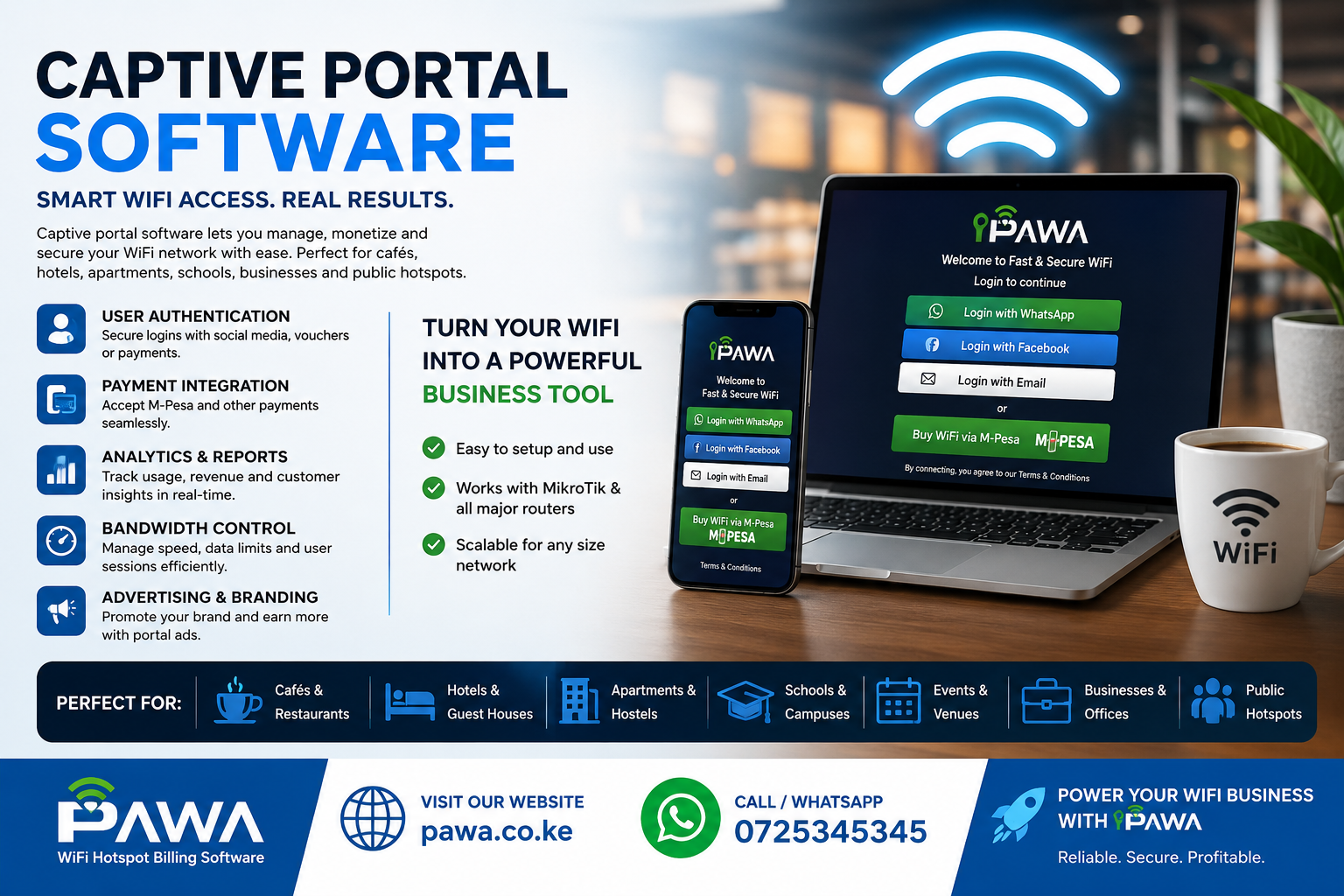
Captive Portal Software in Kenya: A Powerful, Simple Guide to Winning Guest WiFi
If you run a hotspot, a hotel, an estate, a café, or an ISP in Kenya, you have almost certainly typed the phrase captive portal software into Google. Maybe you were trying to understand what it actually means. Maybe you were comparing tools. Maybe you were just trying to figure out why your guest WiFi keeps giving away free internet instead of collecting M-Pesa payments.
This guide answers all of it, in plain language, and it does so better and faster than the definitions floating around the Kenyan web today.
Captive portal is the program that shows a login page to anyone joining a public or guest WiFi network and asks them to sign in, accept terms, enter a voucher, or pay before internet access is granted.
That’s it. One sentence, no jargon. Everything below builds on that simple idea and shows you exactly how captive portal works, what to look for, and how to choose the right one for a WiFi business in Kenya — with Pawa WiFi as the practical example throughout, since Pawa is built specifically around MikroTik-powered captive portal for Kenyan hotspot operators.
Captive Portal Software: What It Actually Means
Every WiFi network you’ve ever joined at an airport, hotel lobby, or estate gate used some form of captive portal software. It is the “middleman” between a device that wants internet and the router that controls access. When your phone connects to a WiFi signal, captive portal software intercepts that connection and shows a landing page instead of raw internet. Only after you complete an action on that page — logging in, entering a code, or paying — does the software instruct the router to open the gate.
In Kenya, this pattern has become the backbone of the hotspot business model. Estate WiFi operators, ISPs, and café owners rely on captive portal to convert an open WiFi signal into a business with recurring revenue. Without it, anyone within range could use the network for free, and there would be no way to track who is online, how much data they have used, or when their time has expired.
Captive portal software is not just a login screen. It is a small business engine sitting between your router and your customer, deciding who gets access, for how long, and at what price.
Captive Portal Software vs Traditional WiFi Login Pages
A lot of people confuse captive portal software with a plain WiFi password. They are not the same thing. A shared password only controls who can join the network. Captive portal controls what happens after someone joins — the landing page, the payment step, the time limit, and the automatic cut-off when the session ends.
Traditional hotspot setups in Kenya used to rely on manual voucher books, physical cash collection, and router configurations that had to be reset by hand every time a customer’s time expired. Captive portal replaced that entire manual workflow. Instead of an operator writing down who paid and for how long, the software tracks it automatically and revokes access the second a package expires.
This is also where the difference between hotspot billing and PPPoE billing becomes relevant, since many Kenyan operators run both side by side. If you are trying to decide which model fits your business, this comparison of PPPoE vs hotspot billing breaks down when captive portal software (hotspot-style) makes more sense than a fixed PPPoE account, and when the two should be combined.
Captive Portal Software Benefits for WiFi Operators in Kenya
Why does captive portal matter so much to a small hotspot business? Because it turns a technical router setting into a revenue system. Here is what good captive portal gives an operator that a simple password never can:
- Automatic payment collection — customers pay through M-Pesa directly on the landing page, without an attendant collecting cash.
- Session control — access expires exactly when a package runs out, with no manual intervention.
- Usage visibility — operators can see who is online, which package they bought, and how the network is performing.
- Branding — the landing page can carry a business name, logo, and offers instead of a generic router screen.
- Fraud reduction — vouchers and sessions are tied to actual payments, cutting down on free-riding and disputes.
These benefits apply whether you’re running a single café hotspot or managing hundreds of routers across an estate network. Real-world examples of how different Kenyan businesses apply captive portal software — from apartment WiFi to reseller networks — are covered in Pawa’s use cases for WiFi operators.
Captive Portal Software Features You Should Look for Before You Buy
Not all captive portal software is built the same way, and Kenyan operators often get this wrong by choosing tools built for markets where M-Pesa doesn’t exist. Before committing to any platform, check for these core features:
- Local payment integration — STK Push, PayBill, and Till number support, not just card payments.
- MikroTik compatibility — deep integration with RouterOS so the portal can talk directly to your hardware.
- Package flexibility — hourly, daily, weekly, and monthly plans that customers can choose from the landing page.
- Voucher support — for customers who prefer to buy access offline and redeem a code.
- Real-time dashboards — visibility into revenue, active users, and router health from one screen.
- Automatic expiry and renewal prompts — so customers are nudged to buy again instead of just disconnecting.
Pawa’s feature set was built directly around this checklist, because most Kenyan hotspot failures come down to a portal that either doesn’t talk to M-Pesa properly or doesn’t sync cleanly with MikroTik.
Captive Portal Software and M-Pesa Payment Integration
In Kenya, captive portal software is only as useful as its payment layer. A beautifully designed login page means nothing if the customer can’t pay in a way they already trust — and for most Kenyans, that means M-Pesa.
Good captive portal should support STK Push (the “Enter M-Pesa PIN” prompt customers already know), PayBill numbers, and Till numbers, so operators can choose the collection method that fits their business. It should also confirm payment instantly and trigger the router to grant access within seconds, not minutes. A slow confirmation loop is one of the fastest ways to lose customer trust in a hotspot business.
This is the exact problem Pawa’s M-Pesa WiFi billing system was designed to solve — connecting the captive portal login screen directly to M-Pesa’s confirmation pipeline so that “customer pays” and “customer is online” happen almost simultaneously.
Captive Portal Software for MikroTik Routers
MikroTik hardware dominates the Kenyan ISP and hotspot market because it is affordable, powerful, and flexible. But MikroTik’s built-in hotspot tools are, on their own, fairly basic. This is where third-party captive portal software becomes essential — it sits on top of MikroTik’s RouterOS and adds the business logic that raw hardware doesn’t provide: package management, M-Pesa billing, customer records, and reporting.
Setting up captive portal software on a MikroTik router involves connecting the router’s API to the billing platform, configuring the hotspot profile, and pointing the login page to the software’s landing page instead of MikroTik’s default page. It sounds technical, but a well-documented setup guide makes it manageable even for operators without a networking background. Pawa’s MikroTik setup guide walks through this process step by step, and further detail on server-side authentication is covered in this guide to MikroTik RADIUS server configuration.
Captive Portal Software for Hotspot Businesses
A hotspot business is, at its core, a captive portal software business. The router provides the signal, but the software decides who can use it and what they pay. For a small operator running one or two access points in an estate or shopping center, the priorities are different from a large ISP: simplicity, low monthly cost, and reliable M-Pesa collection matter more than advanced enterprise features.
Pawa’s MikroTik hotspot billing solution for Kenya is built for exactly this segment — small and mid-sized hotspot operators who need captive portal that “just works” without a full IT team behind it. It bundles package management, M-Pesa collection, and router monitoring into a single dashboard so an operator can run the whole business from a phone.
Captive Portal Software for ISPs and WISPs
Larger internet service providers and wireless ISPs (WISPs) use captive portal software differently from a single-site hotspot. At scale, the software has to manage hundreds or thousands of customers across multiple routers, support both hotspot and PPPoE billing models, and generate financial reports that match what an accountant expects to see.
For ISPs, captive portal software becomes part of a wider billing stack that also has to handle renewals, suspensions for non-payment, and customer support tickets. Pawa’s ISP billing software for Kenya extends the same captive portal engine used for hotspots into a full ISP management layer, and this deeper breakdown of MikroTik ISP management software covers what growing WISPs should expect from a serious platform in 2026.
Captive Portal Software Pricing in Kenya: What It Should Cost
One of the most searched questions around captive portal software is simply: how much does it cost? Pricing in Kenya usually falls into two models — a flat monthly subscription, or a percentage of revenue collected through the platform (sometimes both, depending on whether the operator uses their own Till/PayBill or the provider’s).
For a small hotspot with two routers and a couple of thousand users, monthly captive portal software subscriptions in Kenya typically start in the low thousands of shillings. Larger operators with more routers, more users, and PPPoE support pay more, but usually still less than the cost of building custom software from scratch. Transparent, published pricing matters here, because hidden fees are one of the biggest sources of frustration among Kenyan WiFi operators. Pawa publishes its pricing openly, along with a full pricing guide that explains exactly when the 5% collection fee applies and when it doesn’t.
Captive Portal Software Setup: Getting Started the Right Way
Getting captive portal software running for the first time is usually the hardest part of starting a hotspot business, mostly because operators try to configure everything manually before understanding the full workflow. The right order of operations matters: confirm your MikroTik router is compatible, decide on your package structure (hourly, daily, weekly), connect your M-Pesa Till or PayBill, and only then go live with the captive portal login page.
Rushing this process is how operators end up with a hotspot that either doesn’t collect payments correctly or locks out paying customers. A structured setup guide removes most of the guesswork. Pawa’s step-by-step setup guide for starting a WiFi business walks new operators through this exact sequence, from choosing hardware to going live with a working captive portal.
Captive Portal Software Security: What Operators Often Miss
Because captive portal software sits at the entry point of a network, it is also a security checkpoint. A poorly configured captive portal can leak access to unpaid users, expose customer data, or become a target for abuse on an open network. Operators should look for software that isolates guest traffic properly, encrypts payment data in transit, and logs access in a way that can be audited if something goes wrong.
This matters even more for shared infrastructure like estate WiFi or office hotspots, where dozens of unrelated users share the same access point. A captive portal that doesn’t separate sessions cleanly can create real privacy and security risks, not just billing headaches. Pawa’s approach to platform security and reliability is outlined on its trust page, which covers how customer and payment data are handled across the system.
Captive Portal Software for Hotels, Cafés, and Estates
Hospitality and residential WiFi are two of the fastest-growing use cases for captive portal software in Kenya. Hotels want a branded landing page that looks professional to guests, while estates want a system that can bill hundreds of households automatically every month without a caretaker chasing payments door to door.
Captive portal software adapts well to both, but the configuration differs. A hotel typically wants short-session, high-turnover access tied to room numbers or vouchers, while an estate wants recurring monthly billing tied to a household or unit. These distinctions matter when choosing a platform, since not every captive portal vendor supports both models equally well. Pawa’s use cases page breaks down how the same underlying captive portal engine is configured differently for apartments, reseller networks, and existing ISPs.
Captive Portal Software vs Open WiFi: Why the Difference Matters
Open WiFi — a network with no password and no landing page — feels convenient, but it is almost never sustainable as a business model in Kenya. Without captive portal software, there is no way to bill customers, no way to limit abuse, and no way to know who is actually using the network at any given time.
This is why the “pay to connect” model has become so common across Kenyan hotspots: customers join a visible network, are shown a captive portal landing page, and complete a small M-Pesa payment before they’re allowed online. It’s a direct, low-friction way to monetize WiFi that open networks simply cannot replicate. The mechanics of this model, and how operators price it, are explained in detail in Pawa’s guide to pay to connect WiFi.
Captive Portal Software Common Mistakes to Avoid
Even good captive portal software can be undermined by avoidable operator mistakes. The most common ones seen across Kenyan hotspot deployments include:
- Skipping router compatibility checks before subscribing to a platform.
- Using a personal M-Pesa number instead of a business Till or PayBill, which complicates reconciliation.
- Ignoring session limits, which lets a handful of customers hog bandwidth for everyone else.
- Not testing the payment flow end-to-end before opening the hotspot to the public.
- Overcomplicating package options, which confuses customers instead of simplifying their choice.
Most of these issues come down to skipping the basics before launch. A good FAQ resource can catch many of them early — Pawa’s frequently asked questions page answers the specific setup and billing questions Kenyan operators run into most often.
Captive Portal Software: How It Works Step by Step
To really understand captive portal software, it helps to walk through what happens the moment a customer’s phone joins a hotspot network:
- The device connects to the WiFi signal broadcast by the router.
- The router, configured with captive portal software, intercepts the connection instead of allowing internet traffic.
- The customer is redirected to a landing page showing available packages.
- The customer selects a package and pays, usually through M-Pesa STK Push.
- The software confirms payment and sends a command to the router.
- The router opens access for that specific device, tied to the purchased package’s time or data limit.
- When the session expires, the software automatically revokes access and returns the customer to the landing page.
This entire loop typically takes seconds, not minutes, when the underlying router setup is done correctly. For operators who also run PPPoE-based broadband alongside hotspot billing, this guide to MikroTik PPPoE server setup shows how the two authentication systems can run on the same network.
Captive Portal Software and RADIUS Authentication
As hotspot networks grow beyond a single router, captive portal software increasingly relies on RADIUS (Remote Authentication Dial-In User Service) to centralize user authentication across many access points. Instead of each router keeping its own list of active users, a RADIUS server becomes the single source of truth that every router checks against.
This matters for Kenyan operators managing multiple sites, because it means a customer’s account, package, and payment history stay consistent no matter which router they connect through. Centralized authentication also makes it far easier to spot fraud, expired accounts, or unusual usage patterns across an entire network. The technical side of setting this up is explained in Pawa’s guide to MikroTik RADIUS server configuration.
Captive Portal Software for ISP Management at Scale
As a hotspot business grows into a full internet service provider, captive portal software has to grow with it. What started as a single login page for a handful of users eventually becomes part of a much larger management system covering customer records, invoicing, router health monitoring, and support tickets.
This transition is where many Kenyan operators struggle, because tools built for a small hotspot often don’t scale cleanly into ISP-level operations. Choosing captive portal that was designed with this growth path in mind — rather than one that has to be replaced entirely once you scale — saves significant migration pain later. Pawa’s guide to MikroTik ISP management software covers exactly what to look for as a hotspot business matures into an ISP.
Captive Portal Software and Outdoor WiFi Access Points
Captive portal doesn’t work in isolation — it depends heavily on the hardware broadcasting the signal in the first place. Outdoor access points, in particular, need to be positioned and configured correctly for the captive portal login experience to feel smooth rather than frustrating, especially across estates, compounds, and open spaces where signal strength varies.
A weak outdoor signal often gets blamed on “bad captive portal ” when the real issue is hardware placement or interference. Getting the access point setup right first makes the software’s job much easier. Pawa’s guide to outdoor WiFi access points in Nairobi covers the hardware side of this equation in detail.
Captive Portal Software Hardware Sourcing in Nairobi
Good captive portal software still needs compatible, genuine hardware underneath it. Buying MikroTik routers from unreliable sources in Kenya has led to counterfeit units, missing warranties, and firmware issues that make captive portal integration unnecessarily difficult.
Sourcing routers from a trusted reseller reduces the chance of these problems before a hotspot business even launches. Pawa’s guide to finding a genuine MikroTik reseller in Nairobi is a useful starting point for operators who want their captive portal to run on hardware that won’t cause avoidable headaches later.
Captive Portal Software for Fibre-Backed Hotspots
Fibre internet has become far more common across Kenyan towns and estates, and it has changed what customers expect from a hotspot experience. Captive portal connected to a fibre backhaul can support far more simultaneous users at higher speeds than older wireless-only setups, which changes both the pricing and the packages an operator can realistically offer.
Operators moving from wireless backhaul to fibre often need to revisit their captive portal software configuration, since bandwidth limits and package tiers that made sense on a slower connection may need to be redesigned. Pawa’s guide to fibre WiFi hotspots walks through what changes when fibre becomes the backbone of a captive portal-powered hotspot.
Captive Portal Software Troubleshooting: Fixing Access Point Issues
Even the best captive portal software will look broken if the underlying access points are misbehaving. Common symptoms — customers unable to reach the login page, sessions dropping randomly, or slow speeds despite a paid package — often trace back to access point configuration rather than the software itself.
Diagnosing these issues methodically, starting with signal strength and interference before touching the software configuration, saves operators from unnecessary troubleshooting loops. Pawa’s technical guide to fixing access point issues is written specifically for Kenyan operators dealing with this exact class of problem.
Captive Portal Software Business Model: Hotspot Economics Explained
Captive portal software is what makes the hotspot resale business mathematically possible. Operators buy bulk internet from an upstream provider, then use captive portal software to resell that bandwidth in smaller, priced increments — hourly, daily, or weekly packages — to end users who could not or would not buy a full home internet connection.
The margin in this business depends heavily on how efficiently the captive portal collects payments and manages sessions, since leakage from unpaid access directly eats into profit. Understanding this economic model in full — including bulk pricing, package design, and margin calculation — is covered in Pawa’s guide to the hotspot business explained.
Captive Portal Software and Broader Internet Infrastructure
Captive portal software is only one layer of a working WiFi business — it needs a live internet connection behind it. In areas where fibre and wireless ISPs don’t yet reach, or where operators need a fast, independent backhaul for a hotspot site, satellite internet has become a practical option for feeding a captive portal setup. Spacekits, a Kenyan Starlink installation and support provider, is one example of the infrastructure layer that hotspot operators increasingly plug into before their captive portal ever comes into play — proof that captive portal sits within a much larger connectivity stack, not on its own.
Captive Portal Software Buyers in the Wider Kenyan Digital Marketplace
WiFi hardware and software don’t exist in a vacuum — Kenyan operators increasingly discover routers, access points, and business software through digital marketplaces rather than door-to-door sales. Marketplaces like JAAT’s internet and networking category list the same class of hardware that captive portal depends on, giving operators a way to compare routers, access points, and connectivity products before committing to a build-out.
This kind of marketplace visibility matters for captive portal software adoption in Kenya specifically, because most small operators are not IT professionals — they are shop owners, estate managers, or entrepreneurs who need to source equipment and understand pricing before they can even test a captive portal login page for the first time.
Captive Portal Software Sits Inside a Wider Business Software Stack
For many Kenyan WiFi operators, captive portal software is just one piece of a larger set of tools running their business. The same operator managing a hotspot might also need POS software for a side retail shop, property software for rental units, or booking software for a lodge. Understanding where captive portal fits inside this broader category of Kenyan business software — alongside billing, POS, and property tools — helps operators budget and plan their tech stack as a whole rather than tool by tool. JAAT’s business software category is a useful reference point for operators comparing captive portal against the other systems running their business.
Captive Portal Software Development: When to Build Custom
Most Kenyan hotspot operators are better served by an existing captive portal software platform than by building one from scratch — the cost and complexity of custom development rarely make sense for a single-site business. But larger ISPs, WISPs, or operators with very specific billing rules sometimes reach a point where off-the-shelf captive portal no longer fits their workflow.
In those cases, working with a Kenyan software development company to build or extend a captive portal system becomes worth considering. Zamacore, a Kenya-based software development company, is one example of the kind of technical partner ISPs turn to when they need custom integrations — M-Pesa reconciliation, third-party CRM connections, or bespoke reporting — layered on top of a standard captive portal software foundation.
Captive Portal Software and Web Portal Development Fundamentals
At a technical level, captive portal software is a specialized type of web portal — a system built around logins, sessions, and controlled access rather than open browsing. Understanding this connection helps explain why captive portal software shares so much DNA with other portal-based business systems, from customer self-service dashboards to staff management tools.
Kenyan software teams that specialize in web portal development, such as Zama Web Experts, build the same category of session-based, role-controlled systems that power captive portal software — just applied to different industries. Recognizing this shared foundation is useful for operators evaluating whether a captive portal vendor actually understands secure, scalable portal architecture or is offering something more superficial.
Captive Portal Software Compared to Other Kenyan SaaS Billing Tools
It’s worth putting captive portal in context alongside other subscription and billing software used by small Kenyan businesses. Retail shops use point-of-sale platforms like Vega POS to manage daily sales and stock, the same way hotspot operators use captive portal software to manage sessions and payments. Both categories share a common pattern: a small monthly subscription, M-Pesa-first payment collection, and a dashboard built for owners without a technical background.
Seeing captive portal as part of this broader wave of Kenyan SaaS tools — rather than as a standalone, unfamiliar category — makes it easier for new operators to evaluate pricing, support quality, and what “good” looks like, since the expectations are similar across retail POS, salon booking, courier, and hotspot billing software.
Captive Portal Software FAQs: Common Questions Answered
Does captive portal work without internet from an upstream provider? No. Captive portal controls access to an existing internet connection; it doesn’t generate internet on its own. You still need a working upstream connection, whether from fibre, wireless, or satellite.
Can captive portal software run on any router? Not every router supports advanced captive portal features. MikroTik is the most widely supported platform among Kenyan captive portal providers because of its flexible API.
Is captive portal the same as a firewall? No. A firewall blocks or allows traffic based on rules. Captive portal software specifically manages the login and payment experience before a user is granted network access at all.
How fast should captive portal confirm an M-Pesa payment? Within seconds. Any longer, and customers assume the payment failed and either retry (causing double charges) or abandon the hotspot entirely.
More detailed operator questions are answered on Pawa’s FAQ page.
Captive Portal Software: Final Thoughts on Choosing the Right Platform
Captive portal software is the single most important piece of technology behind any Kenyan WiFi business that charges for access. It decides who gets online, how they pay, and how smoothly the entire experience feels to a paying customer. Choosing captive portal software that integrates cleanly with M-Pesa, works reliably with MikroTik hardware, and gives operators real visibility into their revenue is the difference between a hotspot that runs itself and one that constantly needs manual fixing.
Whether you’re launching your first hotspot, migrating from manual vouchers, or scaling into a full ISP, the right captive portal software should feel less like a technical tool and more like the quiet engine running your business in the background. If you’re ready to see how this works in practice, get in touch with Pawa to talk through your setup, or explore the full blog for more Kenya-specific guides on billing, MikroTik, and hotspot growth.